---
title: "How to Connect Social Feed Carousel with Remote Carousel?"
url: https://theplusaddons.com/docs/connect-social-feed-carousel-with-remote-carousel/
date: 2024-06-27
modified: 2026-09-21
lang: en
author: "Aditya Sharma"
description: "A Social Feed carousel normally carries its own arrows and dots. The Carousel Remote widget lets you move them — into a heading row, a sidebar, a different column, anywhere..."
image: https://theplusaddons.com/wp-content/uploads/2024/06/Remote-1-1024x554.jpg
word_count: 840
---

# How to Connect Social Feed Carousel with Remote Carousel?

## 

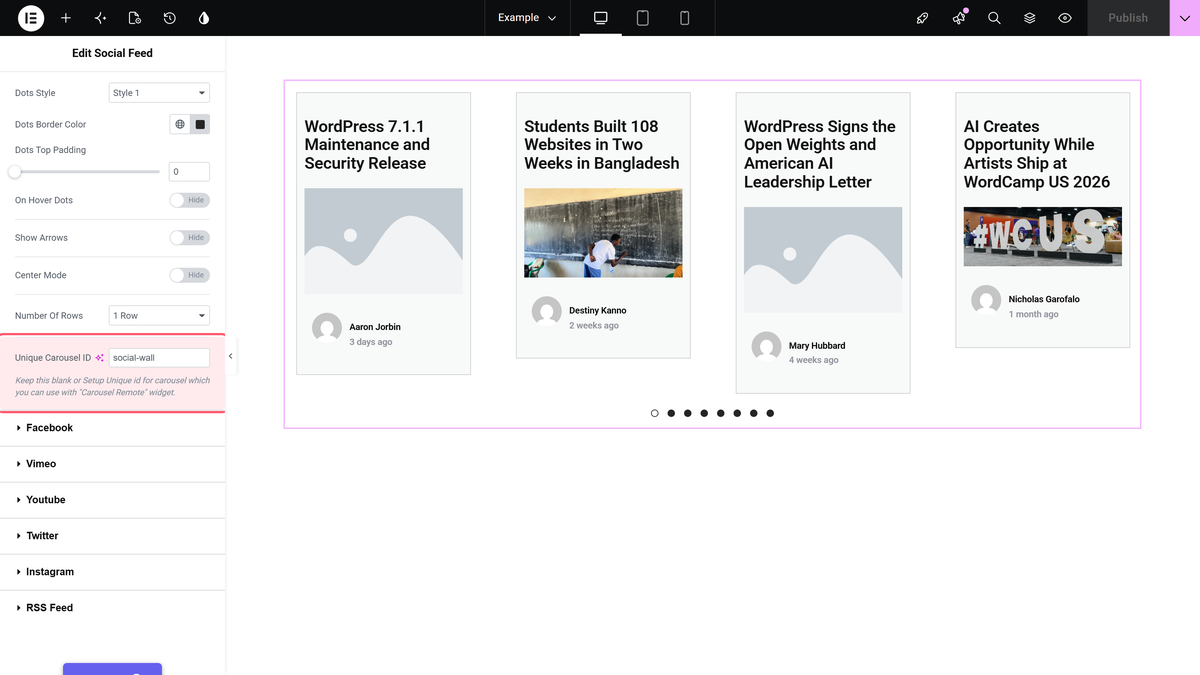
- Social Feed uses Layout set to Carousel under Content > Content Feed, and it needs a unique Unique Carousel ID in Style > Carousel, such as social-wall.
- Carousel Remote matches the feed by the same string in Unique Connection ID, and Remote Type must stay on Carousel.
- The Plus Addons for Elementor Pro ships Social Feed and Carousel Remote as Pro-only widgets, while Elementor (free) must be installed and active.
- Carousel Remote can place Prev/Next buttons and Dots anywhere on the same page, but the carousel’s own navigation should be turned off in Style > Carousel once the remote works.

A **Social Feed** carousel normally carries its own arrows and dots. The **Carousel Remote** widget lets you move them — into a heading row, a sidebar, a different column, anywhere on the same page.

The two widgets find each other through a string you type into both of them.

***Requirement - This widget is a part of The Plus Addons for Elementor Pro, make sure it's installed & activated to enjoy all its powers.***

[LIVE WIDGET LINK](https://theplusaddons.com/elementor-widget/social-feed/?utm_source=tpae&utm_medium=docs&utm_campaign=text)

## Before You Start

- **Edition:** **Pro** — **Social Feed** ships only in The Plus Addons for Elementor Pro. With Pro deactivated the widget does not render at all, and there is no free version of it.- **Prerequisite:** [Elementor](https://wordpress.org/plugins/elementor/) (free) installed and active.- **Widget to enable:** go to **The Plus Addons > Widgets**, search for **Social Feed** and turn its toggle on.- **Second widget to enable:** in the same screen, search for **Carousel Remote** and turn its toggle on. It is Pro-only too.- **Prerequisite:** your server must be able to make outbound HTTPS requests. The feed is fetched **server-side** while the page renders, not by the visitor's browser.- **Prerequisite:** a Social Feed that already works. Set the feed up first and confirm the posts appear, then add the remote.

## Connect the two widgets

- In the **Social Feed** widget, set **Layout** to **Carousel** under **Content > Content Feed**.- Fill the **Social Feeds** item as usual, so the carousel has slides.- Go to **Style > Carousel** and type a unique string into **Unique Carousel ID** — something like *social-wall*. The field is empty by default.

![The Carousel section of the Style tab, showing Unique Carousel ID - the string the Carousel Remote widget matches.](https://theplusaddons.com/wp-content/uploads/2026/09/socialfeed-carousel-id.webp)

- Drop a **Carousel Remote** widget wherever you want the controls to live, on the same page.- In its **Content** tab, type the *same* string into **Unique Connection ID**, and leave **Remote Type** on **Carousel**.- For arrows, open **Prev/Next** and make sure **Next/Prev Button** is on — it is on by default.- For dots, open **Dots** and turn **Dots** on. It is off by default. Add one dot item per slide you want to jump to.
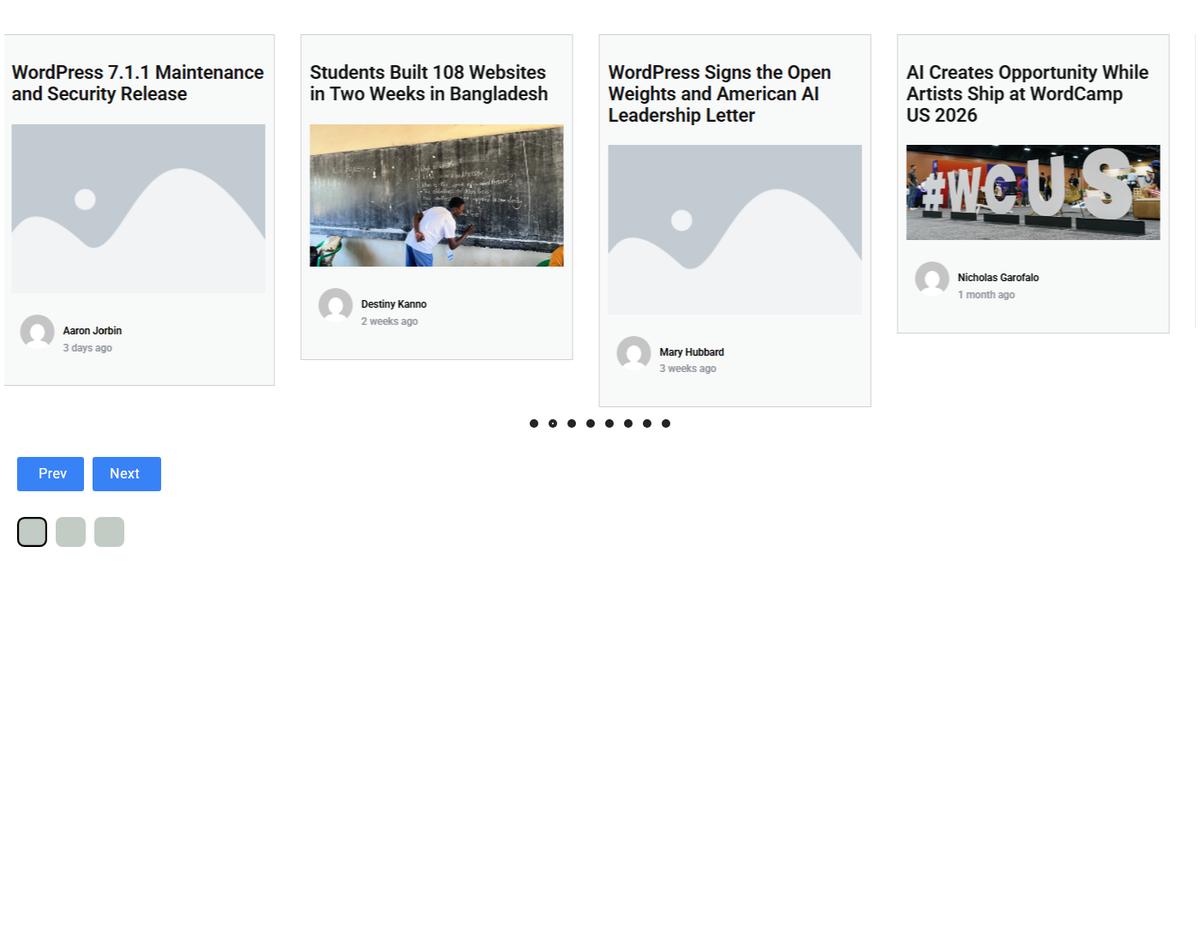
![The feed in the Carousel layout with a Carousel Remote widget under it.](https://theplusaddons.com/wp-content/uploads/2026/09/socialfeed-result-carousel.webp)

## The two fields that must match

| Widget | Field | Where | Default |
| ------ | ----- | ----- | ------- |
| Social Feed | **Unique Carousel ID** | Style > Carousel | empty |
| Carousel Remote | **Unique Connection ID** | Content | empty |
| Carousel Remote | **Remote Type** | Content | **Carousel** (the others are **Switcher** and **Horizontal Scroll**, for different widgets) |
| Carousel Remote | **Next/Prev Button** | Prev/Next | **Show** |
| Carousel Remote | **Dots** | Dots | **Hide** |

## How It Behaves

- **The pairing is the string, nothing else.** The widgets do not need to be near each other in the layout; they only need the same value in the two fields.- **The remote renders its own controls.** With the ids matched, the remote drew a **Prev** / **Next** pair and a dot row, while the feed carousel initialised with one slide per post.- **Remote Type must be Carousel.** **Switcher** and **Horizontal Scroll** are for other widgets and will not drive a feed carousel.

## Limitations

- **Turn the carousel's own navigation off.** Two sets of arrows and dots on the same slider is confusing. Hide the built-in ones in **Style > Carousel** once the remote is working.- **The dots do not count themselves.** The remote's **Dots** section takes a list of dot items that you add by hand, so if your feed has eight slides you have to add eight dots.- **One id, one carousel.** Reusing the same string on two feeds on one page means the remote has two targets; give each carousel its own id.- **Filter Option and Columns Manage disappear in the Carousel layout.** Both sections are hidden when **Layout** is **Carousel**; the carousel has its own column settings under **Style > Carousel**.

## Not verified

So you know exactly what has and has not been checked:

- **Whether the remote's buttons move the carousel.** The remote rendered with working **Prev** and **Next** controls and a dot row, and the feed carousel initialised with eight slides, but no click was measured.- **Remote Type = Switcher and Horizontal Scroll.** Neither was exercised with a Social Feed carousel.- **The dot list.** Dots were switched on and the row rendered, but no dot item was configured with an icon or image, and no dot was clicked.- **Styles 2, 3 and 4, and the Style tab as a whole.** Only **Style 1** and **Style 2** were rendered, and no styling control other than **Unique Carousel ID** was exercised.- **Responsive behaviour.** Only one 390px load of the grid was checked; the tablet and mobile column and gap settings were not exercised one by one.

## Troubleshooting

### The remote does nothing

Compare the two strings character for character — **Unique Carousel ID** in the Social Feed and **Unique Connection ID** in the remote. A trailing space counts. Then check **Remote Type** is **Carousel**, and that the feed's **Layout** really is **Carousel** and not Grid.

### The remote is invisible

Both **Next/Prev Button** and **Dots** can be off, which leaves the widget with nothing to draw. Turn at least one of them on.

### There are two sets of arrows

The carousel's own navigation is still on. Switch it off in **Style > Carousel**.

### The Carousel Remote widget is not in the panel

Turn it on in **The Plus Addons > Widgets**, the same screen where you enabled Social Feed.

## Related Docs

- [Social Feed Elementor Widget: Settings Overview](https://theplusaddons.com/docs/social-feed-elementor-widget/)- [How to Add Live YouTube Video Feed in Elementor?](https://theplusaddons.com/docs/add-live-youtube-video-feed-in-elementor/)- [How to Create a Multi-Social Media Wall Feed in Elementor?](https://theplusaddons.com/docs/create-a-multi-social-media-wall-feed-in-elementor/)

## Frequently Asked Questions

**Q: What do I need before connecting a Social Feed carousel to a remote control?**
A: The setup depends on three things: Social Feed must be enabled, Carousel Remote must be enabled, and the page needs Elementor installed and active. The Plus Addons for Elementor, The Plus Addons, Plus Addons for Elementor, POSIMYTH also requires Pro to be active because Social Feed ships only in the Pro version. One more gotcha is server access to outbound HTTPS requests, since the feed is fetched server-side while the page renders.

**Q: Why does the remote control do nothing after I connect it?**
A: The usual failure point is a mismatch in the connection string. The Social Feed widget uses Unique Carousel ID and the remote uses Unique Connection ID, and they have to match character for character, including spaces. Also confirm Remote Type is set to Carousel and that the feed layout is actually Carousel, not Grid. That combination is what lets The Plus Addons for Elementor, The Plus Addons, Plus Addons for Elementor, POSIMYTH link the two widgets together.

**Q: Can I place the carousel controls in a different column or heading row?**
A: That is exactly what Carousel Remote is for. The controls do not have to sit next to the feed carousel, only on the same page with the same ID string. The page says you can move arrows and dots into a heading row, a sidebar, or another column. That makes it useful when you want cleaner layouts without keeping navigation inside the slider itself.

**Q: What should I use as the connection ID for a Social Feed carousel?**
A: Use one unique string in both widgets, such as social-wall. In Social Feed it goes in Unique Carousel ID under Style &gt; Carousel, and in Carousel Remote it goes in Unique Connection ID under Content. The important part is consistency, not the exact wording. Reusing the same string on two different feeds on one page creates confusion because one remote can end up targeting more than one carousel.

**Q: How do I avoid having two sets of arrows on the same carousel?**
A: Turn off the carousel’s built-in navigation once the remote controls are working. The page calls out this exact problem because both Social Feed and Carousel Remote can render arrows and dots at the same time. Keeping only one navigation source makes the slider easier to use and avoids duplicate controls that fight for attention.

**Q: What happens if I want dots but no arrows on the remote?**
A: Carousel Remote can render either arrows, dots, or both, but at least one of those sections has to be turned on or the widget has nothing visible to draw. Dots are manual here too: you add one dot item per slide you want to jump to. That matters because if your feed has eight slides, you need eight dots for a complete set of jump targets.