






The Plus Addons for Elementor shipped two releases in September, and the headline is that your AI assistant can now design on-brand instead of guessing. Version 6.5.1 landed on 2 September and 6.5.2 followed on 24 September, for both Free and Pro.
Most of what changed is the unglamorous kind that decides whether a site stays up: keyboard access across more widgets, stricter validation on forms and logins, and a long list of listing and filter fixes. One change needs your attention before you update, because Elementor 3.28 is now the minimum.
Here is everything in the September update, what it means for your pages, and what is coming next on the public roadmap.
🎉 What Changed At A Glance
| Release | Date | Biggest Changes |
|---|---|---|
| 6.5.1 | 2 September 2026 | MCP Abilities discoverable by WordPress AI agents, icon font loads only where used, Plus Form GDPR export and erase (Pro), three low severity security patches (Free) |
| 6.5.2 | 24 September 2026 | Elementor 3.28 required, three new MCP abilities, AI Design Skills, keyboard operation across Tabs, menus and listings, carousel pause and play control |
| 6.5.3 | 7 October 2026 | Patch after the month closed: carousel dot navigation freeze fixed, Plus Form submit token fixed for cached pages |
🤖 AI Design Skills And Three New MCP Abilities
If you build with an AI assistant connected to Elementor, 6.5.2 gives it better material to work from. The release bundles design, motion, WooCommerce and theme builder skills that guide an agent toward on-brand output instead of generic layouts.
- Three new abilities:
get-design-guide,duplicate-pageandset-post-statusare now available to connected agents. - Widgets and controls are discoverable: Since 6.5.1, WordPress AI agents, including Angie, can find and control the plugin’s widgets through the Abilities API.
- An optional in-editor channel for Angie: It uses a curated, safer tool set rather than exposing everything.
- A permission fix you will want: Setting a page to published, private or scheduled through an ability now requires the matching publish permission. Publishing through an ability now follows the same permission rule as publishing by hand.

New to connecting an assistant to WordPress? Our guide to the WordPress MCP Adapter covers installing it, connecting Claude and locking it down. The full AI Abilities page lists what an agent can do.
⚠️ Elementor 3.28 Is Now The Minimum
Version 6.5.2 requires Elementor 3.28 or newer. On an older Elementor, the widgets pause and an admin notice explains why, instead of throwing an error on the front end. Your content is not touched, but the widgets will not render until you update Elementor.
Check your Elementor version before you update The Plus Addons for Elementor on any client site you have not opened lately.
⌨️ Keyboard And Screen Reader Access Across More Widgets
Last month the accordion became keyboard operable. September carries that work across the rest of the library:
- Tabs and Tours: Full keyboard operation and a corrected ARIA tab structure, including the mobile titles.
- Navigation Menu: Wrapped in a nav landmark, opens on keyboard focus and marks the current page.
- Pricing Table: The plan name renders as a heading, each button has an accessible name, and the old price uses a
deltag. - Carousel: Autoplaying carousels get a keyboard-focusable pause and play control.
- Load More: Now keyboard operable across all listing widgets.
- Social Icon: Icon-only links now carry an accessible name.
- Number Counter: Renders the target number before scripts run.
None of these need settings changes. They apply after you update.
📨 Forms, Logins And Privacy
Pro’s Plus Form picked up the most meaningful privacy change of the month. The GDPR export and erase tools in WordPress can now include form submissions, so a data request no longer means digging through the entries table by hand. That arrived in Pro 6.5.1.
- Notifications: Recipients, line breaks and reply-to routing are corrected.
- Non-Latin data: Submissions now reach integrations as UTF-8.
- Mailchimp: GDPR validation is scoped to the form that was submitted.
- Element Cache: The five form widgets are exempt from Elementor’s Element Cache.
- Forms and login: Submission, login and permission handling now use stricter validation.
If forms on a cached site ever failed silently, update to 6.5.3 as well. It fixes a case where page caching could freeze the Plus Form submit token and make submissions fail.
🔒 Security Hardening
Free 6.5.1 carries three patches the changelog rates as low severity: handling of query values in editor option lookups, output escaping of the home and author labels in Breadcrumbs, and output escaping of author names and excerpts in Blog Listing. Pro 6.5.2 hardens widget style and layout controls against local file inclusion across the widget style files, and 6.5.1 added stricter validation for external file, chart and image fetching.
You do not have to act on any of this beyond updating. Update both editions so the Free and Pro halves stay in step.
🧩 Listing, Filter And Dynamic Content Fixes
If you build directories, blogs or shops with the listing widgets, this is the part of the update you will notice most.
- Empty lists after filtering: The AJAX category filter and Load More no longer return an empty list in Dynamic Listing, Blog Listing, Clients, Product Listing and Team Member.
- Pagination inside a category: A filtered Dynamic Listing or Product Listing now paginates within the selected category.
- Search Filter: The grid no longer collapses to 0px after paginating, and search query performance improved.
- Dynamic Tags: ACF Group fields, loop-aware values and author avatar and URL now resolve correctly, and post term tags resolve against the current item instead of the archive.
- Off Canvas: Dynamic tags now resolve per card inside loops.
- Horizontal Scroll: Mobile speed, last-slide distance and page jump on snap are fixed.
Other changes worth knowing about: the icon font now loads only on the widgets that use it, the Instagram feed moved to Graph API v22.0, and WooCommerce High-Performance Order Storage is declared compatible. For every change, read the complete changelog.
🗺️ What Is On The Roadmap
The public roadmap shows what the team is working on and what is queued. These are not promises with dates, and a card can move or change scope before it ships. Here is where it stands today.
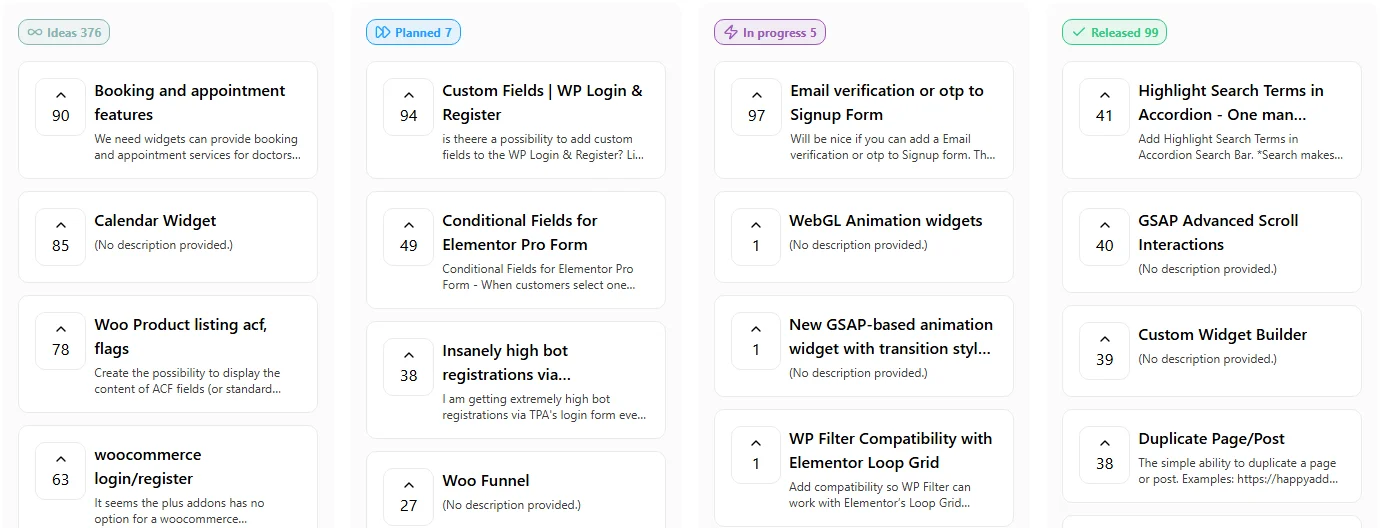
- In progress: Email verification or OTP on the signup form, WebGL animation widgets, a new GSAP-based animation widget with transition styles and repeater support, and WP Filter compatibility with Elementor’s Loop Grid.
- Planned: Custom fields for WP Login and Register, conditional fields for the Elementor Pro Form, stronger protection against bot registrations, and a Woo Funnel.
Want something on that board? Vote on a request or add your own. Votes are how the order gets decided.
📚 Suggested Reading
🚀 How To Update
- Back up your site.
- Check that Elementor is on 3.28 or newer. Update it first if it is not.
- Update from Plugins in wp-admin, or from Dashboard, Updates. Update Free first, then Pro. Go straight to 6.5.3 if it is offered.
- Clear your page cache and CDN cache so the updated CSS and JS get served.
- Open a page with a form, a filtered listing and a carousel, and confirm each behaves.
Building client sites with The Plus Addons for Elementor? Update to the latest release to pick up the new AI skills, the wider keyboard support and the listing fixes. Or get The Plus Addons Pro if you are not on it yet.



