






The Plus Addons for Elementor 6.5.0 is here, for both Free and Pro. The front end got lighter, the accordion became properly keyboard operable, and we retired three widgets that had stopped earning their place.
That last one is the part we spent the most time on. Retiring a widget usually means somebody’s two-year-old page quietly loses content the next time they hit Update. This release makes sure that does not happen, and it tells you inside the plugin rather than burying it in a changelog.
Here is everything in this release, and what to check after you update.
🎉 What shipped in The Plus Addons for Elementor 6.5.0
- Free and Pro both move to 6.5.0: The two editions ship together. Update Free first, then Pro.
- A lighter front end: Icon font CSS is now skipped on pages that were not built with Elementor, so a blog archive no longer pays for a font it never uses. Admin and editor files no longer load on front end requests. Widget asset dependencies moved into a single registry, so working out which CSS and JS a page needs is one lookup instead of a scattered set of checks. Admin styles and scripts now load only on plugin screens. On the Pro side, external API responses and repeated database lookups are cached, so a widget that talks to a third party service is not re-fetching on every page view.
- Smart Loop Builder is out of beta: The Blog Listing loop builder no longer carries the beta label. If you were holding off on using it in production because of that label, it is gone.
- The accordion is now keyboard operable: Headers carry a button role, respond to both Enter and Space, and announce whether they are open or closed. Space toggles the panel without scrolling the page, which is the detail that usually gets missed.
- Tabs and Tours got an accordion toggle icon option, and Pro’s Search Filter picked up OR match logic for multi-select checkbox filters.
We are not quoting a performance percentage. The real gain depends on your theme, your host, and which widgets a page actually uses, and one number from one test site would not tell you anything useful about yours. Measure your own pages before and after.
On the accordion there is a trade-off worth explaining. The header tag is author-chosen and can be any heading level, but aria-expanded is not valid on a heading role, so announcing the state requires a button role. We chose to announce state rather than preserve the heading level. A state that is never announced is a worse failure for a screen reader user than a lost heading level, and the surrounding document still provides structure.
For all the changes, check out the complete changelog here.
🧹 Widget changes you should know about
This is the part of the release that needs your attention, so it is surfaced in the plugin itself. After you update, every administrator sees this:
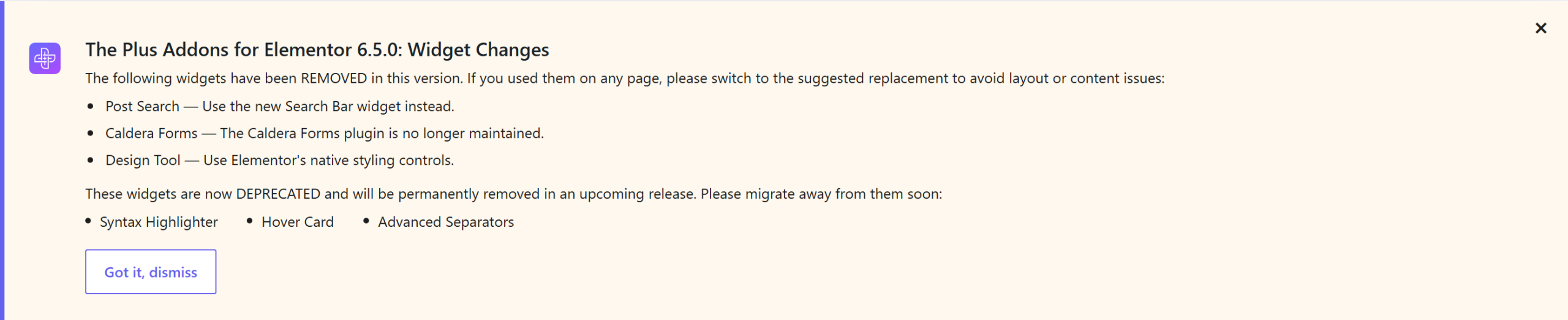
Removed in 6.5.0:
- Post Search. Use Search Bar in Pro. On Free, use the WordPress search block or the search option inside Header Extras.
- Caldera Forms. The Caldera Forms plugin is no longer maintained.
- Design Tool. Use Elementor’s own styling controls.
Now deprecated and going away in a later release: Syntax Highlighter, Hover Card, and Advanced Separators. They still work in 6.5.0. Treat this as your migration window.
Your existing pages keep their content
This is the bit that usually breaks. When Elementor saves a page it rebuilds the stored layout from the widget types it currently knows about, and a type that is no longer registered gets dropped along with every setting saved against it. You do not even have to touch the widget. Editing an unrelated heading on the same page and clicking Update is enough, because the whole document is rewritten on save.
Version 6.5.0 registers a hidden placeholder for each removed widget, so Elementor still recognises those saved nodes and writes them back untouched. Your page stays editable, the settings survive the save, and visitors never see the notice. Migrate those spots anyway. The placeholder protects your data while you do it, it is not a permanent home.
🔧 Fixes across the library
Free users get caching fixes (the cache now regenerates on update and activation, the purge action completes reliably, and the first page view after clearing cache is no longer unstyled), Testimonial fixes for word limits and Read More, Blog Listing and Gallery Listing Metro and lightbox restorations, Post Meta updated for the current WordPress API, Header Extras Mini Cart counts, Progress Bar Lottie animations, and alt text on Blog Listing author avatars.
Pro adds fixes for a Mailchimp fatal error caused by a bad file path, a Generator fatal error when old settings were missing widget option keys, Off Canvas breaking when WordPress inserted extra tags into inline scripts, Social Feed hanging on a slow API, Circle Menu failing on script load order, Search Bar erroring when WooCommerce was inactive, and Recently Viewed products coming back empty.
One intentional change to watch. On Blog Listing, Dynamic Listing and Product Listing, column gaps now apply between items only and not on the outer edges. Your grid will sit slightly differently than it did on 6.4. That is the fix, not a regression.
Security and housekeeping
Output rendering was reviewed across multiple widgets in both editions. Form submission, registration and login handling were tightened. Dashboard input validation, remote request handling and license verification were hardened. SVG and SVGZ validation improved. A text domain error was corrected, so strings that could not be translated now can be. Free’s widgets now register correctly when Pro does not load them, and an unsupported Elementor version now shows an admin notice instead of a fatal error.
Uninstall actually cleans up. If you opted in to data removal, 6.5.0 clears the generated cache directory, its markers and its transients, and Pro drops its form tables. On multisite the cleanup runs for every site rather than the main site alone, and a subsite whose owner did not opt in keeps its data.
Compatibility. Tested up to WordPress 7.1, with Elementor 4.1 compatibility updated. Requires WordPress 6.0 and PHP 7.4.
📚 More from The Plus Addons
🚀 How to update
- Back up your site. This release retires three widgets, so a restore point is worth two minutes.
- Update from Plugins in wp-admin, or from Dashboard, Updates.
- Running Pro? Update both, and update Free first.
- Read the widget changes notice, then visit any page that used Post Search, Caldera Forms or Design Tool and switch to the replacement.
- Clear your page cache and CDN cache so the rebuilt CSS and JS get served.
Building client sites with The Plus Addons for Elementor? Update to The Plus Addons for Elementor 6.5.0 to pick up the performance work, the keyboard-friendly accordion, and the full fix list. Or get The Plus Addons Pro if you are not on it yet.



