Skip to content

Build Elementor Pages by Talking to Your AI

Connect The Plus Addons for Elementor with any MCP-compatible AI assistant and compose full pages widget by widget. 163 abilities cover every widget, from headings and buttons to WooCommerce, Lottie, and dynamic content.

Mcp-abilities
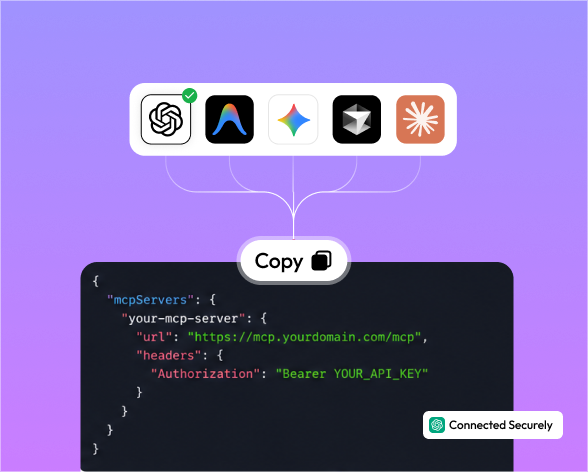
Works with Every MCP-Compatible AI Assistant

A Smarter Way to Build Elementor Pages with AI

Connect The Plus Addons for Elementor with any MCP-compatible AI assistant and compose full pages widget by widget. 163 abilities cover every widget, from headings and buttons to WooCommerce, Lottie, and dynamic content.

Pages from a Plain-English Description

Ask for a hero, three info boxes, a pricing table, and a CTA. The AI orchestrates the right widgets into a complete, styled layout. No starter template required.

Screenshot or URL to Live Page

Drop in a competitor URL or a Figma screenshot. The AI inspects the live HTML to extract Google Fonts, color palette, hero images, and heading text, then rebuilds the layout widget by widget with The Plus Addons for Elementor.

Every Widget Attribute, Controllable by Chat

Heading font size, button hover style, accordion animation, blog grid columns, carousel autoplay. Every exposed control becomes an ability parameter, so the AI sets the correct Elementor attribute instead of guessing.

Schema-Aware Widget Building

The get-theplus-widget-schema ability returns the full control schema for any The Plus Addons for Elementor widget. The AI reads it before building, which means fewer errors, no made-up control keys, and no silent failures when a plugin version changes.

Real Widgets, Fully Editable Afterwards

Every ability output is a real Elementor element with a real element ID. Open the panel, tweak settings, duplicate, or move the element. It behaves exactly like a widget you placed yourself.

Mcp-abilities

Get Started with MCP Abilities for The Plus Addons for Elementor

Set up the MCP connection and start building Elementor pages, configuring widgets, and composing layouts directly through your AI assistant.

Mcp-abilities
Mcp-abilities
Mcp-abilities
Mcp-abilities
Mcp-abilities

Explore the Abilities of The Plus Addons for Elementor

163 server-side abilities that let any MCP-compatible AI assistant build, configure, and compose every widget directly inside Elementor.

2

Core Utilities

The foundation every build runs on. get-theplus-widget schema returns the full Elementor control schema for any widget, and tpae/layout creates and nests sections, columns, and containers.

Small Feature

55

Free Widget Library

Every essential widget from The Plus Addons for Elementor is now fully AI-accessible, enabling smooth integration, smarter workflows, enhanced customization, faster development, and user experiences everywhere.

Small Feature

58

Pro Widget Library

Advanced widgets for marketing-grade pages, all callable through chat.

Small Feature

12

WooCommerce Suite

Every WooCommerce page, AI-built and fully editable in Elementor.

Small Feature

113

Total Abilities

The complete MCP server in one install. 80 free abilities plus 83 Pro, covering every widget in The Plus Addons for Elementor ecosystem.

Small Feature

Connect AI Directly to Your Elementor Editor

Use MCP-powered AI workflows to build pages, configure widgets, orchestrate layouts, and recreate designs faster with The Plus Addons for Elementor.

AI-Powered Page Building

Describe a page in plain English and the AI orchestrates the right widgets into a complete, styled layout. Headings, info boxes, pricing tables, CTAs, and more, all composed widget by widget. No starter template required.

  • Page composition

  • Widget orchestration

  • Plain-English prompts

Mcp-abilities

Screenshot and URL to Live Page

Drop in a competitor URL or a Figma screenshot. The AI inspects the live HTML to extract Google Fonts, color palette, hero images, and heading text, then rebuilds the layout widget by widget using The Plus Addons for Elementor.

  • HTML inspection

  • Font extraction

  •  Layout rebuild

Mcp-abilities

Schema-Aware Widget Building

The get-theplus-widget-schema ability returns the full Elementor control schema for any widget. The AI reads it before building, which means fewer errors, no guessed control keys, and accurate output every time.

  • Schema lookup

  • Correct attributes

  • Version-safe builds

Mcp-abilities

Layout and Container Orchestration

The tpae/layout ability handles section, column, and container creation and nesting. The AI plans multi-column grids, inserts inner containers, and places widgets inside each, all in one conversation turn.

  • Section creation

  • Container nesting

  • Multi-column grids

Mcp-abilities

Full Attribute Control by Chat

Heading font size, button hover style, accordion animation, blog grid columns, carousel autoplay speed. Every exposed Elementor control becomes an ability parameter, so the AI sets the correct attribute instead of guessing.

  • Typography

  •  Animation

  • Responsive controls

Mcp-abilities

Automate Repetitive Elementor Work with AI

Everything designed to remove drag-and-drop fatigue and improve how teams build, configure, and scale Elementor pages with AI assistance.

AI Page Composition

Describe a SaaS homepage, a portfolio, or a landing page and the AI composes it widget by widget using The Plus Addons for Elementor. No template store hunting, no clipboard copy-paste.

Screenshot and URL Recreation

Hand the AI a competitor URL or a design screenshot. It inspects the live HTML to pull Google Fonts, color palette, hero images, and heading text, then rebuilds the layout inside Elementor.

Schema-Aware Building

The get-theplus-widget-schema ability gives the AI the full Elementor control schema for any widget before it builds, so attribute names, enum values, and control keys are always correct.

Smart Layouts

The tpae/layout ability handles sections, columns, and container nesting. Multi-column grids, inner containers, and widget placement happen in one conversation turn.

Every Widget Controlled by Chat

Font sizes, hover styles, animations, grid columns, autoplay speeds, and every other exposed Elementor control becomes an ability parameter the AI can set precisely.

Real, Editable Output

Every ability output is a real Elementor element with a real element ID. Open the panel, tweak settings, duplicate, or move it. It behaves exactly like a widget you placed yourself.

Traditional Elementor Building vs AI-Powered MCP Workflows

See how MCP Abilities for The Plus Addons for Elementor turn repetitive drag-and-drop work into faster, smarter, conversation-driven page building.

Without MCP

With MCP

Need Quick Help? Simple Answers to Common Questions.

What is MCP for The Plus Addons for Elementor?
It is a server-side layer that exposes 163 abilities on top of The Plus Addons for Elementor, letting any MCP-compatible AI assistant create, configure, and compose Plus widgets directly inside your Elementor editor.

Any MCP-compatible AI assistant. That includes Claude, Cursor, VS Code, Windsurf, Cline, and any other tool that speaks the Model Context Protocol.

Complete Elementor pages from a plain-English description, recreations of any page from a screenshot or URL, full attribute control over every exposed widget setting, multi-column layouts with nested containers, and full WooCommerce pages on the Pro plan.
113 in total. 2 core utilities (get-theplus-widget-schema and tpae/layout), 80 free widget abilities, and 83 Pro widget abilities.
Free covers 80 essential widgets plus the 2 core utilities. Pro unlocks 83 additional widgets including the full WooCommerce suite (12 abilities), dynamic content, advanced marketing primitives, advanced navigation, creative media (Lottie, scroll-sequence, draw-svg), social suite, conversion stack, site polish, and visualisations.
Yes. Every ability writes a real The Plus Addons for Elementor widget, not a core Elementor fallback. The output respects your global colors, typography settings, custom CSS, and performance pipeline, so there is no drift between AI-built and hand-built sections.
Yes. Every ability output is a real Elementor element with a real element ID. You can open the panel, tweak settings, duplicate the element, or move it to another container. It behaves exactly like a widget you placed yourself.
The get-theplus-widget-schema ability is the mandatory entry-point for complex widgets. The AI reads the full Elementor control schema before building, so attribute names, enum values, and control keys are always correct, even after a plugin version update.

Yes. The AI inspects the live HTML to extract Google Fonts, color palette, hero images, and heading text, then rebuilds the layout widget by widget using The Plus Addons for Elementor.