






After someone signs up, the registration form reloads its own page. A redirect lets you greet new members on a welcome page, an onboarding guide or a pricing page instead.
The Redirect After Register option of the WP Login & Register widget from The Plus Addons for Elementor sets that page.
To check the complete feature overview documentation of The Plus Addons for Elementor WP Login & Register widget, click here.
Requirement – This widget is a part of The Plus Addons for Elementor, make sure it’s installed & activated to enjoy all its powers.
Before You Start
- Edition: Pro — the WP Login & Register widget is only part of The Plus Addons for Elementor Pro. The free plugin lists it as a locked Pro widget and does not add it to Elementor.
- Widget to enable: WP Login & Register, switched on under The Plus Addons > Widgets.
- WordPress setting: Settings > General > Membership: Anyone can register must be ticked, or the register form shows a notice instead of its fields.
How to Redirect After Registration
- Add the WP Login & Register widget and set Type to Register or Login and Register.
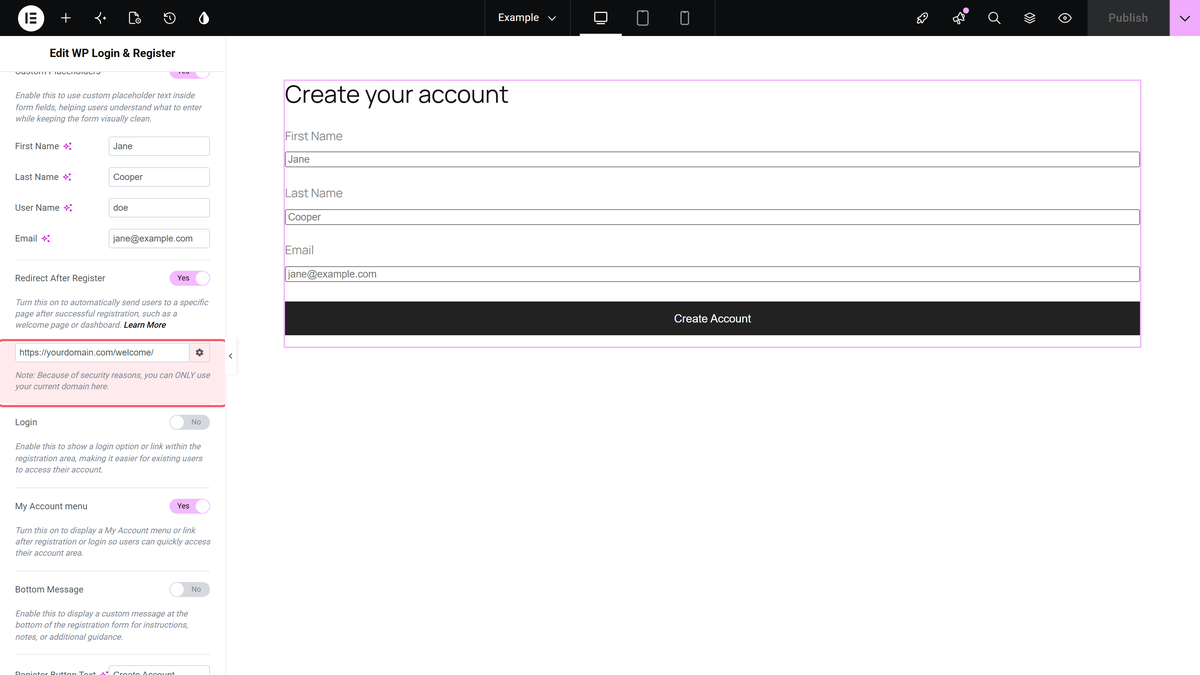
- Open Register Options and turn on Redirect After Register.
- Paste the full address of the destination page into the link field under the switch.
- Publish the page and test a sign-up from a private browser window.
How It Behaves
- When the account is created, the form shows its Success text and then opens the address you set.
- With the switch off, the registration page simply reloads.
- New accounts get the New User Default Role from Settings > General.
- WordPress emails the new member a link to set their password and notifies the site admin, unless Custom Email is on in Register Extra Options.
Log New Members In Automatically
A redirect to a members-only page only helps if the new member is logged in. Turn on Password Field in Register Extra Options, then turn on Auto Login After Register in Register Options. In our test the new member arrived logged in. Auto Login After Register is only offered while Password Field is on.
Limitations
- The field accepts any address. The note under it says only your own domain works, but in our test the form redirected to an external site. Only enter pages you trust.
- Without Password Field, new members are not logged in; they first have to set a password from the email WordPress sends them.
- The widget is part of The Plus Addons for Elementor Pro only.
Troubleshooting
The form shows a registration notice instead of fields
Tick Anyone can register in Settings > General and save.
New members land on the page but are asked to log in
Turn on Password Field and Auto Login After Register.
