




How to connect a Carousel Remote Sync (Dots & Arrows) with Elementor Dynamic Listing Carousel?

Key Takeaways

  • Dynamic Listing widget from The Plus Addons for Elementor displays posts, pages, and custom post types in multiple styles and layouts.
  • Carousel Remote widget connects with the Dynamic Listing widget to create carousel navigation solutions using unique IDs.
  • Users can enable Next/Previous buttons or Dots for navigation, ensuring the number of dots matches the number of slides in the carousel.
Table Of Content

The Dynamic Listing widget from The Plus Addons for Elementor is an extremely powerful widget which allows you to show posts, pages, landing pages, and custom post types in multiple styles and layouts. 

When you’re using the carousel layout of the Dynamic Listing widget, it can be connected with the Carousel Remote widget for creating powerful carousel navigation solutions.

Let’s see how you can connect the Dynamic Listing widget with the Carousel Remote widget. 

To check the complete feature overview documentation of The Plus Addons for Elementor Carousel Remote widget, click here.

Requirement  – This widget is a part of The Plus Addons for Elementor, make sure its installed & activated to enjoy all its powers.

For this process, first, drag and drop the Carousel Remote widget and the Dynamic Listing widget, and then follow the below steps: 

1. Once you add the Dynamic Listing widget after choosing the appropriate settings (Post Listing Types, Post Type and Style) for your content set the layout to Carousel from the Layout dropdown.
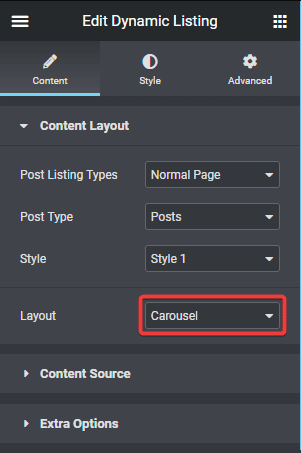
Dynamic listing layout

2. Then go to the Style tab > Carousel Options and add a unique id in the Unique Carousel ID field. This can be any combination of letters and numbers.
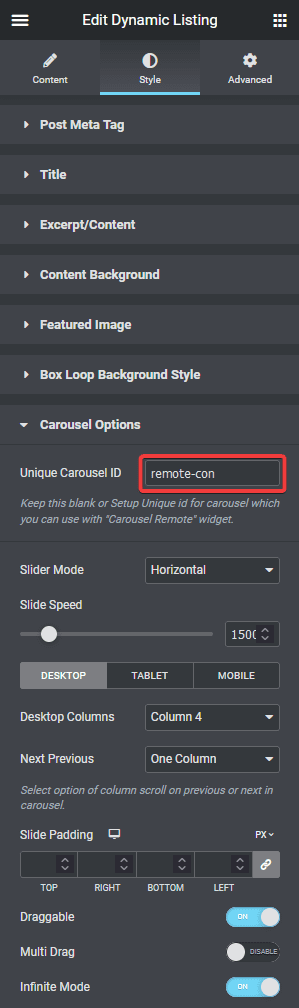
Dynamic listing unique connection id

3. Now select the Carousel Remote widget, then go to the Content tab, add the same ID in the Unique Connection ID field and make sure Remote Type is selected as Carousel.
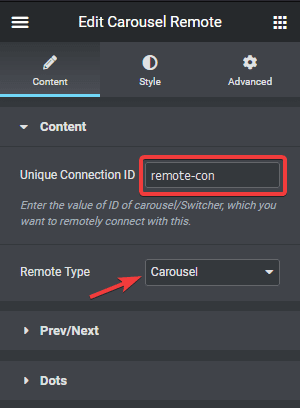
Carousel remote unique connection id remote

4. Now you can have two different types of navigation, a Next and Previous button and Dots (image or icon). You can use either one or both.

a) To use the next previous button go to Prev/Next tab and turn on the Next/Prev Button toggle. You’ll find some customisation options as well.
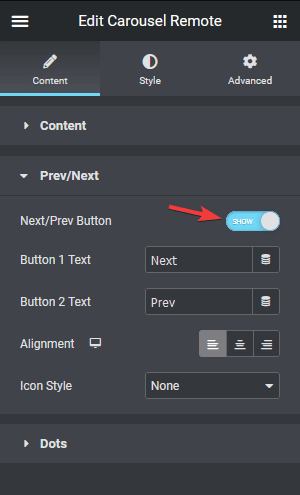
Carousel remote next prev

b) But if you want to use dot navigation, then go to the Dots tab and turn on the Dots toggle. Now, make sure to have the same number of dot items as the number of slides in your Dynamic Listing carousel. You will get some customisation options for your dot navigation.
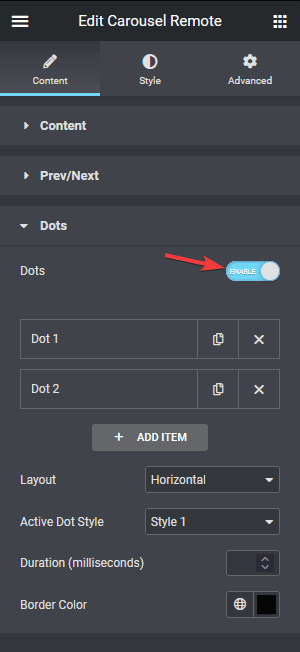
Carousel remote dots

But you should use the Prev/Next navigation option for easy maintenance if the number of content items continues to grow over time.

Note: You should disable all the navigation options for the Dynamic Listing widget for the best user experience.

Now you can navigate the Dynamic Listing widget carousel from any part of your page.

Also, check how to connect the Carousel Remote widget with the Dynamic Categories widget.

About the Author

Photo of Aditya Sharma CMO of The Plus Addons for Elementor
CMO · The Plus Addons for Elementor · 10 years experience

He has spent years in the WordPress ecosystem building, breaking, and optimizing sites until they actually perform. He works at the intersection of speed, growth, and usability, helping creators ship websites that load fast and convert. An active WordPress community contributor sharing through tools, tutorials, and direct collaboration. Tested practice, not theory.

WordPressElementorn8nAIClaudeAutomationServer
Get Instant Answers to all your questions about The Plus Addons for Elementor, trained on 1000+ Docs and Videos

Related Frequently Asked Questions

What should I do if the Carousel Remote widget isn't syncing with the Dynamic Listing widget?

If the Carousel Remote widget isn't syncing, ensure that the Unique Carousel ID in the Dynamic Listing widget matches the Unique Connection ID in the Carousel Remote widget. Both IDs must be identical for the connection to work properly. Additionally, check that the Remote Type is set to Carousel in the Carousel Remote widget settings.

Can I use the Carousel Remote widget with other Elementor widgets?

The Carousel Remote widget is specifically designed to work with the Dynamic Listing widget from The Plus Addons for Elementor. It does not support other Elementor widgets or page builders like Gutenberg or Divi. This limitation ensures optimized performance and functionality when creating carousel navigation solutions.

What is the best navigation option for a growing number of items in the Dynamic Listing carousel?

For a Dynamic Listing carousel with a growing number of items, using the Prev/Next navigation option is recommended. This approach simplifies maintenance as you add more content, ensuring that users can easily navigate through the items without needing to adjust dot navigation settings.

How do I customize the dot navigation in the Carousel Remote widget?

To customize the dot navigation, enable the Dots toggle in the Dots tab of the Carousel Remote widget settings. Ensure that the number of dot items matches the number of slides in your Dynamic Listing carousel. This allows for intuitive navigation, enhancing user experience as they can visually track their position within the carousel.

What happens if I forget to disable navigation options in the Dynamic Listing widget?

If you forget to disable navigation options in the Dynamic Listing widget, it may lead to a confusing user experience. Users could see multiple navigation controls, which can be overwhelming. For optimal performance, it's best to disable all navigation options in the Dynamic Listing widget when using the Carousel Remote widget.

Last reviewed: April 12, 2026