Are you looking to add a self-hosted video to your Elementor website? Adding self-hosted video allows you to have full control over your video content.
With the Video widget from The Plus Addons for Elementor, you can easily add self-hosted videos to your Elementor website.
To check the complete feature overview documentation of The Plus Addons for Elementor Video widget, click here.
Requirement – This widget is a part of The Plus Addons for Elementor, make sure it’s installed & activated to enjoy all its powers.
To do this, add the Video widget from The Plus Addons for Elementor to the page and follow the steps.
1. Select Self Hosted from the Source dropdown under the Video tab.
2. Then add your video in the Mp4 Video Link section from the media library.
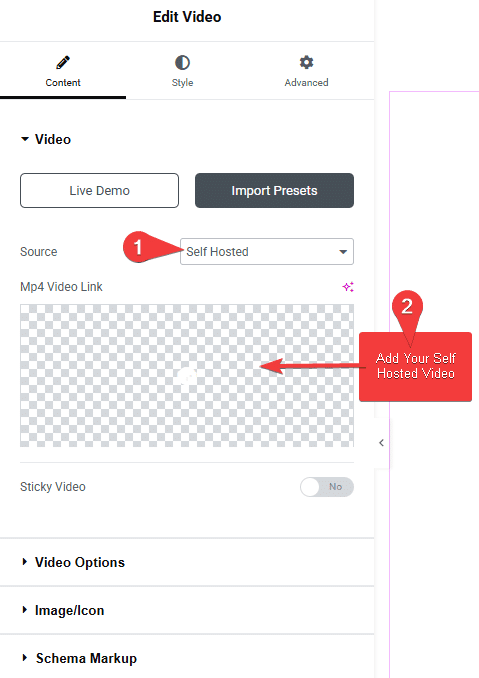
Note: You can only add mp4 videos.
You can adjust some video options from the Video Options tab. You’ll find the following options –
- AutoPlay – By enabling this toggle, you can autoplay the video.
- Mute – By enabling this toggle, you can mute the video.
- Loop – By enabling this toggle, you can play the video in a loop.
- Controls – From this toggle, you can show or hide the video controls from the video.
- Video Touch Disable – From this toggle, you can enable or disable the video touch feature.
This is how easily you can add a self-hosted video on your Elementor website.