




How to Create a Radar Chart in Elementor?

Key Takeaways

  • The Plus Addons for Elementor Chart widget allows users to create radar charts easily on their Elementor website.
  • Users select Radar from the Select Chart section under the Chart tab to create a radar chart.
  • Customization options for the radar chart are available in the Special Option tab, similar to those for the Line chart.
Table Of Content

Do you want to create a radar chart in Elementor? Radar charts, also known as spider charts or web charts, are powerful visual tools that display multiple data points in a circular format. They are commonly used in business and marketing presentations to showcase comparisons between different variables.

With the Chart widget from The Plus Addons for Elementor, you can easily convert your data into a radar chart on your Elementor website.

To check the complete feature overview documentation of The Plus Addons for Elementor Chart widget, click here.

Requirement  – This widget is a part of The Plus Addons for Elementor, make sure it’s installed & activated to enjoy all its powers.

To do this, add the Chart widget to the page and follow the steps – 

1. You can select Custom from the Chart Type dropdown under the Layout tab.

2. You have to select Radar from the Select Chart section under the Chart tab.

3. After that, in the Label Value field, you have to add chart labels separated by a pipe sign (|).
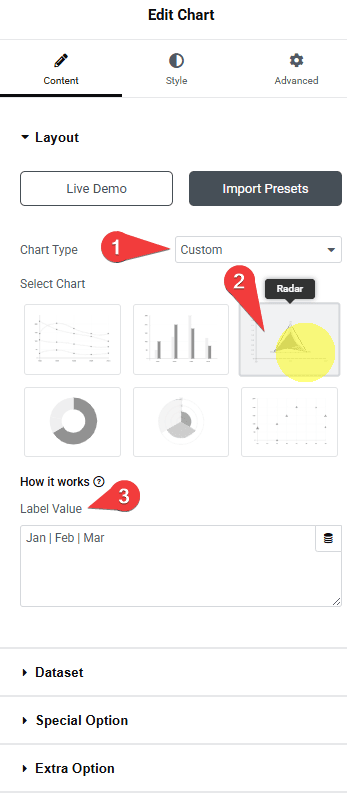
Tpae chart type radar how to create a radar chart in elementor? From the plus addons for elementor

3. Then, in the Dataset tab, you have to add the data for the chart. You’ll find the same options as for the Line chart.

You can customize the chart further from the Special Option tab. Here you’ll find the same options that are available for the Line chart.

Now you should have a beautiful interactive radar chart.
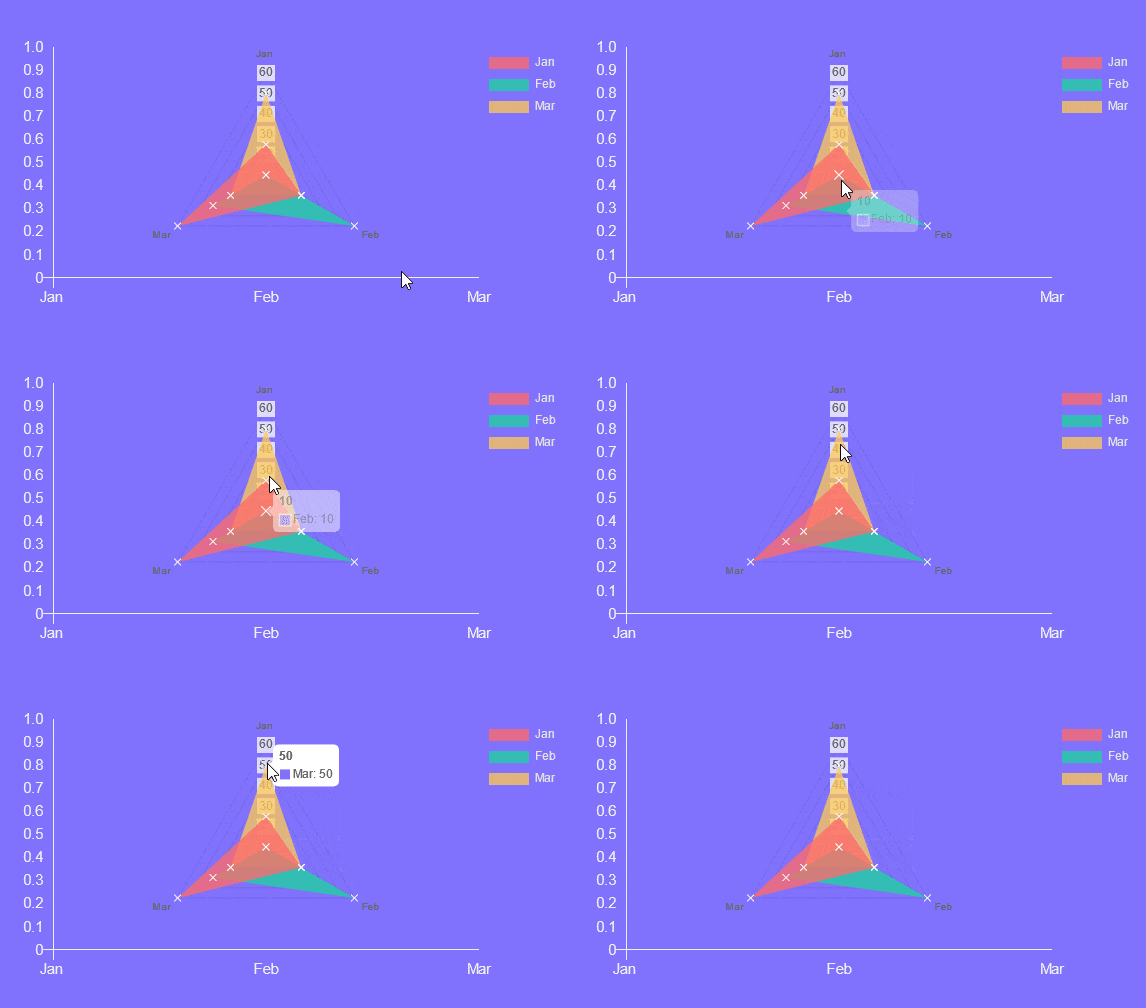
Radar chart demo

About the Author

Photo of Aditya Sharma CMO of The Plus Addons for Elementor
CMO · The Plus Addons for Elementor · 10 years experience

He has spent years in the WordPress ecosystem building, breaking, and optimizing sites until they actually perform. He works at the intersection of speed, growth, and usability, helping creators ship websites that load fast and convert. An active WordPress community contributor sharing through tools, tutorials, and direct collaboration. Tested practice, not theory.

WordPressElementorn8nAIClaudeAutomationServer
Get Instant Answers to all your questions about The Plus Addons for Elementor, trained on 1000+ Docs and Videos

Related Frequently Asked Questions

What should I do if my radar chart is not displaying correctly in Elementor?

If your radar chart isn't displaying correctly, ensure that you have selected 'Radar' from the 'Select Chart' section under the Chart tab. Additionally, check that your labels in the Label Value field are correctly formatted and separated by a pipe sign (|). A common issue is incorrect data formatting, which can prevent the chart from rendering properly.

Can I use a radar chart to compare multiple variables in my business presentation?

Radar charts are ideal for comparing multiple variables, making them perfect for business presentations. They visually represent data points in a circular format, allowing for quick comparisons between different metrics. This can help stakeholders easily grasp the relationships between various factors.

What settings work best for creating an effective radar chart in Elementor?

For an effective radar chart, ensure you add clear and concise labels in the Label Value field. Use distinct data points in the Dataset tab to highlight differences. Customizing the chart further from the Special Option tab can enhance clarity and visual appeal, making your data more engaging.

What happens if I forget to activate The Plus Addons for Elementor before using the radar chart?

If you forget to activate The Plus Addons for Elementor, the Chart widget, including the radar chart feature, will not be available. This means you won't be able to create or customize radar charts on your Elementor website. Always ensure the plugin is installed and activated to access its full functionality.

Are there any limitations when using the radar chart feature in Elementor?

The radar chart feature is part of The Plus Addons for Elementor, which means it is limited to users of this specific plugin. Additionally, the chart's effectiveness can be impacted by the amount of data you include; too many data points can clutter the visualization and make it hard to read.

Last reviewed: April 9, 2026
