---
title: "How to Show WooCommerce Recently Viewed Products in Elementor?"
url: https://theplusaddons.com/docs/show-woocommerce-recently-viewed-products-in-elementor/
date: 2025-01-08
modified: 2026-09-11
lang: en
author: "Aditya Sharma"
description: "Do you want to remind shoppers of the products they looked at earlier? A Recently Viewed row brings them straight back to items they were considering. The Woo Product Listing..."
word_count: 363
---

# How to Show WooCommerce Recently Viewed Products in Elementor?

## 

- The Plus Addons for Elementor Pro includes the Woo Product Listing widget, and its Product Listing Types setting supports a Recently Viewed listing type.
- The Plus Addons > Extra Options > Settings turns on WooCommerce Recently Viewed tracking, and product views are recorded only while that setting is on.
- Guests store Recently Viewed items in a browser cookie for one day, while logged-in shoppers keep the list in their account until cleared.

Do you want to remind shoppers of the products they looked at earlier? A Recently Viewed row brings them straight back to items they were considering.

The Woo Product Listing widget in The Plus Addons for Elementor has a Recently Viewed listing type.

*To check the complete feature overview documentation of The Plus Addons for Elementor Product Listing widget, [click here](https://theplusaddons.com/docs/product-listing-widget-settings-overview/).*

***Requirement - This widget is a part of The Plus Addons for Elementor, make sure it's installed & activated to enjoy all its powers.***

[LIVE WIDGET LINK](https://theplusaddons.com/elementor-listing/?utm_source=tpae&utm_medium=docs&utm_campaign=text#woo-products-wgts)

## Before You Start

- **Edition:** **Pro** — the Woo Product Listing widget is part of The Plus Addons for Elementor Pro. It does not appear in the widget panel of the free plugin.- **WooCommerce** installed and active, with some published products.- **Widget to enable:** Woo Product Listing, switched on under **ThePlus Settings > Widgets**.

## Step 1: Switch on Recently Viewed tracking

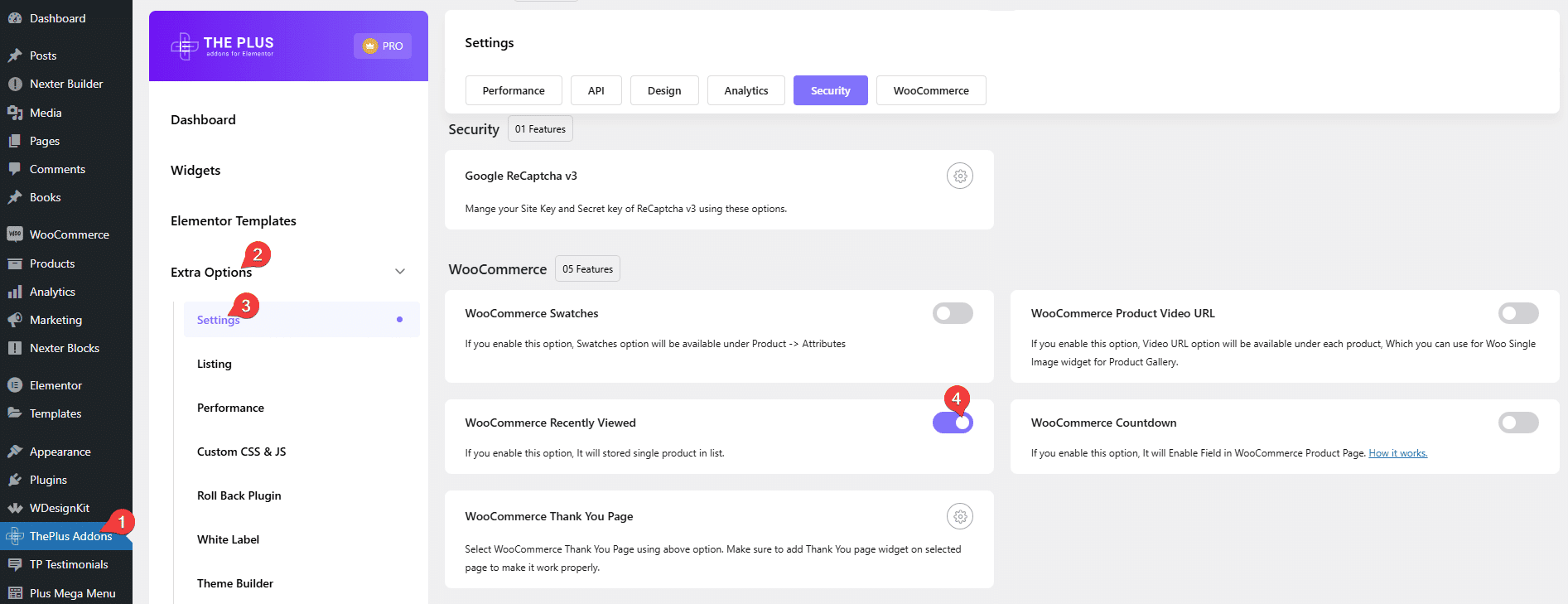
In WordPress, open **The Plus Addons > Extra Options > Settings** and turn on **WooCommerce Recently Viewed**. Product views are only recorded while this is on.
![The WooCommerce Recently Viewed setting in The Plus Addons settings](https://theplusaddons.com/wp-content/uploads/2025/01/product-listing-woocommerce-recently-viewed.png)

## Step 2: Add the listing

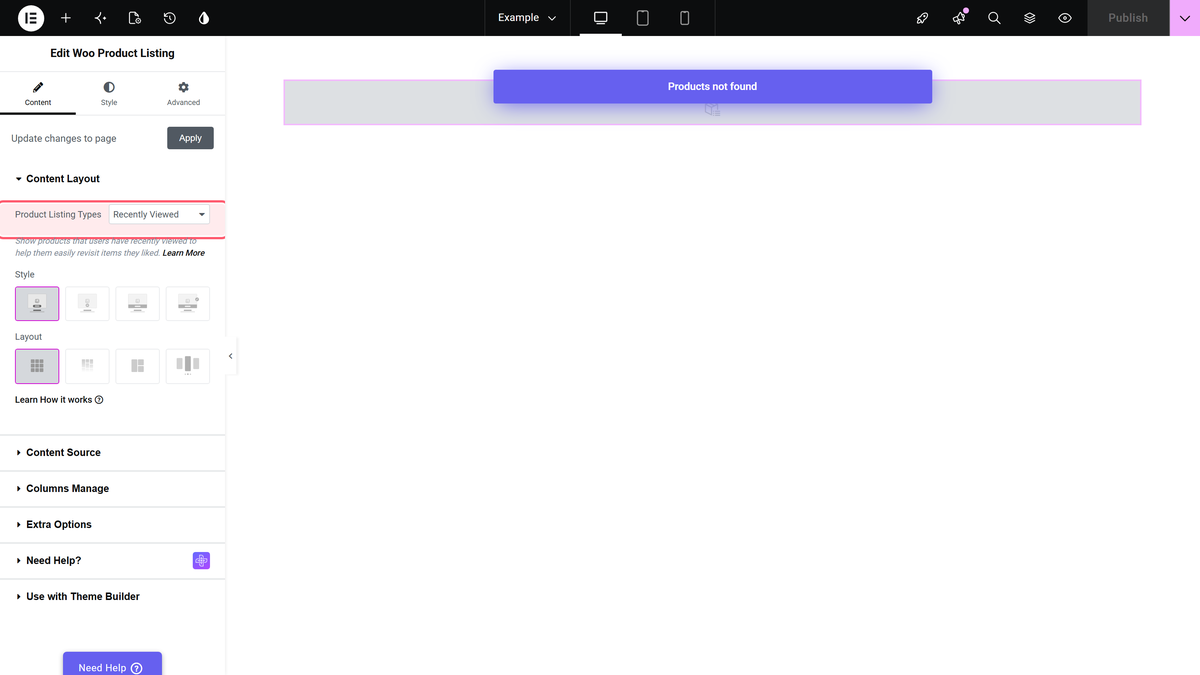
Add the **Woo Product Listing** widget where the row should appear — often the single product template or the cart page. Set **Product Listing Types** to **Recently Viewed** and use the **Grid** or **Masonry** layout.

![Product Listing Types set to Recently Viewed](https://theplusaddons.com/wp-content/uploads/2026/09/tp-product-listout-product-listing-types-wide-recent.webp)

## Step 3: Decide what first-time visitors see

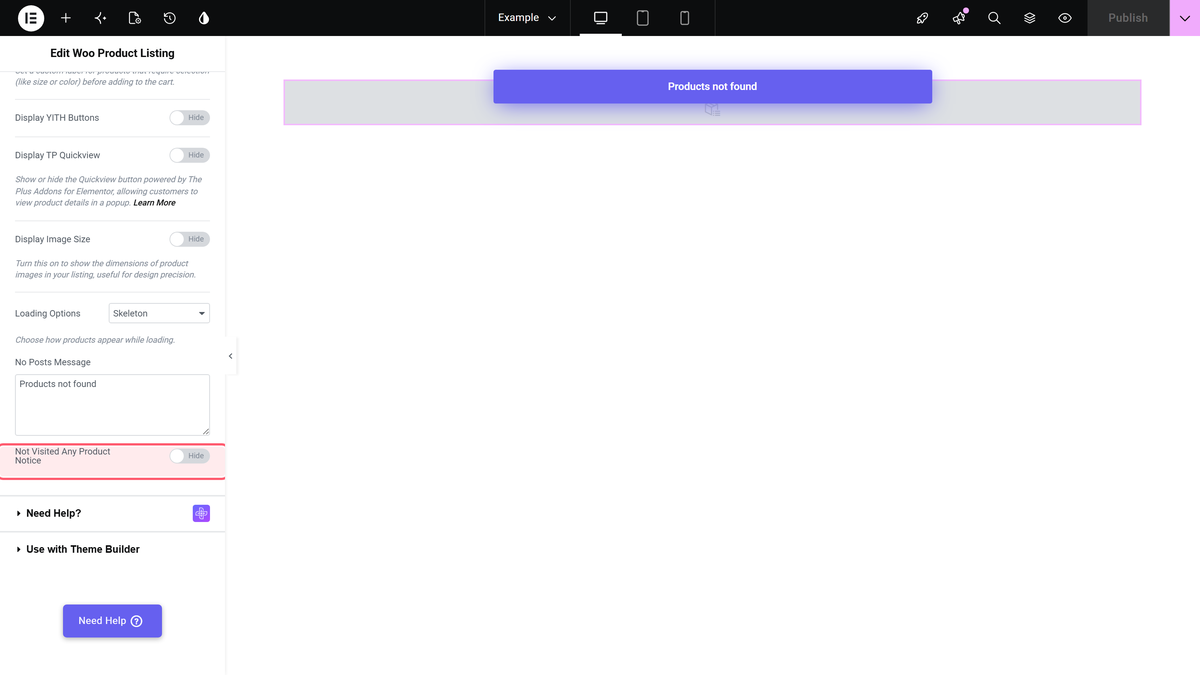
Someone who has not viewed any product yet gets an empty listing. Turn on **Not Visited Any Product Notice** in **Content > Extra Options** to show a message instead, and write it in **No Posts Message**.

![The Not Visited Any Product Notice switch](https://theplusaddons.com/wp-content/uploads/2026/09/tp-product-listout-not-visited-any-product-notice-wide-recent.webp)

## How it remembers

| Shopper | Stored in | How long |
| ------- | --------- | -------- |
| Logged in | Their account | Until cleared |
| Guest | A browser cookie | One day |

## Limitations

- **Not with Metro or Carousel** — the plugin notes this listing type needs Grid or Masonry.- **Only views made while tracking is on** are remembered.- **Guests are remembered for a day.**- **Pro only.** The Woo Product Listing widget is not in the free plugin.

## Troubleshooting

### The listing is always empty

Check the Recently Viewed setting is on, then open a couple of product pages and reload.

### Guests lose their list

That is the one-day cookie. Logged-in shoppers keep theirs.

## Related Docs

- [Woo Product Listing widget: settings overview](https://theplusaddons.com/docs/product-listing-widget-settings-overview/) — every control in the widget.- [Show related products](https://theplusaddons.com/docs/show-related-products-on-a-product-page/)- [Create a wishlist page](https://theplusaddons.com/docs/create-a-woocommerce-wishlist-page-in-elementor/)

## Frequently Asked Questions

**Q: Why is my recently viewed products list empty in Elementor?**
A: The usual cause is that Recently Viewed tracking is still off, because the widget only records product views while that setting is enabled. The page also says the listing stays empty until someone opens a few product pages first. In practice, this means the row can look broken even when the setup is fine. For a quick check, turn on WooCommerce Recently Viewed in The Plus Addons &gt; Extra Options &gt; Settings, then revisit a couple of products and reload the page.

**Q: What do I need before showing recently viewed products on a product page?**
A: The setup depends on three things: WooCommerce installed and active, some published products, and the Woo Product Listing widget enabled under ThePlus Settings &gt; Widgets. The Plus Addons for Elementor, The Plus Addons, Plus Addons for Elementor, POSIMYTH provides the Woo Product Listing widget as part of the Pro edition, so it will not appear in the free plugin. That matters because missing any one of those pieces can stop the row from showing at all.

**Q: Where should I place the recently viewed products row?**
A: The page points to two common placements: the single product template or the cart page. That makes sense because both are places where shoppers are already deciding what to do next, so a Recently Viewed row can bring them back to items they were considering. The widget should be added as a Woo Product Listing row, then set to Recently Viewed with either Grid or Masonry layout.

**Q: Does recently viewed tracking work for guest shoppers too?**
A: Guest shoppers are remembered with a browser cookie for one day, while logged-in shoppers keep their list in their account until it is cleared. That difference matters if you expect repeat visitors to see the same row later. The Plus Addons for Elementor, The Plus Addons, Plus Addons for Elementor, POSIMYTH uses tracking only while WooCommerce Recently Viewed is turned on, so guests will lose their list after that one-day window.

**Q: Can I use Metro or Carousel layout for recently viewed products?**
A: Metro and Carousel are not supported for this listing type. The page says Recently Viewed needs Grid or Masonry instead, so layout choice is not cosmetic here. If you pick Metro or Carousel, the row will not match what this feature expects. For a cleaner result, keep the listing type on Recently Viewed and use one of the two supported layouts from the start.

**Q: What should first-time visitors see instead of an empty recently viewed row?**
A: First-time visitors get an empty listing unless you turn on Not Visited Any Product Notice in Content &gt; Extra Options. That setting lets you show a message through No Posts Message instead of leaving a blank area on the page. It is useful because an empty block can look like a broken widget, while a short notice makes it clear there just is not any browsing history yet.