






Do you want a page where shoppers find everything they saved for later?
In The Plus Addons for Elementor it takes two widgets: Woo Wishlist to save products, and Woo Product Listing to show them.
To check the complete feature overview documentation of The Plus Addons for Elementor Product Listing widget, click here.
Requirement – This widget is a part of The Plus Addons for Elementor, make sure it’s installed & activated to enjoy all its powers.
Before You Start
- Edition: Pro — the Woo Product Listing widget is part of The Plus Addons for Elementor Pro. It does not appear in the widget panel of the free plugin.
- WooCommerce installed and active, with some published products.
- Widget to enable: Woo Product Listing, switched on under ThePlus Settings > Widgets.
Step 1: Add a wishlist button to your products
Place The Plus Addons Woo Wishlist widget in your single product template, or wherever shoppers should be able to save a product. Leave its Unique Name as tpwishlist — the wishlist page reads that name.
Step 2: Create the wishlist page
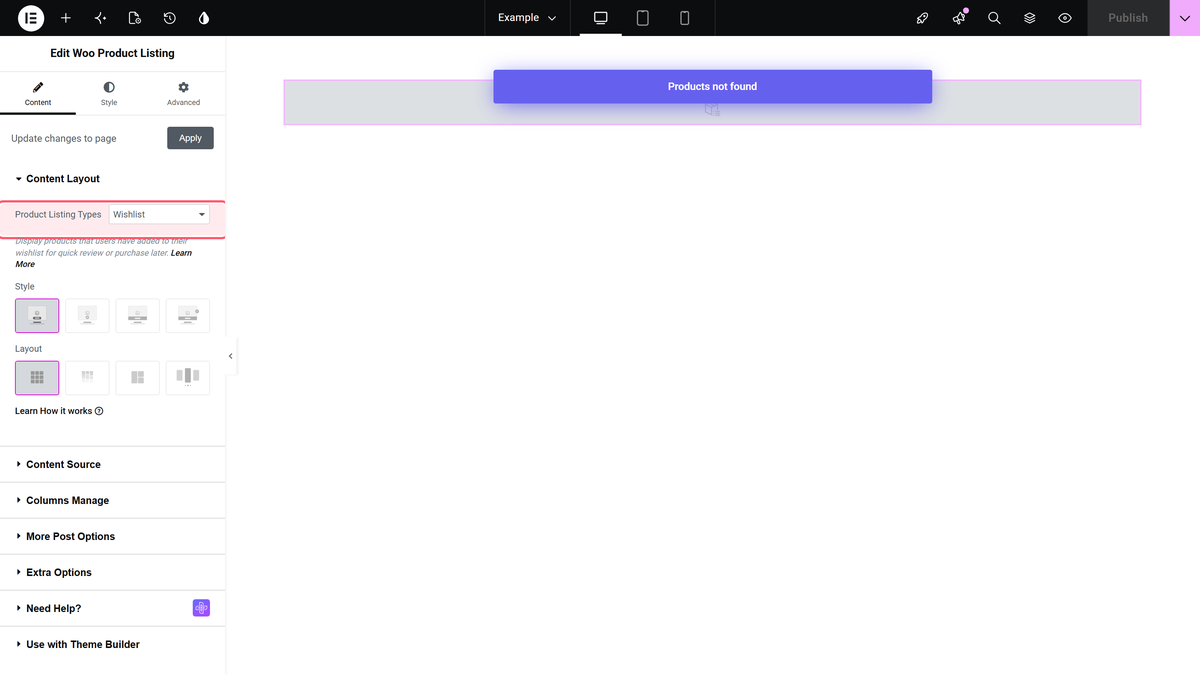
Create a page, add the Woo Product Listing widget, and set Product Listing Types to Wishlist. Use the Grid or Masonry layout.
Step 3: Link to it
Add the page to your menu or header so shoppers can find it.
How it remembers
| Shopper | Saved in |
|---|---|
| Logged in | Their account, on any device |
| Guest | That browser only |
Limitations
- Not with Metro or Carousel — the plugin notes this listing type needs Grid or Masonry.
- Not connected to YITH Wishlist. Products saved with a YITH button do not appear here. See which wishlist.
- Pro only. The Woo Product Listing and Woo Wishlist widgets are not in the free plugin.
Troubleshooting
The wishlist page is empty
Save a product with the Woo Wishlist button first, and check its Unique Name is tpwishlist.
A guest’s wishlist disappeared
It lives in that browser only. Clearing site data or switching device loses it; logging in keeps it.
Related Docs
- Woo Product Listing widget: settings overview — every control in the widget.
- Add a YITH wishlist button to listings
- Show recently viewed products
