






A carousel’s arrows and dots normally sit directly under it. The Carousel Remote widget moves that navigation somewhere else — into a column beside the carousel, above a heading, anywhere on the page.
The two widgets are joined by an id you invent. You type it into the carousel, then type the same id into the remote.
For the full settings tour of the Social Reviews widget, see Social Reviews Widget Settings Overview.
Requirement – This widget is a part of The Plus Addons for Elementor Pro, make sure it’s installed & activated to enjoy all its powers.
Before You Start
- Edition: Pro — Social Reviews ships only in The Plus Addons for Elementor Pro. The widget does not exist in the free plugin at all: no widget file, no CSS and no JavaScript, so there is nothing to fall back to.
- Prerequisite: Elementor (free) installed and active.
- Widget to enable: go to The Plus Addons > Widgets, search for Social Reviews and turn its toggle on.
- Second widget to enable: in the same screen, search for Carousel Remote and turn its toggle on.
- No account needed: the Manual source needs no token, no key and no login. It is the one source you can use straight away.
Connect the two widgets
- Edit the page with Elementor and add both the Social Reviews widget and the Carousel Remote widget.
- In the Social Reviews widget, leave Type on Reviews, pick a Style, and set Layout to Carousel.
- Add your reviews under Social Reviews, from whichever sources you want.
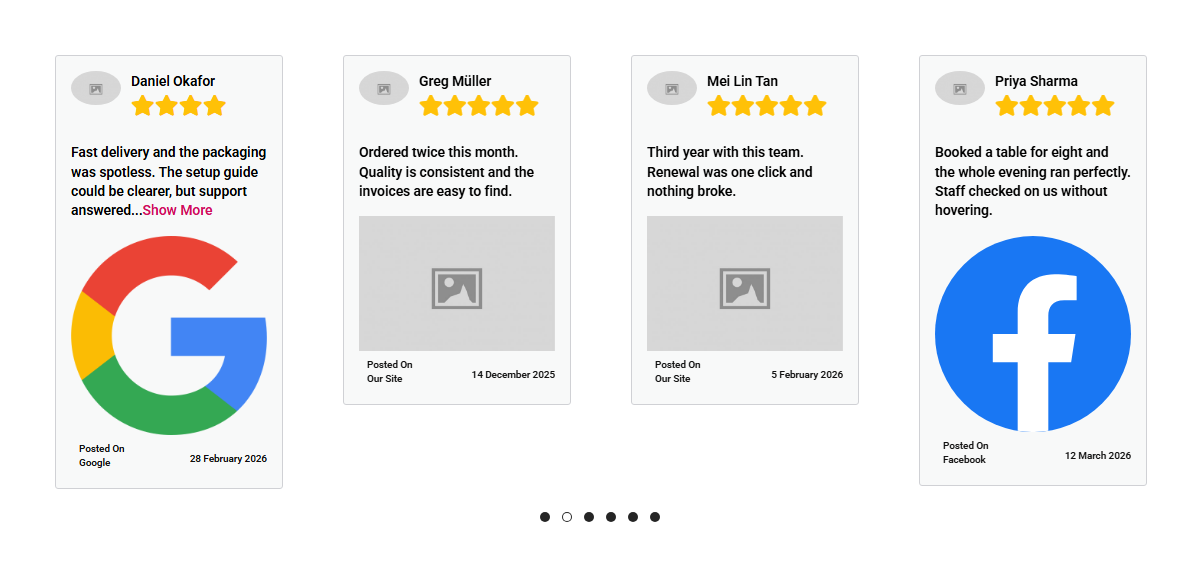
- Still in the Social Reviews widget, go to Style > Carousel and type something into Unique Carousel ID. Any short name will do, as long as it is used once on the page.
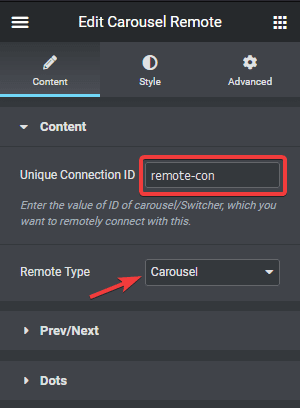
- Select the Carousel Remote widget, open its Content tab, and put the same id into Unique Connection ID. Set its Remote Type to Carousel.
Choose the navigation
The remote gives you two kinds of control, and you can use either or both.
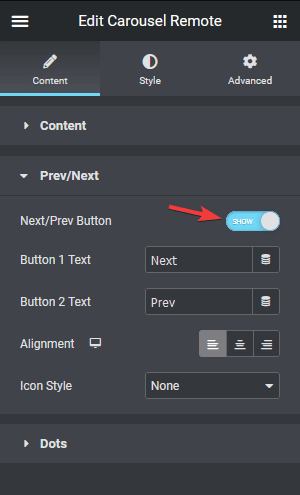
- For arrows: open the remote’s Prev/Next tab and turn the Next/Prev Button toggle on.
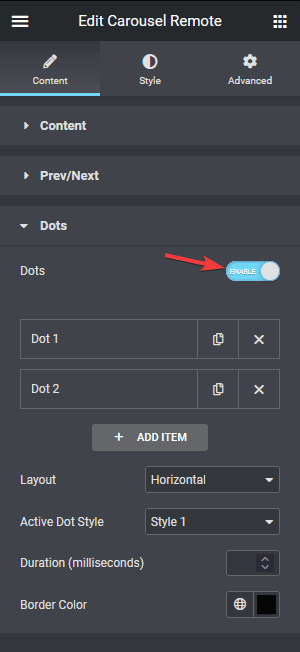
- For dots: open its Dots tab and turn the Dots toggle on. Give it the same number of dot items as you have slides.
Turn the carousel’s own navigation off once the remote is doing the job, or visitors get two sets of controls. In Social Reviews that means Style > Carousel > Show Dots, and Show Arrows if you switched it on.
The settings involved
| Setting | Widget | What it does | Default |
|---|---|---|---|
| Layout | Social Reviews | Must be Carousel, or there is nothing to remote-control. | Grid |
| Unique Carousel ID | Social Reviews | The name you invent. Found under Style > Carousel. | empty |
| Unique Connection ID | Carousel Remote | The same name, typed again. | empty |
| Remote Type | Carousel Remote | Must be set to Carousel. | — |
| Show Dots | Social Reviews | The carousel’s own dots. Turn off when the remote provides them. | on |
| Show Arrows | Social Reviews | The carousel’s own arrows. | off |
How It Behaves
- The id is the whole connection. There is no picker and no list — the remote finds the carousel by matching the string, so the two have to be identical.
- The carousel autoplays on its own regardless. Autoplay is on by default, so the reviews will move whether or not anyone touches the remote.
- The remote can sit anywhere on the page, in any container, as long as both widgets are on the same page.
Limitations
- One id, one carousel. Use the same Unique Carousel ID twice on a page and the remote has no way to tell the two apart.
- Three sections disappear in the Carousel layout. Columns Manage, Filter Option and Load More/Lazy Load are all skipped when Layout is Carousel. The carousel has its own column settings under Style > Carousel.
- Carousel arrows are off by default. A carousel straight out of the box shows dots only. Turn Show Arrows on under Style > Carousel if you want them.
- In the Carousel layout the source logo is rendered very large. With Style-1 and the default carousel settings, the Google and Facebook logos fill most of the card, and a Manual row with no Platform Logo set draws a big grey placeholder. In the Grid layout the same logos are small.
- Both widgets have to be switched on. Carousel Remote has its own toggle in The Plus Addons > Widgets, separate from Social Reviews.
Not verified
So you know exactly what has and has not been checked:
- The Carousel Remote actually driving the review carousel. The Unique Carousel ID field exists and the carousel initialises, but a page pairing the two widgets was not published and no remote click was measured.
- Clicking a carousel dot. The carousel was seen to have advanced on its own (autoplay is on by default), but a dot click did not move it in the one measurement taken, and arrows are off by default so there was none to click.
- A wall of real Facebook or Google reviews. This page was checked without ever entering a real access token, API key or place id, so what the finished Facebook or Google feed looks like once connected was not observed for this revision. Everything below that does not need a credential was checked on a published page.
- The Carousel Remote widget’s own settings. Its Prev/Next and Dots tabs were not opened for this revision; the steps and screenshots for them are the ones this page already carried.
Troubleshooting
The remote does nothing
Check the id on both sides, character for character — a trailing space is enough to break it. Then check that Remote Type on the remote is Carousel, and that the Social Reviews widget’s Layout really is Carousel.
I cannot find Unique Carousel ID
It is on the Style tab, under Carousel — and that section only exists when Layout is Carousel.
There are two sets of dots
The carousel’s own dots are still on. Turn Show Dots off under Style > Carousel in the Social Reviews widget.
The Carousel Remote widget is not in the panel
Switch it on in The Plus Addons > Widgets. It is a separate widget with its own toggle.
