


































Do you want to show the parent page or parent categories link in your Elementor breadcrumb? A good breadcrumb navigation link can improve the user experience on your website, especially if it contains the parent page link. With the parent page link, users can easily navigate back to the parent page of the current page.
With the Breadcrumbs Bar widget from The Plus Addons for Elementor, you can easily show the parent page link in your Elementor breadcrumb.
To check the complete feature overview documentation of The Plus Addons for Elementor Breadcrumbs Bar widget, click here.
Requirement – This widget is a part of The Plus Addons for Elementor, make sure it’s installed & activated to enjoy all its powers.
To do this, add the Breadcrumbs Bar widget to the template and follow the steps –
1. Select a style from the Breadcrumbs Style section under the Layout tab.
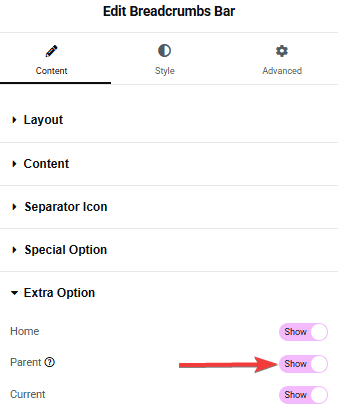
2. Then go to the Extra Option and make sure to turn on the Parent toggle.
Suggested reading: how to add breadcrumbs to Elementor tag page
Now, you should be able to see the parent page link in the breadcrumb bar.

Also, read how to add breadcrumbs on WooCommerce product single page.

