






Big Update: New RSS Feed Option, Labels for Widgets & More!

Key Takeaways

  • The Plus Addons for Elementor introduces the RSS Feed feature, allowing users to import content from any RSS-supported site into their layouts.
  • The Plus Theme Builder is now available for free users, enabling them to load widgets like blog listings and dark mode across all site pages without a Pro license.
  • The Plus Addons adds labels and tooltips to every widget setting, providing short descriptions and detailed documentation for better user understanding.
  • The Plus Addons for Elementor improves multilingual compatibility across widgets, enhancing reliability for global websites.

We’re back with a brand-new update for The Plus Addons for Elementor!

This release brings fresh new features designed to make your website smoother, smarter, and more dynamic.

Ready to see what’s new? Let’s jump in!

Update 1: Introducing the RSS Feed

Say hello to the RSS Feed, your new favorite way to bring content from anywhere on the web straight into your Elementor layouts.

You can now easily import posts, news, or updates from any RSS-supported site, whether it’s your own blog, a partner site, or even a YouTube channel playlist.

Here’s why you’ll love the RSS Feed Feature:

  • Easily bring in posts from any website that supports RSS.
  • Pick your favorite layout, such as Masonry, Carousel, or a simple Grid.
  • Decide how many posts to show and even skip the latest ones if you like.
  • Choose whether to display images, titles, authors, or publish dates.
  • Make titles clickable so visitors can jump straight to the original post.
  • Fine-tune how images appear using tags like content or enclosure.

It’s flexible enough to work for blogs, news feeds, YouTube updates, or even custom post types like hotel listings or directories.

Simply add your feed URL, and your dynamic content loads in seconds.

How the RSS Feed Works

To get started, make sure the Social Feed widget is activated in your Plus Addons for Elementor dashboard.
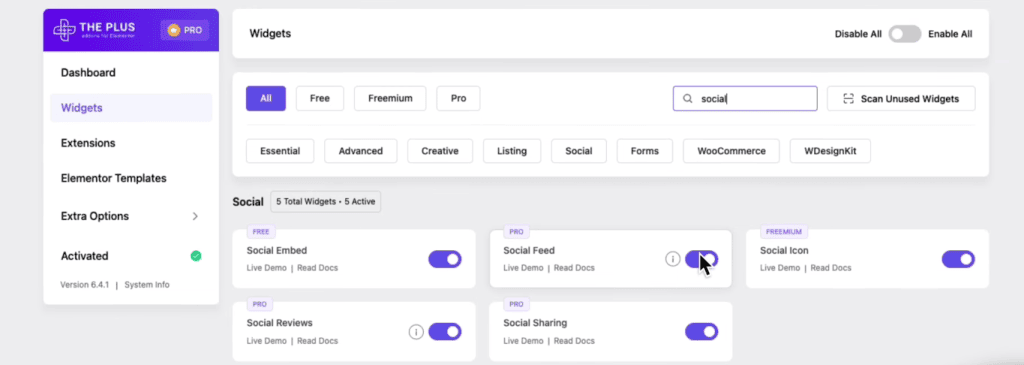
Social feed enable big update: new rss feed option, labels for widgets & more! From the plus addons for elementor

Once it’s enabled, drag and drop the Social Feed widget onto your Elementor editor.

On the left sidebar, you’ll see the Social Feed settings.

Under the Item section, click on the platform, for example, Facebook.

You’ll then see a Source dropdown. Click on it and choose the WP RSS Feed option to start using the RSS Feed feature.
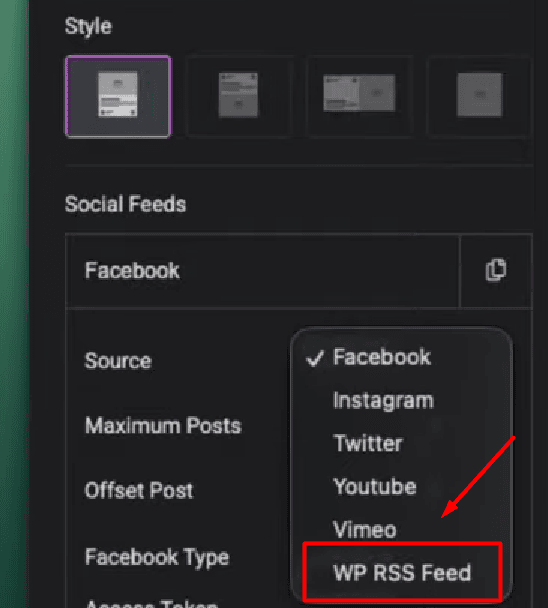
Social feed style 1 big update: new rss feed option, labels for widgets & more! From the plus addons for elementor

After that, multiple customization options will appear, which you can adjust as needed to match your style and layout preferences.
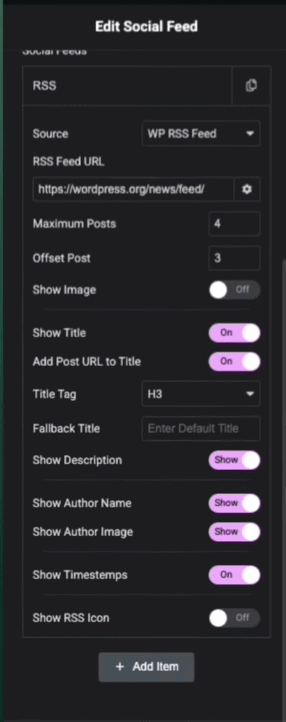
Edit social feed 1 big update: new rss feed option, labels for widgets & more! From the plus addons for elementor

By default, the RSS Feed URL will show “theplusaddons.com,” but you can replace it with your own feed link.

That’s how easily you can display your RSS Feed with the RSS Feed from The Plus Addons for Elementor.

Update 2: Theme Builder Integration for Free Users

We’ve also added a small but very useful enhancement, especially for users who don’t have Elementor Pro.

Now, you can enable The Plus Theme Builder (completely free) to load widgets like blog listings, preloaders, or dark mode across all your site pages.

Whether it’s your preloader animation or dark mode toggle, you can now add them globally in your header or footer using the free theme builder. No Pro license is required.
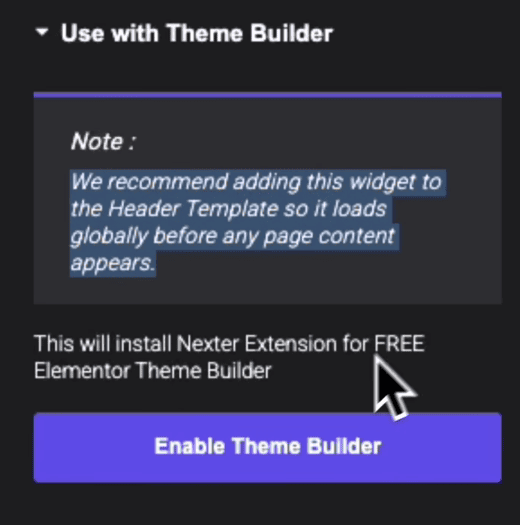
Enable theme builder 1 big update: new rss feed option, labels for widgets & more! From the plus addons for elementor

Update 3: Helpful Labels for Every Widget Setting

We know The Plus Addons come with many customization options, and sometimes it can feel a bit overwhelming.

That’s why we’ve added labels and tooltips to explain every setting inside the widget panel.

Now you’ll see short descriptions guiding you through what each option does, and if you need more information, just click “Learn More” to open our detailed documentation.

For example:

  • Wondering what “Autoplay” in Accordion does? Now it’s clearly explained.
  • Confused about SEO Schema options? Click once and get the full breakdown.
  • Curious about Carousel Remote connections? It’s all right there in the widget panel.
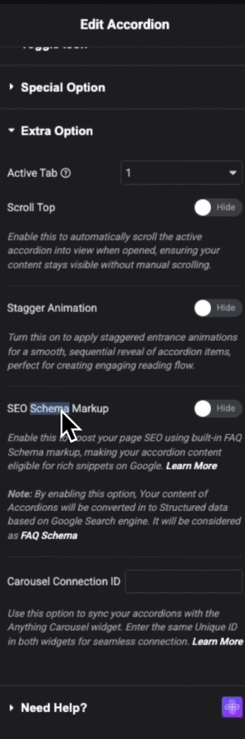
Edit accordion 1 big update: new rss feed option, labels for widgets & more! From the plus addons for elementor

This update is focused on making your design workflow smoother and helping you understand every feature without endless trial and error.

Update 4: More Fixes & Compatibility Updates

We’ve also rolled out multiple fixes and improvements, including better multilingual compatibility across widgets, making The Plus Addons for Elementor even more reliable for global websites.

Wrapping Up: What’s Next

This is just the beginning! Our team is already working on exciting new features coming your way in November, focused on enhancing speed, usability, and creativity for your Elementor projects.

Got feedback or feature requests? Drop them in the comments. We’d love to hear from you.

Until next time, happy creating with The Plus Addons for Elementor!

About the Author

Photo of Aditya Sharma CMO of The Plus Addons for Elementor
CMO · The Plus Addons for Elementor · 7 years experience

He has spent years in the WordPress ecosystem building, breaking, and optimizing sites until they actually perform. He works at the intersection of speed, growth, and usability, helping creators ship websites that load fast and convert. An active WordPress community contributor sharing through tools, tutorials, and direct collaboration. Tested practice, not theory.

WordPressElementorn8nAIClaudeAutomationServer

Related Frequently Asked Questions

How do I use the new RSS Feed feature in The Plus Addons for Elementor?

To use the RSS Feed feature, activate the Social Feed widget in your Plus Addons for Elementor dashboard. Then, drag the Social Feed widget onto your Elementor editor. Select the WP RSS Feed option from the Source dropdown to start importing content. This feature allows you to display posts from any RSS-supported site, making it versatile for blogs, news feeds, or even YouTube updates.

What customization options are available for the RSS Feed?

The RSS Feed feature offers various customization options, such as choosing layouts like Masonry, Carousel, or Grid. You can decide how many posts to display, whether to include images, titles, authors, or publish dates, and even make titles clickable. This flexibility allows you to tailor the feed to match your site's design and content strategy.

Are there any limitations when using the Theme Builder for free users?

While the Theme Builder integration for free users in The Plus Addons for Elementor allows for global widget usage, it may not include all advanced features available to Pro users. Free users can still add essential elements like blog listings and preloaders across their site, but they might miss out on more complex functionalities that require a Pro license.

How does the new update improve multilingual compatibility?

The latest update to The Plus Addons for Elementor includes fixes that enhance multilingual compatibility across widgets. This improvement ensures that your site remains functional and visually appealing for global audiences, which is crucial if you're targeting users who speak different languages. It's a significant step for users looking to create a more inclusive web experience.

What should I know about the performance impact of the new RSS Feed feature?

The RSS Feed feature is designed to load dynamic content quickly, which is essential for maintaining site performance. By simply adding your feed URL, content loads in seconds, allowing for a smooth user experience. However, it's important to monitor how many posts you display, as showing too many at once could slow down your page loading times.

Last reviewed: April 22, 2026