
































Are you looking to exclude blog posts from certain categories or tags on your Elementor website? This can be a useful feature if you want to showcase specific blog posts on your website without including irrelevant posts.
You can easily accomplish this task using the Blog Listing widget from The Plus Addons for Elementor. This powerful widget provides a range of options to customise your blog posts display.
To check the complete feature overview documentation of The Plus Addons for Elementor Blog Listing widget, click here.
Requirement – This widget is a part of The Plus Addons for Elementor, make sure it’s installed & activated to enjoy all its powers.
To do this, add the Blog Listing widget on the page, select the appropriate listing type, style, and layout.
Then go to the Content Source tab, from the Exclude Category field, you can exclude posts from specific categories from the blog post list.
Similarly, from the Exclude Tags field, you can exclude posts with specific tags from the blog post list.
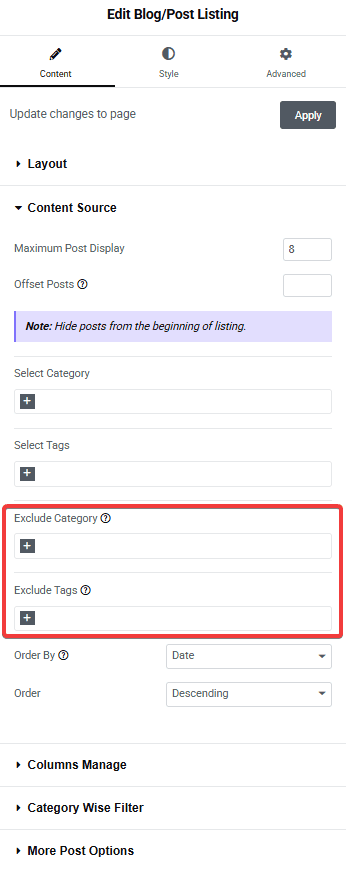
Note: You can add multiple categories or tags together.
You can exclude posts by category or tags separately, or use both together. However, it is important to note that when using both, a post must match both conditions to be excluded from the list.
For example, let’s say you have selected “Clothing” as the category in the Exclude Category field and “Yellow” as a tag in the Exclude Tags field. In order for a post to be excluded, it must belong to the clothing category and have the yellow tag.
Note: It works in the same way when you include posts from categories and tags together.
Also, read How to Show Related Blog Posts on Blog Single Page (Based on Categories & Tags).

