






Are you running an online store using WooCommerce and want to showcase your product ratings? Displaying star ratings on WooCommerce products builds trust and helps visitors make buying decisions.
With the Product Listing widget from The Plus Addons for Elementor, you can show star ratings on your products if they have any ratings.
To check the complete feature overview documentation of The Plus Addons for Elementor Product Listing widget, click here.
Requirement – This widget is a part of The Plus Addons for Elementor, make sure its installed & activated to enjoy all its powers.
To do this, make sure you have added some products to your WooCommerce store and that those products have received at least one rating. Then follow these steps:
1. Add the Product Listing widget on the page, then select the appropriate listing type, style, and layout.
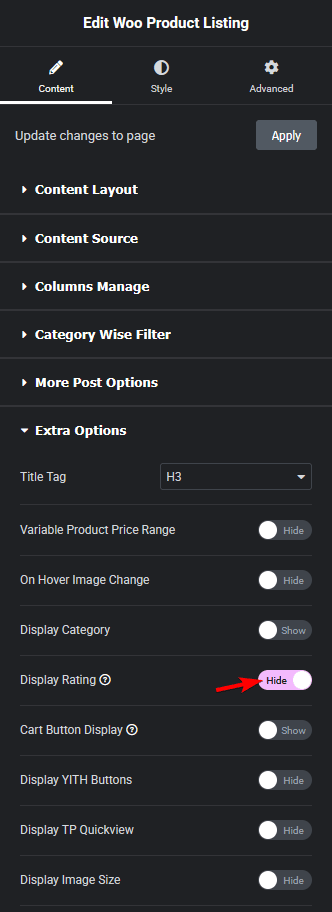
2. Then go to the Extra Options tab and turn on the Display Rating toggle.
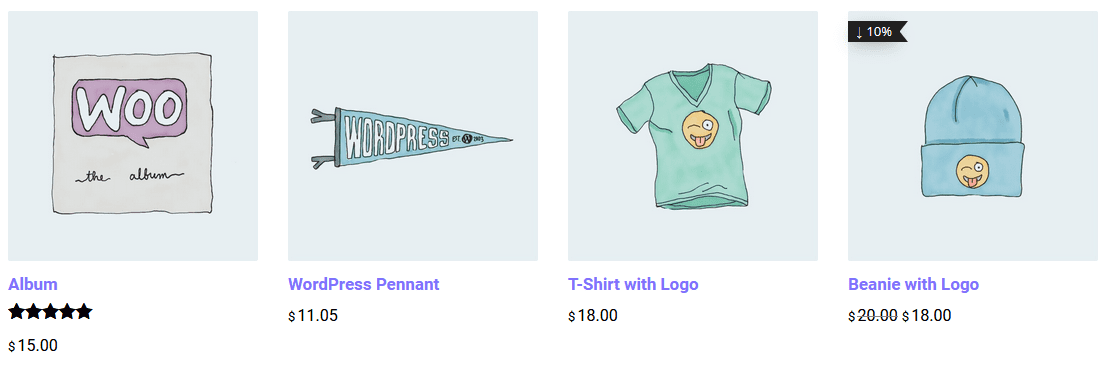
If your products have received ratings, you will see the star rating displayed on each product card.
Also, read How to Display WooCommerce Products on a Custom Page in Elementor.
To let customers filter products by star rating, see How to Create a WooCommerce Rating Filter in Elementor.
To customize the layout of individual product pages, see How to Edit the WooCommerce Product Page in Elementor.
