






















How to Add a Testimonial Carousel Slider in Elementor?

Key Takeaways

  • The Plus Addons for Elementor includes a Testimonial widget that allows users to create an interactive testimonial carousel.
  • Users can select Carousel from the Layout section after adding the Testimonial widget to their Elementor page.
  • Carousel management options are available under the Style > Carousel Options tab in The Plus Addons for Elementor.
Table Of Content

Do you want to add a testimonial carousel to your Elementor website? Creating a dynamic and interactive carousel that showcases your client testimonials in a sleek and captivating manner can add a seamless user experience for your visitors.

With the Testimonial widget from The Plus Addons for Elementor, you can easily create an interactive testimonial carousel on your Elementor website. 

To check the complete feature overview documentation of The Plus Addons for Elementor Testimonial widget, click here.

Requirement  – This widget is a part of The Plus Addons for Elementor, make sure its installed & activated to enjoy all its powers.

To do this, add the Testimonial widget on the page, after selecting the appropriate style, select Carousel from the Layout section. Then select the appropriate source from the Select Source dropdown.
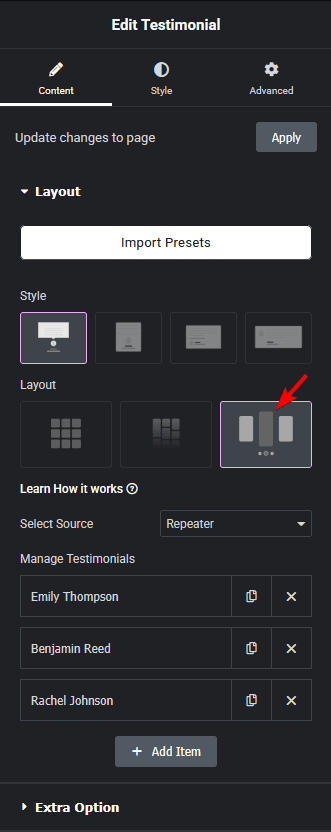
Testimonial carousel layout new how to add a testimonial carousel slider in elementor? From the plus addons for elementor

Now your testimonials will show in a carousel slider. You can manage the carousel from the Style > Carousel Options tab.

Also, read How to Add Testimonials with Custom Post Type in Elementor.

About the Author

Photo of Aditya Sharma CMO of The Plus Addons for Elementor
CMO · The Plus Addons for Elementor · 10 years experience

He has spent years in the WordPress ecosystem building, breaking, and optimizing sites until they actually perform. He works at the intersection of speed, growth, and usability, helping creators ship websites that load fast and convert. An active WordPress community contributor sharing through tools, tutorials, and direct collaboration. Tested practice, not theory.

WordPressElementorn8nAIClaudeAutomationServer
Get Instant Answers to all your questions about The Plus Addons for Elementor, trained on 1000+ Docs and Videos

Related Frequently Asked Questions

What should I do if the testimonial carousel is not displaying on my Elementor page?

If the testimonial carousel is not showing, ensure that the Testimonial widget from The Plus Addons for Elementor is installed and activated. This widget is essential for creating the carousel. If itu2019s activated and still not displaying, check the source selected in the Select Source dropdown to confirm itu2019s pulling testimonials correctly.

What layout options are available for the testimonial widget?

The testimonial widget offers various layout options, including the Carousel layout. To select this, add the Testimonial widget to your page and choose 'Carousel' from the Layout section. This layout is ideal for showcasing multiple testimonials in a visually appealing way.

Does the testimonial carousel work on mobile devices?

The testimonial carousel created with The Plus Addons for Elementor is responsive and should work on mobile devices. However, itu2019s important to test the appearance and functionality on different screen sizes to ensure a seamless user experience across all devices.

What are common mistakes when setting up the testimonial carousel?

A common mistake is not selecting the correct source for the testimonials in the Select Source dropdown. If the source is incorrect or empty, the carousel won't display any testimonials. Always double-check your source settings after adding the widget to avoid this issue.

Last reviewed: April 11, 2026