---
title: "How to add SEO FAQ Schema Markup to Accordion in Elementor?"
url: https://theplusaddons.com/docs/elementor-accordion-schema-markup/
date: 2023-01-25
modified: 2026-09-11
lang: en
author: "Aditya Sharma"
description: "Is your accordion a list of questions and answers? FAQ schema tells search engines exactly that, in a format they can read. The Accordion widget from The Plus Addons for..."
image: https://theplusaddons.com/wp-content/uploads/2020/10/How-to-enable-FAQ-SEO-Schema-Markup-to-Accordion-in-Elementor_.jpg
word_count: 304
---

# How to add SEO FAQ Schema Markup to Accordion in Elementor?

## 

- The Accordion widget from The Plus Addons for Elementor adds SEO Schema Markup with one switch, and the option appears only in The Plus Addons for Elementor Pro.
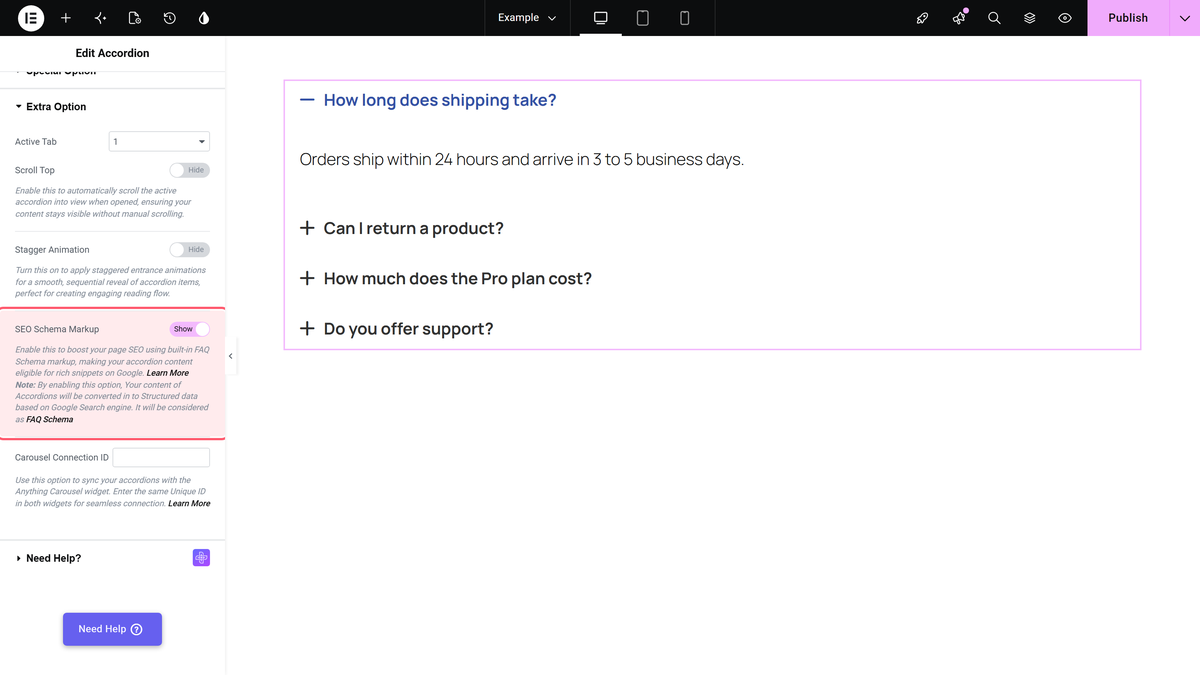
- The setup uses Content > Extra Option, where the user turns on SEO Schema Markup after writing each title as a question and each item’s content as its answer.
- The widget adds schema.org microdata to its own HTML, turning the accordion into an FAQPage with each title as a Question and each content as an Answer, while one FAQ block per page remains the limit.

Is your accordion a list of questions and answers? FAQ schema tells search engines exactly that, in a format they can read.

The Accordion widget from The Plus Addons for Elementor adds FAQ schema with one switch.

*To check the complete feature overview documentation of The Plus Addons for Elementor Accordion widget, [click here](https://theplusaddons.com/docs/elementor-accordion-widget-settings-overview/).*

***Requirement - This widget is a part of The Plus Addons for Elementor, make sure it's installed & activated to enjoy all its powers.***

[LIVE WIDGET LINK](https://theplusaddons.com/elementor-widget/accordion/?utm_source=tpae&utm_medium=docs&utm_campaign=text)

## Before You Start

- **Edition:** **Pro** — SEO Schema Markup is part of The Plus Addons for Elementor Pro. In the free plugin the option shows an upgrade notice instead of working.- **Widget to enable:** Accordion, switched on under **The Plus Addons > Widgets**.

## Steps

- Add the Accordion widget. Write each title as a question and each item’s content as its answer.- In **Content > Extra Option**, turn on **SEO Schema Markup**.- Publish, then check the page with Google’s [Rich Results Test](https://search.google.com/test/rich-results).

![SEO Schema Markup turned on in the Extra Option section](https://theplusaddons.com/wp-content/uploads/2026/09/accordion-schema.webp)

## What It Adds

The widget adds schema.org **microdata** to its own HTML: the accordion becomes an `FAQPage`, each title a `Question` and each content an `Answer`. Nothing changes visually.

## What Google Shows

Since August 2023, Google shows FAQ rich results only for well-known government and health websites. Other sites still get valid FAQ markup, which search engines and AI tools can read, but usually no FAQ drop-down in Google results.

## Limitations

- **One FAQ block per page.** If an SEO plugin (such as Rank Math’s FAQ block) already adds FAQ schema to the page, don’t add a second one here.- **Only visible content counts.** Mark up real questions and answers that visitors can read.- **Items without a title are skipped.**

## Troubleshooting

### The Rich Results Test finds duplicate FAQ

Another plugin or block is also adding FAQ schema. Keep one.

## Related Docs

- [Accordion widget: settings overview](https://theplusaddons.com/docs/elementor-accordion-widget-settings-overview/)- [Google: FAQ structured data](https://developers.google.com/search/docs/appearance/structured-data/faqpage)

## Frequently Asked Questions

**Q: What do I need before adding FAQ schema to an accordion in Elementor?**
A: The Accordion widget has to be installed and activated in The Plus Addons for Elementor, and the SEO Schema Markup option is part of the Pro edition. In the free plugin, that option shows an upgrade notice instead of working. The widget is enabled under The Plus Addons &gt; Widgets, so this is a Pro-only workflow inside Elementor, not a separate schema plugin setup.

**Q: How do I add FAQ schema markup to an Elementor accordion?**
A: The key idea is simple: build the accordion as real questions and answers, then turn on SEO Schema Markup in Content &gt; Extra Option. The page says the widget adds FAQ schema with one switch, so the accordion becomes structured data without changing how it looks on the page. Publish the page and verify it with Google’s Rich Results Test if you want to confirm the markup is present.

**Q: What does Elementor accordion schema markup actually add to the page?**
A: It adds schema.org microdata to the accordion’s own HTML. In practice, the accordion is treated as an FAQPage, each title becomes a Question, and each content area becomes an Answer. The visual design stays unchanged, which matters because this is for search engines and AI tools, not for changing what visitors see on screen.

**Q: Will Google show FAQ dropdowns for every site that adds FAQ schema?**
A: Google has limited FAQ rich results since August 2023 to well-known government and health websites. Other sites can still use valid FAQ markup, and search engines plus AI tools can read it, but Google usually will not show the old FAQ drop-down in results. That means the markup still has value even when the visible SERP enhancement does not appear.

**Q: Why does Rich Results Test show duplicate FAQ schema?**
A: Duplicate FAQ warnings usually mean another plugin or block is already adding FAQ schema to the same page. The page specifically calls out cases like Rank Math’s FAQ block. The fix is to keep only one source of FAQ markup per page, because stacking multiple FAQ blocks can confuse validation tools and create conflicting structured data.

**Q: What are the main limits of using FAQ schema in an accordion?**
A: There are three important limits here: only one FAQ block per page, only visible content counts, and items without a title are skipped. That means you should mark up real questions and answers that visitors can actually read inside the accordion. If you try to use hidden or incomplete content, you risk invalid or ignored markup instead of clean FAQ schema.