




How to Show WooCommerce Recently Viewed Products in Elementor?

Key Takeaways

  • The Plus Addons for Elementor includes a Product Listing widget that displays recently viewed products in Elementor.
  • Users must enable the WooCommerce Recently Viewed option in The Plus Addons for Elementor settings to utilize this feature.
  • The Product Listing widget allows users to select Recently Viewed from the Product Listing Types dropdown and customize style and layout options.
Table Of Content

Do you want to show WooCommerce recently viewed products in Elementor? Showing recently viewed products to users can help increase conversion rates by reminding users of items they may be interested in purchasing.

With the Product Listing widget from The Plus Addons for Elementor, you can easily show recently viewed products in Elementor.

To check the complete feature overview documentation of The Plus Addons for Elementor Product Listing widget, click here.

Requirement  – This widget is a part of The Plus Addons for Elementor, make sure its installed & activated to enjoy all its powers.

Enable WooCommerce Recently Viewed

First, you have to enable The Plus Addons for Elementor WooCommerce Recently Viewed option. To do this –

1. From the Dashboard, go to The Plus Addons > Extra Options > Settings.

2. Scroll down to the WooCommerce Recently Viewed section and enable it.
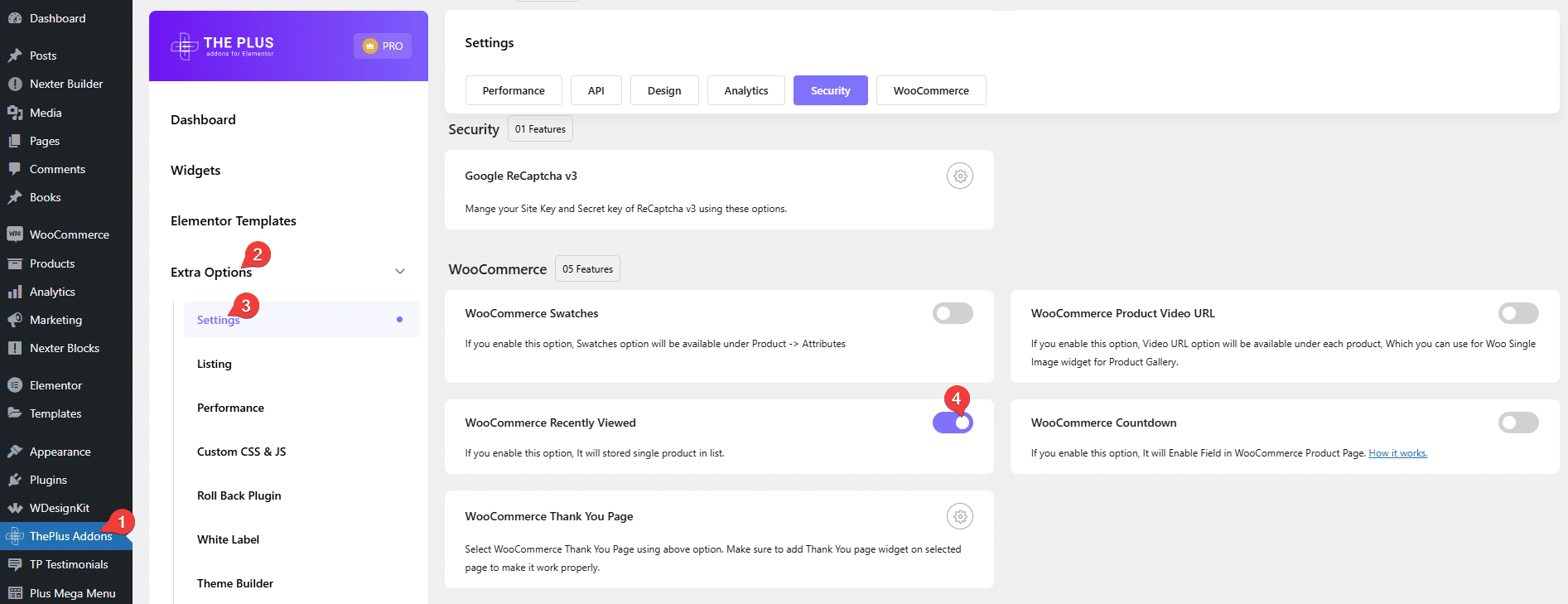
Product listing woocommerce recently viewed how to show woocommerce recently viewed products in elementor? From the plus addons for elementor

Use the Product Listing Widget

To do this add the Product Listing widget to the page or template (like the single product template) where you want to show the recently viewed products, then follow the steps – 

1. Select Recently Viewed from the Product Listing Types dropdown. 
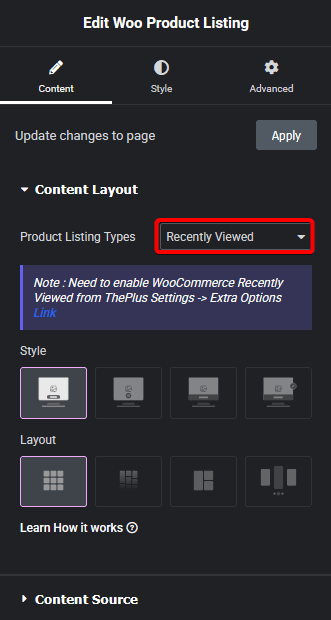
Product listing recently viewed new how to show woocommerce recently viewed products in elementor? From the plus addons for elementor

2. Then select the appropriate style and layout from the Style and Layout sections, respectively.

You can fine-tune the settings and style from other options.

Now you’ll see all the products that you’ve checked previously listed on your set location.

Also, check How to Show WooCommerce Products in Metro Layout in Elementor.

About the Author

Photo of Aditya Sharma CMO of The Plus Addons for Elementor
CMO · The Plus Addons for Elementor · 10 years experience

He has spent years in the WordPress ecosystem building, breaking, and optimizing sites until they actually perform. He works at the intersection of speed, growth, and usability, helping creators ship websites that load fast and convert. An active WordPress community contributor sharing through tools, tutorials, and direct collaboration. Tested practice, not theory.

WordPressElementorn8nAIClaudeAutomationServer
Get Instant Answers to all your questions about The Plus Addons for Elementor, trained on 1000+ Docs and Videos

Related Frequently Asked Questions

What if I can't see the Recently Viewed Products option in The Plus Addons for Elementor?

If the Recently Viewed Products option is not visible, ensure that The Plus Addons for Elementor is installed and activated. This functionality is part of the plugin, and without it, you won't have access to the feature. Check your plugin settings by navigating to The Plus Addons > Extra Options > Settings and look for the WooCommerce Recently Viewed section.

Can I use the Product Listing widget to show recently viewed products on any page?

The Product Listing widget from The Plus Addons for Elementor can be used on any page or template, including single product templates. This flexibility allows you to showcase recently viewed products wherever you think they will enhance user engagement. Make sure to select 'Recently Viewed' from the Product Listing Types dropdown to display the correct items.

What settings work best for displaying recently viewed products?

When displaying recently viewed products, it's important to choose an appropriate style and layout that fits your website's design. The Plus Addons for Elementor allows you to fine-tune these settings, so consider your site's aesthetic and user experience. Test different styles and layouts to see which combination maximizes visibility and encourages conversions.

Does enabling WooCommerce Recently Viewed affect page load times?

Enabling the WooCommerce Recently Viewed feature may have a minimal impact on page load times, as it requires additional data retrieval. However, this feature can significantly enhance user experience by reminding customers of products they showed interest in, potentially increasing conversion rates. Monitor your site's performance after enabling this feature to ensure it meets your speed requirements.

What happens if I forget to enable the Recently Viewed option before using the Product Listing widget?

If you forget to enable the Recently Viewed option, the Product Listing widget will not display any recently viewed products, leaving that section empty. This could lead to a missed opportunity for conversions, as users won't be reminded of products they considered. Always check that this option is enabled in The Plus Addons settings before using the widget.

Is there a way to customize the display of recently viewed products?

Yes, you can customize the display of recently viewed products using the options available within the Product Listing widget. After selecting 'Recently Viewed' from the dropdown, you can choose different styles and layouts to suit your website's design. This customization is key to ensuring that the products align with your overall branding and user interface.

Last reviewed: April 9, 2026