















How to Show Testimonials in Grid Layout in Elementor?

Key Takeaways

  • Testimonial widget from The Plus Addons for Elementor creates a stunning grid layout for testimonials.
  • Users can manage grid columns from the Columns Manage tab in the Testimonial widget.
  • The Plus Addons for Elementor requires installation and activation to access the Testimonial widget features.
Table Of Content

Are you looking to add a beautiful grid layout to showcase your testimonials on your website? Whether you want to highlight client reviews, customer feedback, or success stories, showing them in a grid layout allows you to present testimonials in a visually appealing manner.

With the Testimonial widget from The Plus Addons for Elementor, you can easily create a stunning grid layout for your testimonials.

To check the complete feature overview documentation of The Plus Addons for Elementor Testimonial widget, click here.

Requirement  – This widget is a part of The Plus Addons for Elementor, make sure its installed & activated to enjoy all its powers.

To do this, add the Testimonial widget on the page, after selecting the appropriate style, select Grid from the Layout section. Then select the appropriate source from the Select Source dropdown.
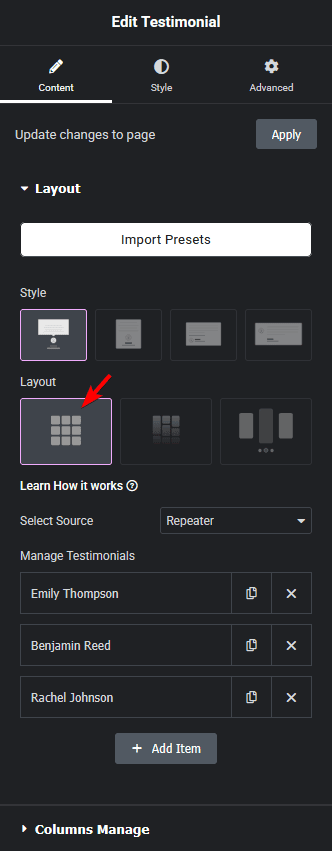
Testimonial grid layout new how to show testimonials in grid layout in elementor? From the plus addons for elementor

Now your testimonials will show in a grid layout. You can manage the grid columns from the Columns Manage tab.

Also, read How to Show Testimonials in Masonry Grid Layout in Elementor.

About the Author

Photo of Aditya Sharma CMO of The Plus Addons for Elementor
CMO · The Plus Addons for Elementor · 10 years experience

He has spent years in the WordPress ecosystem building, breaking, and optimizing sites until they actually perform. He works at the intersection of speed, growth, and usability, helping creators ship websites that load fast and convert. An active WordPress community contributor sharing through tools, tutorials, and direct collaboration. Tested practice, not theory.

WordPressElementorn8nAIClaudeAutomationServer
Get Instant Answers to all your questions about The Plus Addons for Elementor, trained on 1000+ Docs and Videos

Related Frequently Asked Questions

What should I do if my testimonials aren't displaying in the grid layout?

If your testimonials aren't showing in the grid layout, first ensure that the Testimonial widget from The Plus Addons for Elementor is installed and activated. After adding the widget, confirm that you've selected 'Grid' from the Layout section. If the issue persists, check the source selected in the Select Source dropdown to ensure it's pulling the correct testimonials.

Can I use the grid layout for testimonials on mobile devices?

The grid layout for testimonials can be used on mobile devices, but it's essential to check how it appears on smaller screens. You may need to adjust the number of columns in the Columns Manage tab to ensure a good user experience. The Plus Addons for Elementor allows for responsive adjustments, which can help optimize the layout for different devices.

What is the best way to manage the number of columns in the testimonial grid?

To manage the number of columns in your testimonial grid, use the Columns Manage tab after selecting the Grid layout. A common best practice is to choose a column count that balances readability and visual appeal. For example, three columns often work well for desktop views, while reducing to one or two columns on mobile can enhance clarity.

Are there any limitations when using the Testimonial widget in grid layout?

One limitation when using the Testimonial widget in grid layout is that it only works with Elementor and not with other page builders like Gutenberg or Divi. Additionally, ensure that the testimonials you want to display are properly configured in the source you select, as any issues there may prevent them from showing up.

How can I create a masonry grid layout for testimonials instead of a standard grid?

To create a masonry grid layout for your testimonials, refer to the tutorial on How to Show Testimonials in Masonry Grid Layout in Elementor. The masonry layout offers a different visual style that can be more dynamic and visually engaging compared to a standard grid layout.

Last reviewed: April 11, 2026