



























How to Hide Recent Blog Post From List in Elementor?

Key Takeaways

  • The Plus Addons for Elementor Blog Listing widget allows users to hide posts by setting an offset number.
  • Setting the Offset Posts field to 1 hides one blog post from the beginning of the listing.
  • Users can select Date and Descending in the Order By and Order dropdowns to hide the latest blog post(s).
Table Of Content

Do you want to hide the recent blog post from the post listing on your Elementor website? This can be useful if you have a specific blog post that you want to highlight, or you simply don’t want to show less relevant posts in your listing.

With the Blog Listing widget from The Plus Addons for Elementor, you can easily hide posts from the beginning of the listing by setting an offset number.

To check the complete feature overview documentation of The Plus Addons for Elementor Blog Listing widget, click here.

Requirement  – This widget is a part of The Plus Addons for Elementor, make sure it’s installed & activated to enjoy all its powers.

To do this, add the Blog Listing widget on the page, after selecting the appropriate listing type, style, and layout, go to the Offset Posts section under the Content Source tab.

In the Offset Posts field, enter the desired number of posts you want to hide from the beginning of the listing.
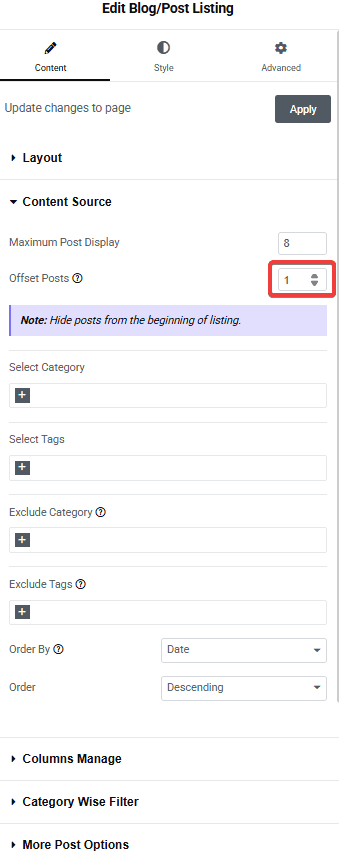
Tpae blog listing offset posts how to hide recent blog post from list in elementor? From the plus addons for elementor

For example, if you set 1 in the Offset Posts field, it will hide one blog post from the beginning of the listing.

Next, select Date from the Order By dropdown and Descending from the Order dropdown. This will ensure that the latest blog post(s) are hidden from the list based on the number set in the Offset Posts field.

Also, check How to Show Recent Blog Posts in Elementor.

About the Author

Photo of Aditya Sharma CMO of The Plus Addons for Elementor
CMO · The Plus Addons for Elementor · 10 years experience

He has spent years in the WordPress ecosystem building, breaking, and optimizing sites until they actually perform. He works at the intersection of speed, growth, and usability, helping creators ship websites that load fast and convert. An active WordPress community contributor sharing through tools, tutorials, and direct collaboration. Tested practice, not theory.

WordPressElementorn8nAIClaudeAutomationServer
Get Instant Answers to all your questions about The Plus Addons for Elementor, trained on 1000+ Docs and Videos

Related Frequently Asked Questions

What should I do if the blog post isn't hiding after setting the offset?

If the blog post isn't hiding as expected, double-check the number you entered in the Offset Posts field. For instance, entering '1' should hide the most recent post. Ensure you've selected 'Date' from the Order By dropdown and 'Descending' from the Order dropdown. This configuration is crucial because it determines which posts are hidden based on their publication date.

What is the best practice for setting the offset number?

A good practice is to set the offset number based on your content strategy. If you want to hide the latest post to feature another, set the offset to '1'. If you have multiple posts to hide, adjust the number accordingly. This ensures that your audience sees the most relevant content first, enhancing user engagement.

What happens if I set the offset number too high?

If you set the offset number too high, you may end up hiding more posts than intended, potentially leaving your blog listing empty or showing only older posts. It's important to balance the offset number with your content strategy to ensure that your audience still sees relevant and timely posts.

Last reviewed: April 11, 2026