



















How to Hide Blog Post Date in Elementor Blog Posts?

Key Takeaways

  • The Plus Addons for Elementor allows users to hide post dates using the Blog Listing widget.
  • Users can turn off the Display Date toggle under the Display Post Meta option to hide dates.
  • Hiding post dates is beneficial for evergreen content that is not time-sensitive.
Table Of Content

Are you looking to hide the date of your blog posts on your Elementor website? Hiding the date can be useful if you have evergreen content that is not time-sensitive. It can also help your website look more up-to-date by removing old dates from your posts.

With the Blog Listing widget from The Plus Addons for Elementor, you can easily hide the post date from the blog post listing.

To check the complete feature overview documentation of The Plus Addons for Elementor Blog Listing widget, click here.

Requirement  – This widget is a part of The Plus Addons for Elementor, make sure it’s installed & activated to enjoy all its powers.

To do this, add the Blog Listing widget on the page, after selecting the appropriate listing type, style, and layout, go to the Display Post Meta option under the Extra Option tab.

Note: Click and Turn on the Display Post Meta toggle if it is turned off.

Then you’ll see different post meta related options, turn off the Display Date toggle. 
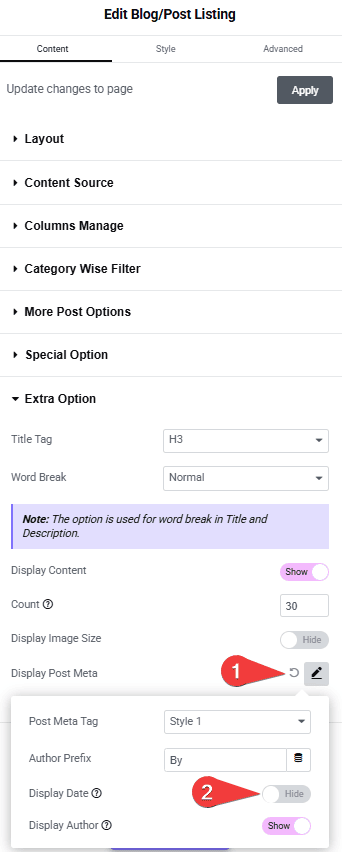
Tpae blog listing display date how to hide blog post date in elementor blog posts? From the plus addons for elementor

This will hide the post date from the post listing.

Also, check How to Hide Author Name in Elementor Blog Posts.

About the Author

Photo of Aditya Sharma CMO of The Plus Addons for Elementor
CMO · The Plus Addons for Elementor · 10 years experience

He has spent years in the WordPress ecosystem building, breaking, and optimizing sites until they actually perform. He works at the intersection of speed, growth, and usability, helping creators ship websites that load fast and convert. An active WordPress community contributor sharing through tools, tutorials, and direct collaboration. Tested practice, not theory.

WordPressElementorn8nAIClaudeAutomationServer
Get Instant Answers to all your questions about The Plus Addons for Elementor, trained on 1000+ Docs and Videos

Related Frequently Asked Questions

What should I do if the post date doesn't hide after following the steps?

If the post date remains visible, ensure that the Display Post Meta toggle is turned on in the Extra Option tab of the Blog Listing widget settings. If it's off, the Display Date toggle won't function correctly. This setting is crucial for controlling what metadata appears with your posts.

Can hiding the blog post date improve my site's appearance?

Hiding the blog post date can enhance the look of your site, especially if you have evergreen content that remains relevant over time. This approach can make your posts appear more current and engaging to visitors, as it removes potentially outdated timestamps.

Are there any limitations when using the Blog Listing widget to hide post dates?

The primary limitation is that the Blog Listing widget from The Plus Addons for Elementor must be installed and activated for this feature to work. If you are using a different widget or page builder, this functionality will not be available.

What happens if I turn off the Display Date toggle?

Turning off the Display Date toggle will completely hide the post date from your blog listing. This is useful for maintaining a clean look on your site, especially for content that doesn't rely on date relevance. Just remember to check your settings to ensure itu2019s configured correctly.

What is the best practice for hiding blog post dates in Elementor?

The best practice is to evaluate whether your content is evergreen before hiding the date. If your posts remain relevant regardless of when they were published, hiding the date can enhance user experience. Use the Blog Listing widget from The Plus Addons for Elementor to manage this setting effectively.

Last reviewed: April 11, 2026