


























How to Create WooCommerce Rating Filter in Elementor?

Key Takeaways

  • WP Search Filters widget from The Plus Addons for Elementor allows users to add a rating filter for WooCommerce products.
  • To implement the rating filter, users must select Rating from the Select Source dropdown in the WP Search Filters widget.
  • The rating filter requires products to have reviews for it to function properly.
Table Of Content

Adding a rating filter can be one of the most important features for your WooCommerce store, allowing customers to sort products based on their ratings. This feature is particularly helpful for customers who want to see the best-rated products first and make a more informed buying decision.

With the WP Search Filters widget from The Plus Addons for Elementor, you can easily add a rating filter for WooCommerce products.

To check the complete feature overview documentation of The Plus Addons for Elementor WP Search Filters widget, click here.

Requirement  – This widget is a part of The Plus Addons for Elementor, make sure its installed & activated to enjoy all its powers.

To do this, make sure you’ve added some products to your WooCommerce store, then you have to use the WP Search Filters widget with the Product Listing widget.

Place the widgets in your desired location on the page or template, then follow the steps –

1. In the Product Listing widget, select Search List from the Product Listing Types dropdown.
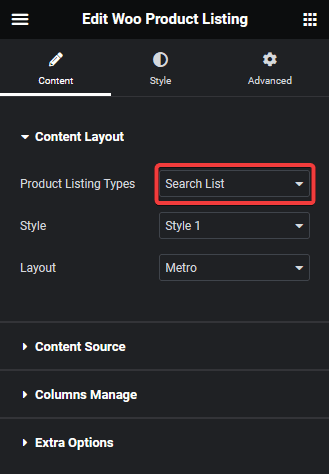
Product listing search list

2. Then select the appropriate style and layout.

3. In the WP Search Filters widget, open the Category item under the Filter Area.

4. From the Filter Type dropdown, select Woo Filter

5. Then select Rating from the Select Source dropdown. 

6. Select Taxonomy from the Select Type dropdown.
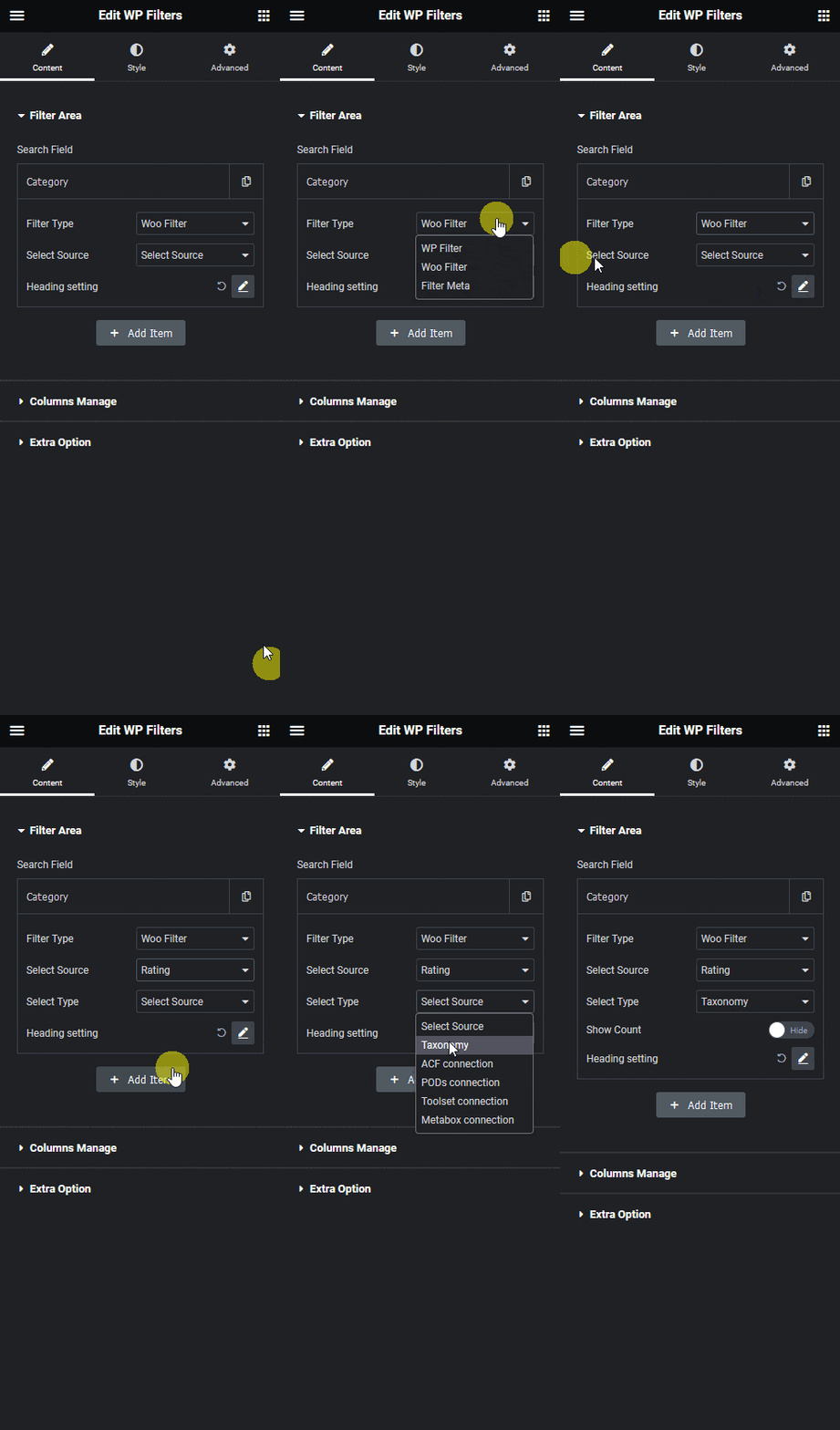
Wp search filters rating

Now you should be able to see a star rating filter, to filter products by ratings.

Note: Make sure your products have some reviews, only then the filter will work.
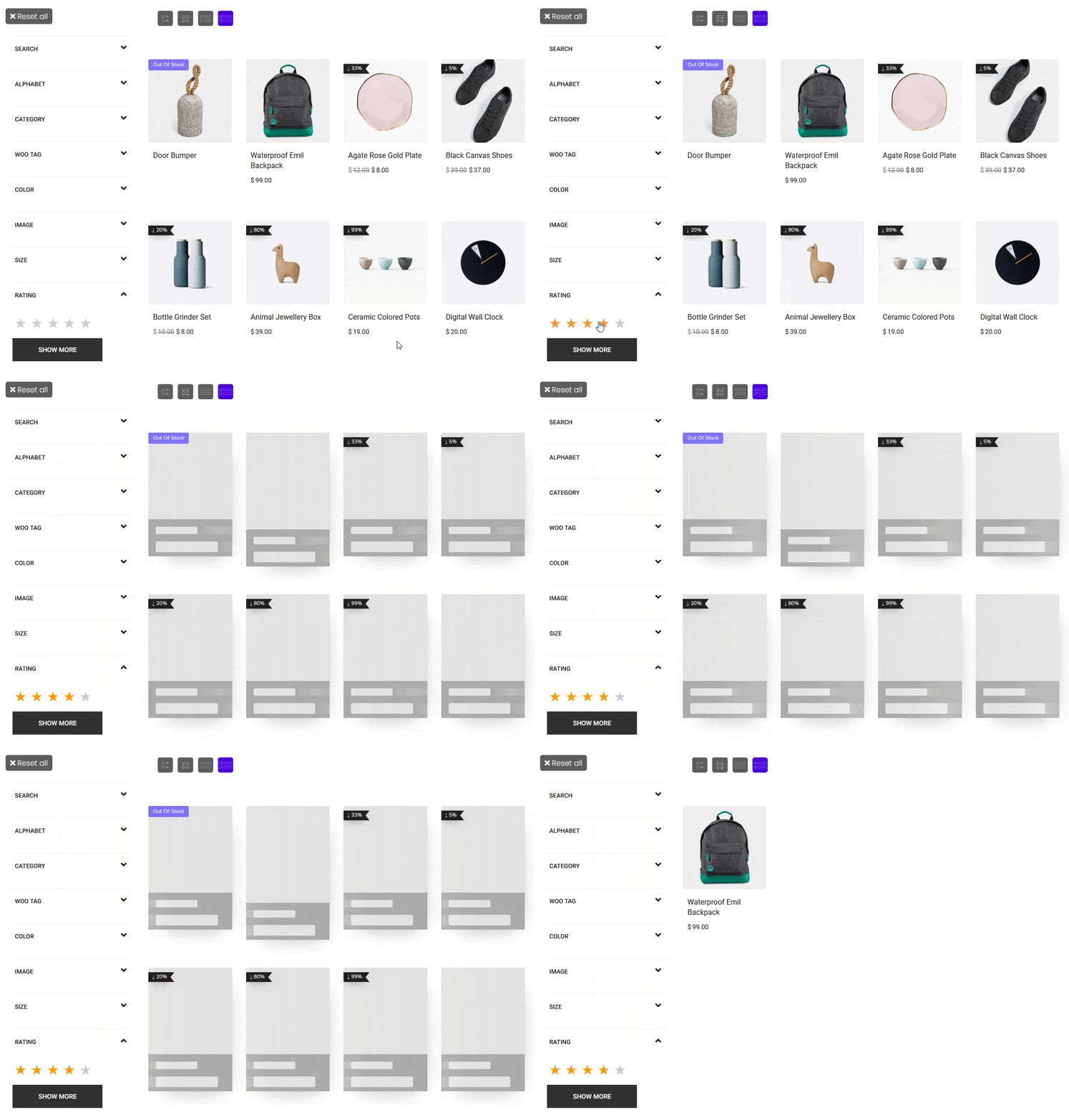
Wp search filters rating demo

Also, read How to Filter WooCommerce Products by Custom Field in Elementor.

About the Author

Photo of Aditya Sharma CMO of The Plus Addons for Elementor
CMO · The Plus Addons for Elementor · 10 years experience

He has spent years in the WordPress ecosystem building, breaking, and optimizing sites until they actually perform. He works at the intersection of speed, growth, and usability, helping creators ship websites that load fast and convert. An active WordPress community contributor sharing through tools, tutorials, and direct collaboration. Tested practice, not theory.

WordPressElementorn8nAIClaudeAutomationServer
Get Instant Answers to all your questions about The Plus Addons for Elementor, trained on 1000+ Docs and Videos

Related Frequently Asked Questions

What should I do if the rating filter is not showing up?

If the rating filter isn't appearing, ensure that your WooCommerce products have reviews. The filter only works when there are ratings available. Additionally, verify that you've correctly set the WP Search Filters widget to use the Rating source in the Select Source dropdown.

What is the best layout for displaying the rating filter?

Selecting the right layout for the Product Listing widget is crucial for usability. Choose a layout that complements your store's design and allows easy access to the rating filter. Experiment with different styles to see which one best highlights the filter and improves customer interaction.

How do I ensure the rating filter works correctly?

To ensure the rating filter functions properly, make sure to add products with reviews to your WooCommerce store. Without reviews, the filter will not display any ratings, rendering it ineffective for customers looking to sort by product quality.

Is the WP Search Filters widget compatible with other page builders?

The WP Search Filters widget is specifically designed to work with Elementor and is part of The Plus Addons for Elementor. It does not support other page builders like Gutenberg, Beaver Builder, or Divi, so ensure you're using Elementor for this feature.

What happens after I set up the rating filter?

After setting up the rating filter, customers will be able to filter products based on their ratings directly on your WooCommerce store. This feature helps them quickly find the best-rated products, improving their shopping experience and potentially increasing sales.

Last reviewed: April 10, 2026