




How to Add Product Compare Button for WooCommerce Products in Elementor?

Key Takeaways

  • The Plus Addons for Elementor includes the Product Listing widget, which allows users to add a product compare button.
  • The YITH WooCommerce Compare plugin must be installed and activated to enable the product comparison feature.
  • Customers can compare products side-by-side, enhancing their shopping experience and potentially increasing sales.
Table Of Content

As an online retailer, it’s vital to provide your customers with the best shopping experience possible. One way to do this is by offering product comparison options.

This feature allows customers to compare different products side-by-side, which can lead to increased customer satisfaction and sales.

With the help of the Product Listing widget from The Plus Addons for Elementor, you can easily add a product compare button on products using the YITH Compare plugin.

To check the complete feature overview documentation of The Plus Addons for Elementor Product Listing widget, click here.

Requirement  – This widget is a part of The Plus Addons for Elementor, make sure its installed & activated to enjoy all its powers.

YouTube video

Note: Make sure you have installed and activated the YITH WooCommerce Compare plugin.

To do this, make sure you’ve added some products to your WooCommerce store, then follow the steps – 

1. Add the Product Listing widget on the page, then select the appropriate listing type, style and layout.

2. Then go to the Extra Options tab, turn on the Display YITH Buttons toggle then turn on the Compare toggle.
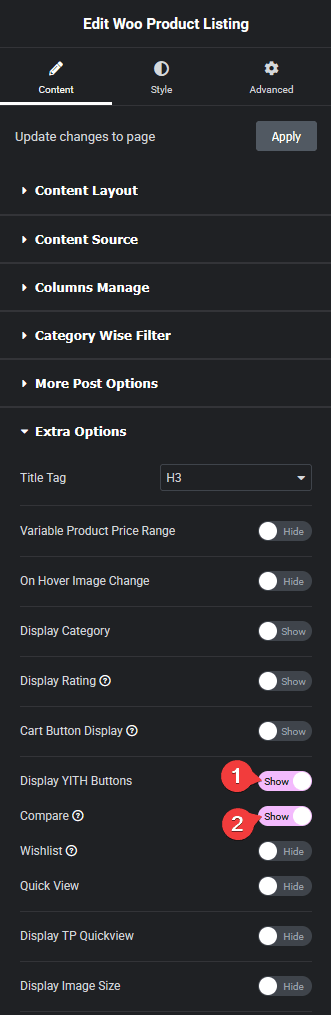
Product listing yith compare new how to add product compare button for woocommerce products in elementor? From the plus addons for elementor

Now you should be able to see a compare icon when you hover over a product and click on it to compare products side by side.

Also, check How to Add Wishlist Button for WooCommerce Products in Elementor.

About the Author

Photo of Aditya Sharma CMO of The Plus Addons for Elementor
CMO · The Plus Addons for Elementor · 10 years experience

He has spent years in the WordPress ecosystem building, breaking, and optimizing sites until they actually perform. He works at the intersection of speed, growth, and usability, helping creators ship websites that load fast and convert. An active WordPress community contributor sharing through tools, tutorials, and direct collaboration. Tested practice, not theory.

WordPressElementorn8nAIClaudeAutomationServer
Get Instant Answers to all your questions about The Plus Addons for Elementor, trained on 1000+ Docs and Videos

Related Frequently Asked Questions

What should I do if the product compare button isn't showing up?

If the product compare button isn't appearing, first ensure that you have installed and activated the YITH WooCommerce Compare plugin. This plugin is essential for enabling the compare functionality. Additionally, check that you have added products to your WooCommerce store and that the Display YITH Buttons toggle is turned on in the Extra Options tab of the Product Listing widget settings.

What are the best settings for displaying the product compare button?

For optimal display of the product compare button, enable the Display YITH Buttons toggle and the Compare toggle in the Extra Options tab of the Product Listing widget. This ensures that the compare icon appears when users hover over a product, making it easy for them to initiate comparisons. Consider the layout and style settings to ensure the button is visually appealing and fits well with your overall design.

What happens if I forget to activate the YITH WooCommerce Compare plugin?

If you forget to activate the YITH WooCommerce Compare plugin, the product compare button will not function, and customers won't be able to compare products. This can lead to a less satisfying shopping experience. Always ensure that this plugin is activated to enable the comparison feature effectively.

Does the product compare button work with other page builders?

The product compare button is specifically designed to work with The Plus Addons for Elementor, which means it only functions within the Elementor page builder. It does not support other page builders like Gutenberg, Beaver Builder, or Divi. If you're using Elementor, ensure you have The Plus Addons installed to access this feature.

How can the product compare feature improve customer satisfaction?

The product compare feature enhances customer satisfaction by allowing users to evaluate multiple products side-by-side. This helps customers make informed purchasing decisions, potentially leading to increased sales. By implementing this feature using The Plus Addons for Elementor, you create a more engaging shopping experience that meets customer needs.

Last reviewed: April 11, 2026