






The font you stare at all day shapes how fast you read code, how often you misread a 1 as an l, and how tired your eyes feel by 6pm. It is the cheapest productivity upgrade a developer can make, and the 2026 shortlist looks different from the one most guides still recommend.
The Stack Overflow 2025 Developer Survey (49,009 responses from 177 countries) puts Visual Studio Code at 75.9% among all respondents, and its font is the first thing many developers change. With Cursor, Claude Code, Copilot, and Windsurf now part of daily work, a coding font also has to stay readable during screen-shared pair-programming at small sizes. Installing one takes two minutes and pays back over years.
Short answer: if you have never changed your coding font, install JetBrains Mono first. It is free, it is the default editor font in JetBrains IDEs, and its tall x-height holds up at small sizes. Want ligatures and the safest free pick? Fira Code. Working in the Next.js and Vercel world? Geist Mono. Want typefaces that shift by syntax? Monaspace. Happy to pay for polish? MonoLisa at USD 149. On Windows already? Consolas and Cascadia Code are installed. Prefer no ligatures? Source Code Pro or Hack.
How We Picked These Coding Fonts
Every font below was re-checked against its own official source in July 2026: the vendor page for paid fonts, and the project repository for open-source ones. For each one we recorded the licence, the current price in the vendor’s own currency, the number of styles, whether the vendor actually claims programming ligatures, and the date of the most recent release. Release dates matter more than they look, because a font that has not shipped in eight years is a different proposition from one updated last quarter, even when both are excellent.
That pass changed several entries. Version numbers and prices that had drifted were corrected against the source, one font is no longer maintained and is now labelled as such, another is still excellent but its own website has no working HTTPS so we link its repository instead, and one claim about a font being an editor’s default could not be confirmed by that editor’s own documentation, so it was removed. Where a vendor does not publish a figure, we say so rather than estimate.
Side-by-Side Comparison: Top Programming Fonts (2026)
Before the deep dives, here is the snapshot. Use it to shortlist two or three fonts to trial in your editor this week.
| Font | Licence and price | Ligatures | Styles | Latest release | Best for |
|---|---|---|---|---|---|
| JetBrains Mono | Free, OFL 1.1 | Yes, 142 | 8, each with italic | v2.304, Jan 2023 | JetBrains IDE users, screen-shared code |
| Monaspace | Free, OFL 1.1 | Yes, plus texture healing | 5 typefaces | v1.400, Mar 2026 | Changing typeface by syntax |
| Geist Mono | Free, OFL 1.1 | Yes | 9 weights plus variable | v1.7.2 repo, Jun 2026 | Next.js and Vercel work |
| MonoLisa | Paid, USD 149 Developer | Yes, over 120 | 10 weights with italics | Version 3 | Developers who want polish |
| Fira Code | Free, OFL 1.1 | Yes | 6 weights | 6.2, Dec 2021 | First upgrade from a default font |
| DejaVu Sans Mono | Free, Bitstream Vera derived | No | 4 | 2.37, Jul 2016 | Linux desktops, wide script coverage |
| Source Code Pro | Free, OFL 1.1 | No | 7 weights with italics | 2.042R-u, Apr 2023 | Ligature skeptics, documentation |
| Gintronic | Paid, 150 € full family | Not advertised | 12 | Sold direct and on Adobe Fonts | A warmer, humanist look |
| Consolas | Proprietary, bundled with Microsoft products | No | 4 | Ships with Windows | Visual Studio on Windows |
| Input Mono | Free for personal use, desktop from USD 5 per style | No | 56, being 4 widths of 14 | Released 2014 | Custom widths and weights |
| Proggy | Free, MIT | No | Bitmap family | Repo active Feb 2026 | Fixed small pixel sizes |
| Monoid | Readme says MIT and OFL, no licence file in repo | Yes | 4 | Dormant since 2020 | Low-DPI screens, with caveats |
| Ubuntu Mono | Free, Ubuntu Font Licence | No | 8 plus a variable font | Part of the Ubuntu Font Family | Ubuntu desktops and terminals |
| Hack | Free, MIT with Bitstream Vera | No | 4 | v3.003, Mar 2018 | Dense terminal windows |
| Cascadia Code | Free, OFL 1.1 | Yes, and Cascadia Mono has none | Variable plus statics | v2407.24, Nov 2024 | Windows Terminal and Visual Studio |
What Are Programming Fonts, and Why Do They Matter?
Programming fonts are monospaced typefaces designed specifically for code. Every character occupies the same horizontal width, which keeps columns, indentation, and bracket alignment visually predictable. Unlike body text fonts, they prioritise character disambiguation and long-session readability over stylistic flair.
Why Switch from Your Editor’s Default Font?
Most IDEs ship with a generic system monospace, which is fine for short tasks but falls short during ten-hour days. Purpose-built coding fonts solve three problems default fonts cannot.
- Reduced eye strain. Programming fonts use consistent stroke weight, open counters, and generous letter spacing so the eye does not work as hard at 11 to 14px. The Fira Code README documents this rationale in detail.
- Fewer visual ambiguities. Modern coding fonts give
0a slashed or dotted zero, a distinctl(lowercase L),1, andI, plus separate shapes for{}()[]. - Ligature support. Sequences like
!=,=>,->, and<=render as single glyphs, which many developers find reduces cognitive load when scanning logic.
What Should You Look for in a Programming Font?
Five factors matter most when you are comparing candidates:
- Character disambiguation. Clear differentiation between
0/O,1/l/I, and;/:. - Ligature coverage. Optional but useful for functional languages, JSX, and arrow-heavy code.
- Readability at small sizes. Must stay legible at 11 to 13px, which is where most developers work on 1440p and 4K displays.
- Weight range. At least Regular, Medium, and Bold, so syntax themes can use weight for emphasis.
- Licence clarity. For commercial projects, avoid fonts with ambiguous or restrictive licences.
What’s New for 2026: JetBrains Mono, Monaspace, and Geist Mono
Three fonts entered serious contention recently that were not on most 2024 lists. Each is worth knowing before you commit to an older favourite.
JetBrains Mono
JetBrains Mono is free under the SIL Open Font License 1.1, and JetBrains describes it as the default editor font for its IDEs. Its readme notes that the most recent version ships with your JetBrains IDE starting with v2019.3, so IntelliJ, PyCharm, Rider, and WebStorm users already have it. There are 8 styles from Thin to ExtraBold, each with an italic, and JetBrains counts 142 code-specific ligatures.
Worth knowing: the current release is v2.304, published in January 2023. The font has not shipped a new version since, which says more about it being finished than neglected, but it is worth knowing if you expect active development. The tall x-height is what makes it readable at 11 to 12px, which is why it holds up when a viewer is squinting at compressed video during a screen share.
Best for: JetBrains IDE users, and anyone who screen-shares code at small sizes.
Monaspace
Monaspace is GitHub Next’s open-source superfamily, now at v1.400, released in March 2026. It is five typefaces designed to mix together: Neon (neo-grotesque), Argon (humanist), Xenon (slab serif), Radon (handwriting), and Krypton (mechanical), all sharing the same metrics so they line up in a single file.
The distinctive feature is texture healing, which GitHub describes as “a novel technique that evens out the density of monospaced type, bringing it closer to how proportional type has looked for centuries.” In practice it widens narrow glyphs like i and l next to wider neighbours so blocks of code look evenly textured. It is licensed under OFL 1.1.
Best for: Developers who want syntax-aware font mixing, such as italic comments in Radon and strings in Argon.
Geist Mono
Geist Mono is Vercel’s open-source monospaced font, the companion to Geist Sans, released under OFL 1.1. It ships nine weights, from Thin through Ultra Black, plus a variable font, and its clean geometric feel pairs naturally with Tailwind-heavy frontend work.
Vercel offers it through Google Fonts as one install route, with one caveat worth reading before you rely on it: Vercel notes that the Google Fonts copy “does not include full glyph set or font-feature-settings support.” If you need the complete character set or the OpenType features, take the files from Vercel directly.
Best for: Next.js and Vercel ecosystem developers, and anyone already using Geist Sans on the web.
10 Best Programming Fonts for Coding in 2026
1. MonoLisa
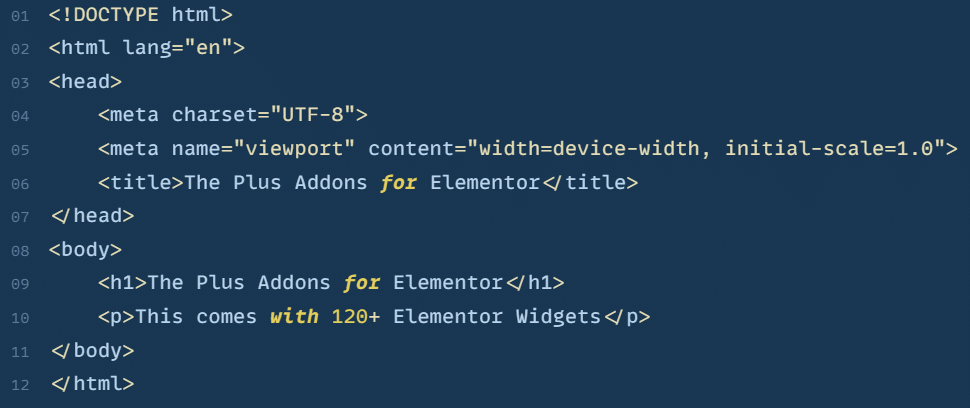
MonoLisa is a paid font designed for developers, published by FaceType with Marcus Sterz as typeface designer. The buy page lists three tiers: a free Trial, the Developer licence at USD 149, and a Creator licence at USD 599 for commercial and superfamily use, or 49 € per weight if you configure it individually. Prices are shown in your local currency, so the figure you see may differ by region.
MonoLisa advertises “over 120 specially designed coding ligatures” and the Developer tier covers 10 weights with italics plus a variable font. The free Trial is genuinely limited, giving you Regular and Bold with a reduced character set and no coding ligatures, so treat it as a look-and-feel test rather than a working setup. A student discount is available on request.
Best for: Developers and designers who want a polished paid font and will use the full weight range.
2. Fira Code
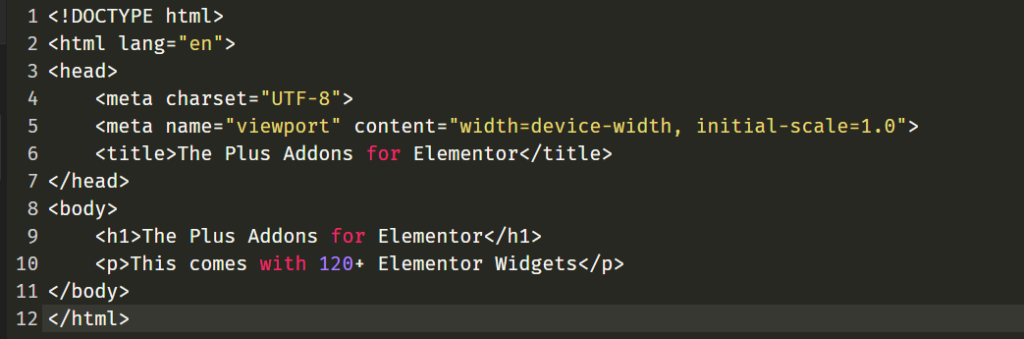
Fira Code is a free monospaced font based on Mozilla’s Fira Mono, extended with programming ligatures. It is the most popular free coding font on GitHub by a wide margin, with 81,865 stars on the official Fira Code repository as of July 2026.
Sequences like ==, !=, =>, <=, and ... render as combined glyphs. The underlying characters stay ASCII, so ligatures are purely visual and do not affect copy-paste or file contents. It ships six weights (Light, Regular, Retina, Medium, SemiBold, Bold), and the Retina weight sits between Regular and Medium for LCD and 4K screens.
Worth knowing: the last tagged release is 6.2 from December 2021, though the repository is still actively maintained, with commits as recently as May 2026.
Best for: VS Code users, developers new to ligatures, and teams standardising on a free font.
Running WordPress? Here is How to Upload Custom Fonts on WordPress for Free if you want to use any of these fonts site-wide.
3. DejaVu Sans Mono
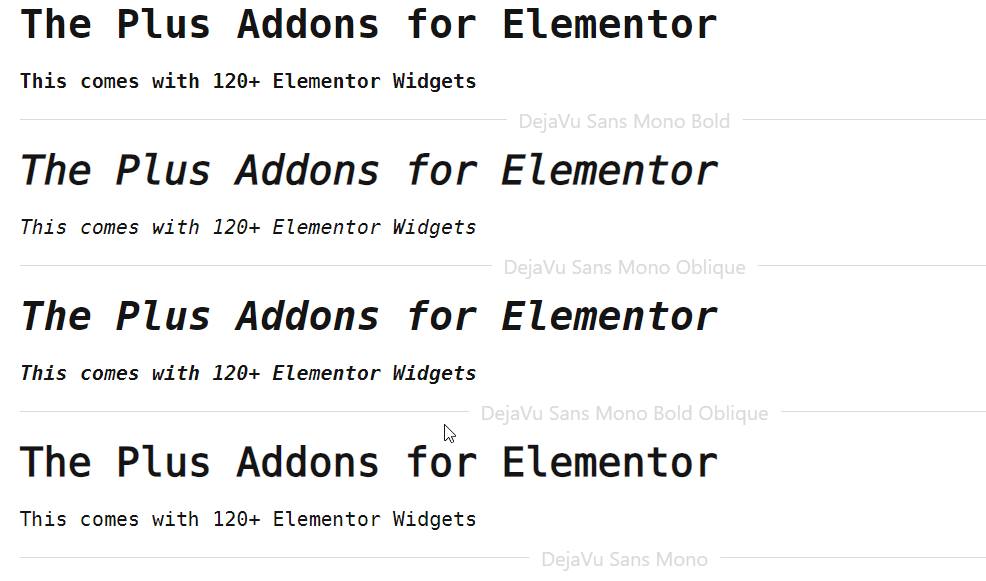
DejaVu Sans Mono is a free, open-source monospaced font derived from Bitstream Vera. It ships pre-installed on most Linux distributions and covers a wide range of scripts including Latin, Cyrillic, Greek, Arabic, and Hebrew. Four styles are available (Book, Oblique, Bold, Bold Oblique), disambiguation between 0, O, l, 1, and I is solid, and there are no ligatures.
One correction worth making, because it is repeated widely: DejaVu does not ship with macOS. It is not in Apple’s font list. What macOS ships is Menlo, which is itself derived from Bitstream Vera Sans Mono, the same ancestor as DejaVu, which is why the two look so similar. On a Mac, Menlo is the zero-install equivalent.
Worth knowing: the current version is 2.37, released in July 2016. The licensing is a patchwork, with DejaVu’s own changes in the public domain and the original glyphs under the Bitstream Vera Fonts License.
Best for: Linux users, and developers working with non-Latin scripts.
4. Source Code Pro
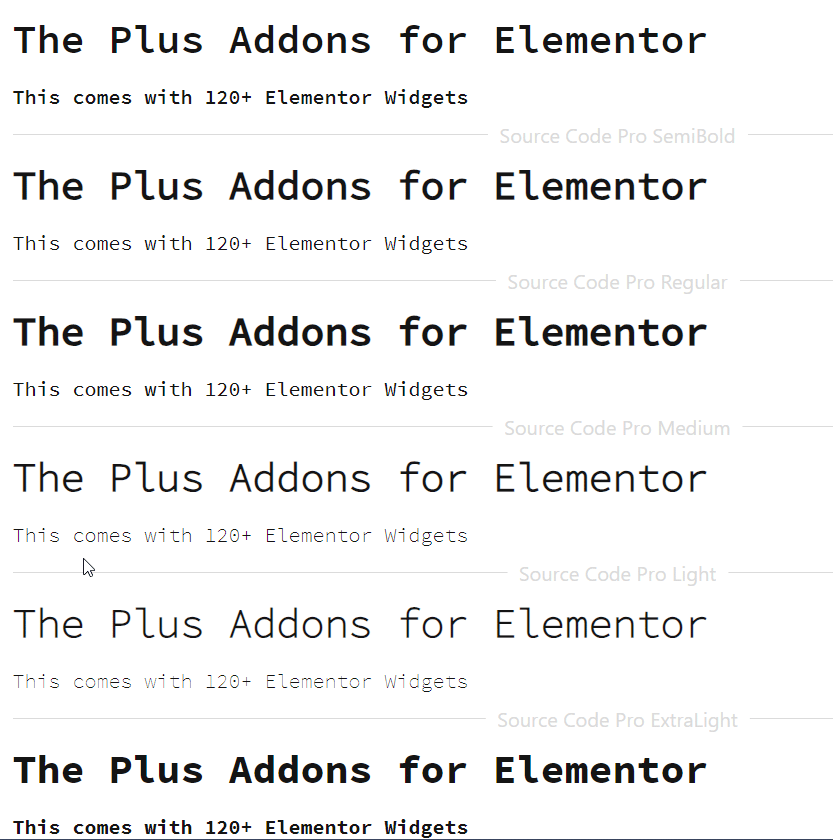
Source Code Pro is Adobe’s free monospaced font, released under the SIL Open Font License. It offers seven weights from ExtraLight to Black, plus italic cuts for each, and it does not include ligatures, which some developers actively prefer.
The font stays legible at small sizes thanks to a dotted zero, a distinct lowercase l with a tail, and i and j dots that sit clearly above the baseline. Adobe designed it as the monospaced companion to Source Sans, so the two pair well on documentation sites. The most recent tagged release is from April 2023 and the repository remains active.
Best for: Developers who dislike ligatures, documentation writers, and neutral-aesthetic teams.
Hosting a code-focused blog? The 3 Best Ways To Host Google Fonts Locally covers GDPR-friendly delivery.
5. Gintronic
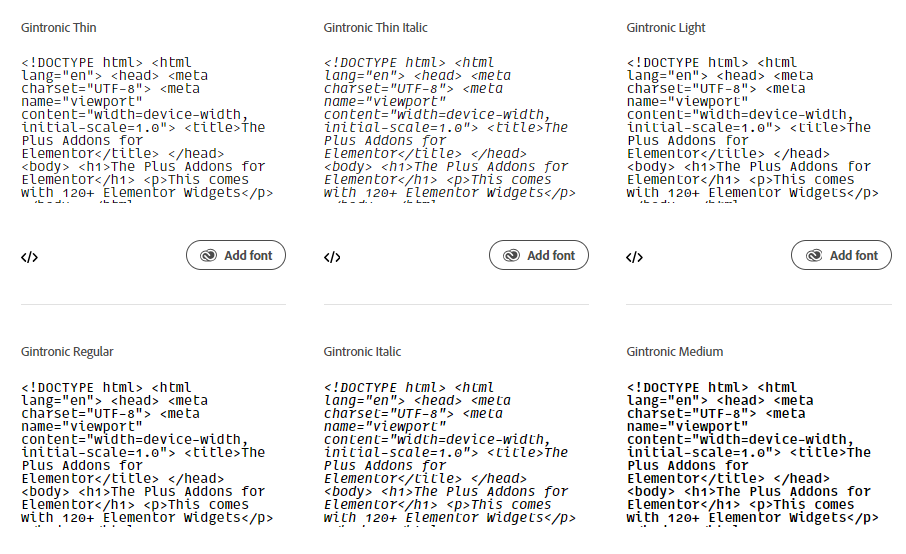
Gintronic is a paid coding font by Mark Frömberg, published through the Berlin studio Hypertype, with a softer and more humanist feel than most monospaced typefaces. It comes in 12 styles, which is six weights from Thin to Black, each with an italic companion, and the character set runs to 1,174 glyphs covering technical symbols and box-drawing glyphs.
Pricing is direct from the designer: 150 € for the full family, 100 € for the Roman or Italic bundle, or 50 € for a single style, with licence sizes running from S (up to 3 users) to XL (up to 50 users). It is also available on Adobe Fonts if you already have a Creative Cloud subscription. Note that unlike most fonts on this list, Gintronic’s own product page does not advertise programming ligatures, so do not pick it for that.
Best for: Developers who want a warm, friendly aesthetic and do not need ligatures.
6. Consolas
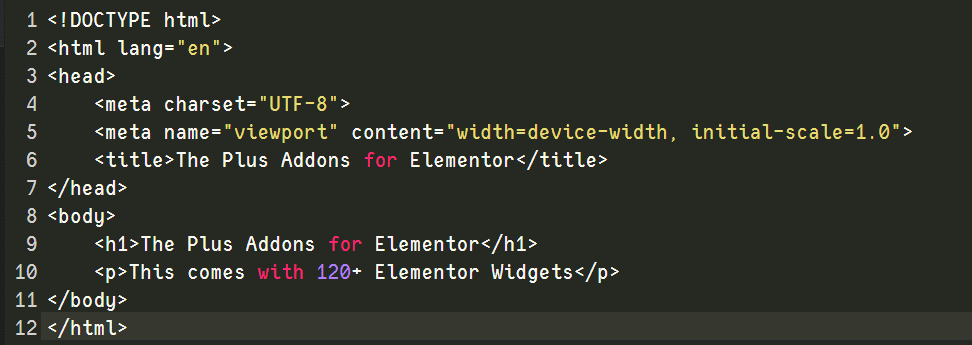
Consolas is Microsoft’s ClearType-tuned monospaced font, designed by Luc(as) de Groot, and it has shipped with Windows since Vista as well as with Office and Visual Studio. Microsoft describes it as “aimed for use in programming environments and other circumstances where a monospaced font is specified.”
One thing to be clear about: you cannot download Consolas on its own. Microsoft’s own font list gives its download status as “N/A, exclusively included with Microsoft products and services where applicable.” If you are on Windows or have Office installed you already have it licensed, and if you are not, it is not an option. It has four styles and no ligatures, though its OpenType features include slashed, dotted, and normal zeros.
Best for: Visual Studio users on Windows who want a good font with zero setup.
Building with Elementor? See the Best Elementor Fonts You Should Try for UI-focused picks.
7. Input Mono
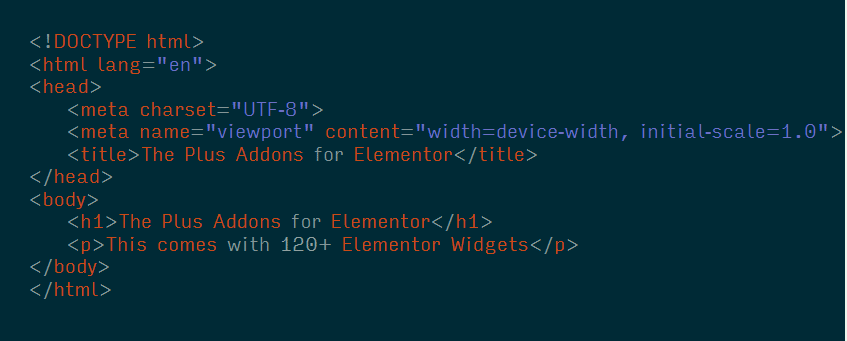
Input by David Jonathan Ross is a highly customisable family released in 2014 through DJR and Font Bureau. Input Mono alone comes in four widths (Normal, Narrow, Condensed, Compressed), each with 14 styles, giving 56 in total. Because Input lets you toggle individual glyph shapes, such as a serif or sans l and a dotted or slashed zero, two developers using Input rarely see the same typeface on screen.
The licensing is more generous than it is often described. Input’s EULA states plainly that “the Font Software is free for personal use,” and defines personal use as “any use on your own computer that involves computer programming, software development, or the composition of plaintext documents.” That covers most people reading this. Paid licences are priced by licence size rather than per seat, starting at a Mini tier covering 3 workstations, with desktop pricing from USD 5 for a single style, USD 40 for a 14-style width package, and USD 100 for the 56-style Mono family.
Best for: Personal setups, and developers who want narrow or extra-light variants.
8. Proggy Fonts
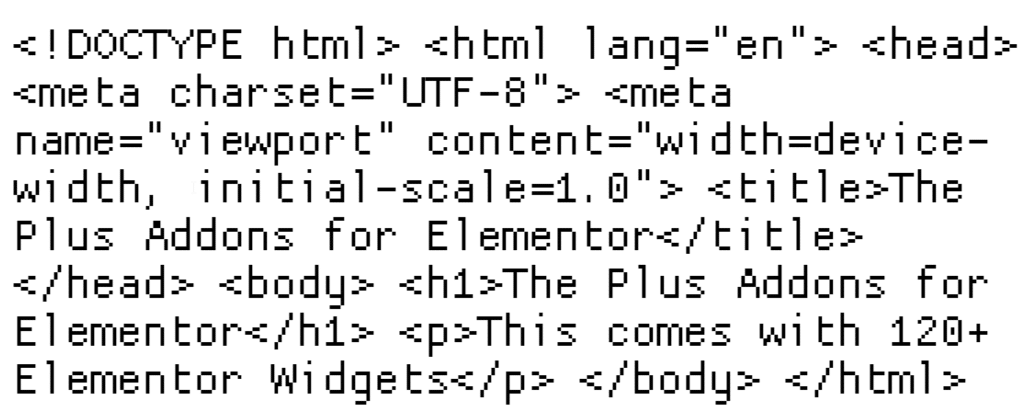
Proggy is a family of bitmap fonts designed by Tristan Grimmer with code listings in mind, available in Microsoft’s .fon format, TrueType, and the PCF format used on Linux and BSD. Because they are bitmap fonts, Proggy variants are crisp at the specific pixel sizes they were drawn for, usually 10 to 12px, and they do not scale gracefully outside those sizes.
Get it from the Proggy GitHub repository, which is MIT licensed and was last updated in February 2026. We link the repository rather than proggyfonts.net deliberately: the original site still loads over plain HTTP but its HTTPS port does not respond, and the site itself now points to the same GitHub repo as the official home.
Best for: Bitmap font enthusiasts and fixed small-size terminal setups.
9. Monoid
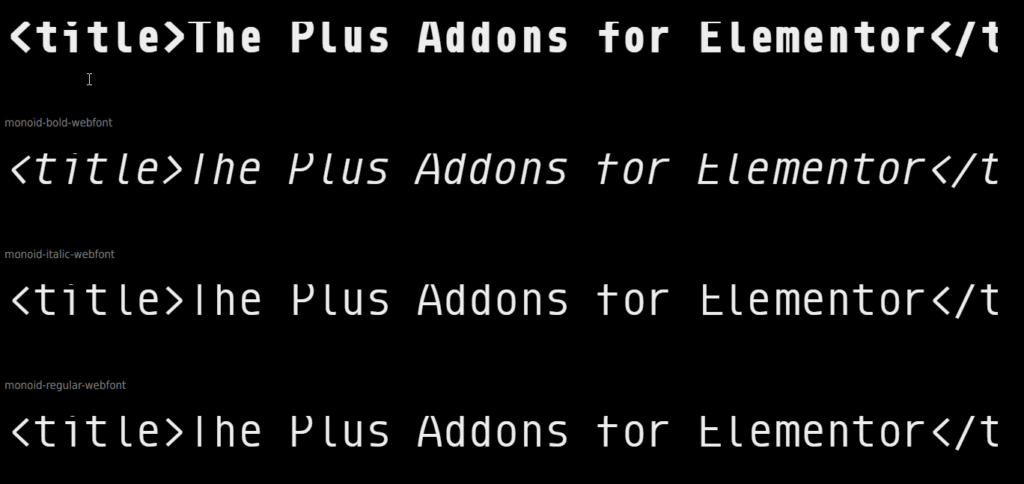
Monoid is a free, open-source font optimised for coding at small sizes. It has a bitmap-like crispness that keeps it legible at 10 to 12px on low-DPI displays where many modern fonts blur, and it ships ligatures, alternate glyphs (the lowercase l has a curved alternate to separate it from 1), and four weights.
Be aware of its status before you adopt it for a team. The project is dormant: the last commit to the repository was in October 2020, there are no GitHub releases at all (only two old tags), and 77 issues are open. Its readme states it is “dual licensed with MIT and OFL licenses,” but there is no licence file in the repository and GitHub detects no licence, which is worth checking with your legal team before commercial use. As a personal font on a 1080p secondary monitor it is still a good pick.
Best for: Low-DPI displays and small font sizes, for personal use rather than company-wide rollout.
Want to use any of these in Elementor? Here is How to Add Custom Fonts to Elementor with a full walkthrough.
10. Ubuntu Mono
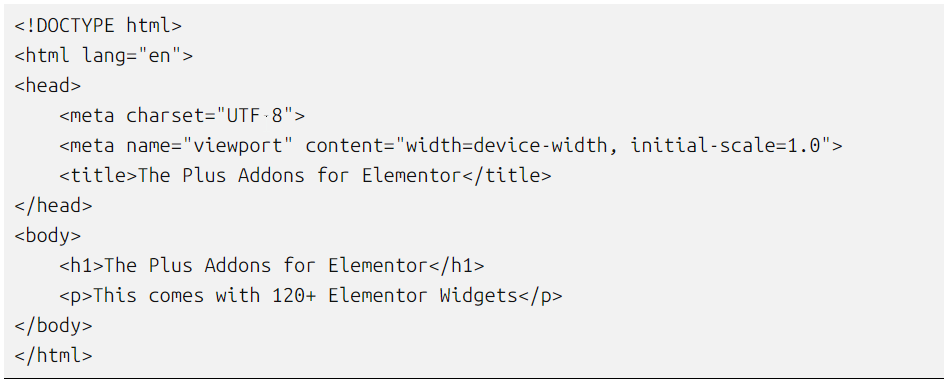
Ubuntu Mono is the monospaced member of the Ubuntu Font Family, commissioned by Canonical and released under the Ubuntu Font Licence. It ships with every Ubuntu installation and is the default terminal font on Ubuntu Desktop. Canonical describes it as the “fixed-width companion” that “comes in 8 styles and a variable font with an adjustable weight axis,” so it has more range than the four styles often quoted for it.
The design is softer and more humanist than DejaVu or Consolas, which many developers find friendlier during long sessions. Canonical also publishes a newer Ubuntu Sans Mono, which reached version 1.100 in May 2026, though the Ubuntu font page still presents Ubuntu Mono as the family’s fixed-width companion.
Best for: Ubuntu users and developers who want a softer feel than most code fonts.
Two More Free Fonts Worth Your Shortlist: Hack and Cascadia Code
Two free fonts come up in almost every 2026 coding-font discussion, so they belong on your shortlist alongside the picks above.
Hack
Hack is a free, open-source monospaced font built specifically for source code, released under the MIT licence with portions under the Bitstream Vera licence. It is crisp and highly legible at small sizes, which makes it a favourite in dense terminal windows, and characters like 0, O, 1, and l stay clearly distinct. Hack ships no programming ligatures at all, so pick it if you prefer plain glyphs. Its current version is v3.003 from March 2018, and no new version has shipped since. Download it from the Hack project site.
Cascadia Code
Cascadia Code is Microsoft’s free monospaced font, bundled with Windows Terminal and, in Microsoft’s own words, “now the default font in Visual Studio as well.” It includes programming ligatures out of the box, and a separate Cascadia Mono variant ships without them. One detail worth knowing: the default font face in Windows Terminal is actually Cascadia Mono, the no-ligature variant, so if you want ligatures in your terminal you need to switch to Cascadia Code yourself. It is open-source under the SIL Open Font License and available from Microsoft’s GitHub repository.
Which Fonts Hold Up for AI Pair-Coding and Screen Sharing?
This is the question that changed how we think about coding fonts. When you pair-program with Cursor, Claude Code, or GitHub Copilot, and especially when you screen-share that session over Zoom or Loom for review, the font has to survive two layers of degradation: the editor rendering at 12 to 13px, and the video codec re-compressing it at 720p or 1080p.
The font properties that predict how well a face survives that pipeline are not mysterious, and you can reason about them from the specimens above:
- A tall x-height helps most. This is JetBrains Mono’s real advantage. More of each lowercase letter survives when a codec throws away detail.
- Even texture beats fine detail. Monaspace’s texture healing exists precisely to remove the uneven density that video compression handles worst.
- Avoid Light weights on a shared screen. Thin strokes are the first thing to disappear into a grey wash. If you share your screen in Fira Code, move up to Retina or Medium.
- Watch narrow apertures. Geometric faces with tight openings on
eanda, Geist Mono among them, tend to fill in first at low bitrates.
If you record tutorials, demo AI tools to clients, or live-code in public, this matters more than ligature aesthetics. If you want more on working this way, see our guides to the best vibe coding tools and Claude Code agents for WordPress.
How to Install a Programming Font in VS Code
Once you have picked a font, installing it in VS Code takes under two minutes. These steps work on Windows, macOS, and Linux, and were checked against VS Code 1.130, released 22 July 2026.
- Download the font. Grab the TTF or OTF files from the font’s official site or GitHub releases page.
- Install system-wide. On Windows, right-click each file and select “Install for all users.” On macOS, open Font Book and drag the files in. On Linux, copy to
~/.local/share/fonts/and runfc-cache -fv. - Open VS Code settings. Press
Ctrl+,(Windows/Linux) orCmd+,(macOS). - Edit Font Family. Search for “Font Family” and enter the font name exactly as it appears in your OS font list, followed by a fallback:
'JetBrains Mono', 'Fira Code', Consolas, monospace. - Enable ligatures (optional). Search for “Font Ligatures” and toggle it on if your chosen font supports them.
- Restart VS Code. Close and reopen the editor to make sure the font loads cleanly.
Cursor and Claude Code users: the same steps apply. Cursor’s own documentation tells you to open Settings, search for “Font Family,” and enter the name of any font installed on your system, using JetBrains Mono and Fira Code as its examples.
Using Programming Fonts on a WordPress Site
Many developers who run documentation sites, code tutorials, or developer blogs on WordPress want the same font they code in to appear in their <code> and <pre> blocks. There are two common approaches:
- Google Fonts integration. Several of the free fonts above, including JetBrains Mono, Geist Mono, Fira Code, Source Code Pro, and Ubuntu Mono, are on Google Fonts and can be added through Elementor or your theme.
- Self-hosted upload. For fonts not on Google Fonts, such as Monoid, Proggy, and Monaspace, you upload the TTF or WOFF files to WordPress and register them with your theme.
If you build with Elementor, The Plus Addons for Elementor lists Custom Upload Fonts and Self-Host Google Fonts among its extensions, which cover both routes without editing functions.php. Self-hosting Google Fonts is also the usual answer to GDPR concerns, because the font files are served from your own server instead of a third-party request.
Which Programming Font Should You Use in 2026?
The best programming font is the one you stop noticing after 20 minutes. If you have never changed yours, start with JetBrains Mono. It is free, it is the default in JetBrains IDEs, and it covers most developer use cases. Fira Code remains the safe second pick.
Here is how we would steer the choice by situation:
- AI pair-coding and screen sharing: JetBrains Mono or Monaspace Neon.
- VS Code and you like ligatures: Fira Code, JetBrains Mono, or Cascadia Code.
- Next.js and Vercel work: Geist Mono.
- Mixing typefaces across syntax: Monaspace, using Neon with Radon for italic comments.
- Visual Studio on Windows: Consolas or Cascadia Code, both already installed.
- Willing to pay for polish: MonoLisa at USD 149, or Gintronic from 150 €.
- Linux terminal and editors: DejaVu Sans Mono, Ubuntu Mono, or Hack.
- You dislike ligatures: Source Code Pro, Hack, or Cascadia Mono.
- Custom width and weight needs: Input Mono.
- Low-DPI or small sizes: Monoid or Proggy, keeping Monoid’s dormant status in mind.
Who should skip this entirely? If you code for 30 minutes a day and your editor’s default font works for you, do not optimise what is not a bottleneck. Font obsession has diminishing returns past the first swap.
Pick two fonts from the table above, install both, and use each for a full week before deciding. Your eyes will tell you which one fits faster than any review can.
Suggested Reading
- 10 Best Programming Languages For Web Development, to pair your new font with the right stack.
- Best Vibe Coding Tools in 2026 (And Where WordPress Fits), for the editors these fonts live in.
- Claude Code Agents for WordPress: Build Your Own AI Dev Team, on AI pair-programming in practice.
- OpenAI API for WordPress: Five Beyond-Chatbot Use Cases, for developer-focused builds.
- Best SEO Plugins for WordPress in 2026, the toolkit our team runs on developer sites.

![Free PX to Inches Converter Tool [Customizable PPI]](https://theplusaddons.com/wp-content/uploads/2024/07/image-104.png)