---
title: "How to Update Your Payment Method?"
url: https://theplusaddons.com/docs/how-to-update-your-payment-method/
date: 2024-05-02
modified: 2026-09-28
lang: en
author: "Aditya Sharma"
description: "It is important to have your payment method updated in your POSIMYTH Store account to ensure continuous and secure transactions. An up-to-date payment method ensures the products are renewed properly..."
image: https://theplusaddons.com/wp-content/uploads/2024/05/How-to-Update-Your-Payment-Method-1024x536.jpg
word_count: 322
---

# How to Update Your Payment Method?

## 

- POSIMYTH Store accounts need an updated payment method to keep products renewed and to continue updates and support.
- PayPal purchases change payment methods only from the PayPal dashboard, with PayPal document guides covering Pay Monthly payments, debit or credit card updates, and automatic payments.
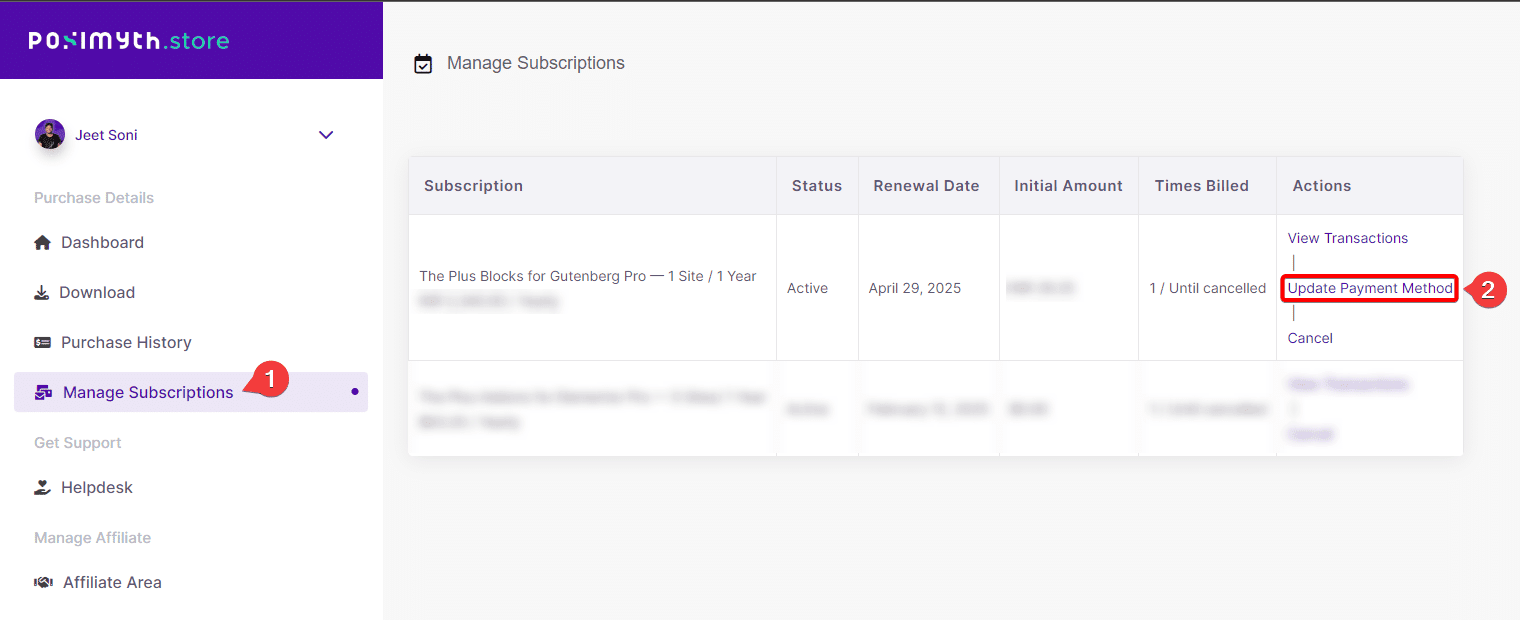
- Credit Card (Stripe) purchases update in the POSIMYTH Store account by logging in, opening Manage Subscriptions, clicking Update Payment Method, selecting Add New Card, and saving the new card details.

It is important to have your payment method updated in your POSIMYTH Store account to ensure continuous and secure transactions. An up-to-date payment method ensures the products are renewed properly and you get continuous updates and support.

If your credit card has expired, or you want to add a different card, you can easily update the payment method.

You may have used PayPal or Credit Card (Stripe) while checkout.

## Did You Purchase Using PayPal?

If you have made a payment through PayPal, you can only change your payment method from the PayPal dashboard.

Refer to the following PayPal document guides:

- [Can I change the payment method for Pay Monthly payments?](https://www.paypal.com/us/cshelp/article/can-i-change-the-payment-method-for-pay-monthly-payments-help857) (If you have used PayPal Wallet)

- [How do I update my debit or credit card on PayPal?](https://www.paypal.com/in/cshelp/article/how-do-i-update-my-debit-or-credit-card-on-paypal-help157)

- [What is an automatic payment and how do I update or cancel one?](https://www.paypal.com/us/cshelp/article/what-is-an-automatic-payment-and-how-do-i-update-or-cancel-one-help240)

You may also reach out to the [PayPal Support](https://www.paypal.com/us/smarthelp/contact-us) for the further assistance.

If you require any assistance from us, please contact us at our [Helpdesk](https://store.posimyth.com/helpdesk/).

## Did You Purchase Using a Credit Card (Stripe)?

If you have used a credit or debit card, you can change the payment method in your Posimyth store account.

1. Log in to your[ POSIMYTH Store](https://store.posimyth.com/) account.

2. From your Dashboard, navigate to **Manage Subscriptions**.

3. On the next page, locate your subscription plan and click on the **Update Payment Method** button.

![Update Payment Method](https://theplusaddons.com/wp-content/uploads/2026/09/posimyth-update-payment-method-1.webp)

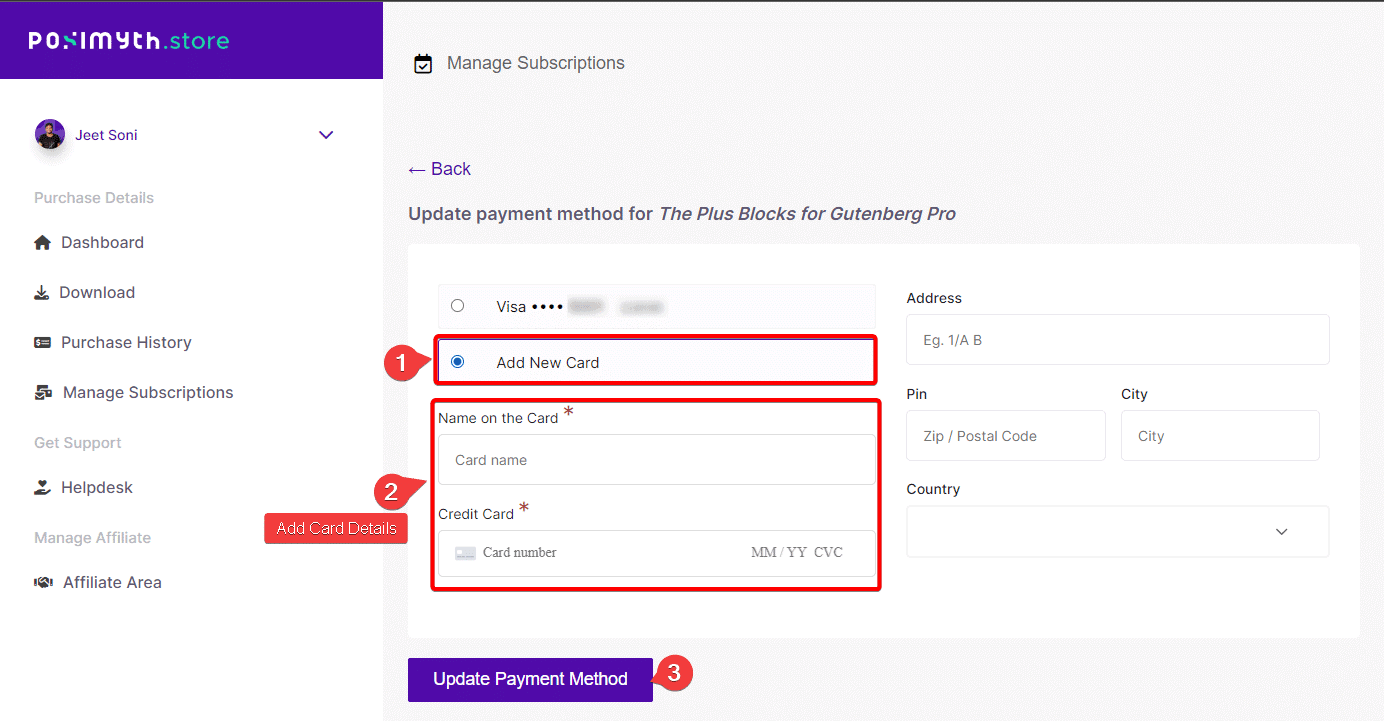
4. On the next screen select the **Add New Card** option and add your card details.

5. Once done click on the **Update Payment Method** button and your payment method will be updated.
![](https://theplusaddons.com/wp-content/uploads/2026/09/posimyth-update-card-details-2-1.webp)

If you have any issues with updating your payment method or any other concerns, please don’t hesitate to reach out to our [support team](https://store.posimyth.com/helpdesk/). We’re always here to assist you with any questions or issues you may have.

Thank you again for choosing The Plus Addons for Elementor Pro. We appreciate your business and look forward to providing you with the best possible experience!

## Frequently Asked Questions

**Q: How do I change my payment method for a subscription if I paid with PayPal?**
A: PayPal payments are handled from the PayPal dashboard, not from the POSIMYTH Store account. That matters because the billing source controls the update path, so changing a card in your store account will not affect a PayPal-based subscription. The page points to PayPal’s own guidance for Pay Monthly payments, updating a debit or credit card, and managing automatic payments. If you need help beyond that, PayPal Support or the Helpdesk are the next places to contact.

**Q: How do I update my payment method after paying with a credit card or Stripe?**
A: Credit card and Stripe purchases are updated inside your POSIMYTH Store account. The flow is tied to Manage Subscriptions, then the specific subscription plan, then Update Payment Method, and finally Add New Card. That sequence matters because the new card is attached at the subscription level, not just saved generally in the account. Once updated, renewal and support access can continue without interruption.

**Q: What should I do if my credit card expired on my POSIMYTH subscription?**
A: An expired card is one of the main reasons to update your payment method right away. The page says you can add a different card in your POSIMYTH Store account when your current card has expired or you want to switch cards. Keeping it current helps avoid renewal problems, which is important because the page links payment updates directly to continuous updates and support.

**Q: Can I update a PayPal payment method from my POSIMYTH Store account?**
A: PayPal-based payments are updated from the PayPal dashboard, not from the POSIMYTH Store account. That separation is important because the checkout method determines where billing changes live. If you used PayPal Wallet or another PayPal automatic payment setup, the page directs you to PayPal’s own tools for changing cards or canceling automatic payments, with PayPal Support available if needed.

**Q: What happens if I don’t update my payment method on time?**
A: Renewals can fail if the stored payment method is outdated, which can interrupt product renewal and stop continuous updates and support. The page ties an up-to-date payment method to secure transactions and proper renewals, so this is not just an admin task. Updating early is safer than waiting for a failed charge because it keeps the subscription in good standing.

**Q: Should I use PayPal or a credit card to update my subscription payment method?**
A: The right choice depends on how you originally checked out. If you paid through PayPal, billing changes stay in the PayPal dashboard. If you used a credit or debit card through Stripe, you update it in your POSIMYTH Store account under Manage Subscriptions. The Plus Addons for Elementor, The Plus Addons, Plus Addons for Elementor, POSIMYTH separates those paths so each payment source is managed where it was created.