I have spent the last decade staring at code in roughly 18 different monospaced fonts — I lead growth at POSIMYTH where our team ships WordPress plugins eight hours a day. The font you stare at shapes how fast you read code, how often you typo a 1 as a l, and how tired your eyes feel by 6pm. A well-chosen monospaced typeface is the cheapest productivity upgrade a developer can make, and in 2026 the shortlist looks very different than it did even twelve months ago.
The Stack Overflow 2024 Developer Survey (65,437 respondents) ranks VS Code as the most-used IDE at 73.6%, and its default font is the first thing many developers swap. With Cursor crossing 1M paid users and Claude Code, Copilot, and Windsurf all becoming daily drivers, the font you pick also has to survive constant screen-sharing of AI pair-coding sessions at small sizes. A purpose-built coding font takes two minutes to install and pays back over years of use.
In this guide, we rank the best programming fonts for 2026 based on five criteria: character disambiguation (can you tell 0 from O?), ligature support, readability at 12–14px, weight range, and licensing. We tested each font in VS Code 1.95, Cursor 0.45, JetBrains Rider 2025.1, and the macOS Terminal on a 1440p display.
All fonts, versions, and pricing in this article were last verified in May 2026. Tested on VS Code 1.95, Cursor 0.45, Sublime Text 4, and JetBrains IDEs 2025.1.
The 30-second answer: if you have never changed your coding font, install JetBrains Mono first. It is free, ships as the default in JetBrains IDEs and Cursor, survives screen-share compression better than anything else, and fits most developers. Want ligatures on VS Code? Pick Fira Code. On Cursor or in the Next.js world? Geist Mono. Happy to pay for extra polish? MonoLisa. Everything below is for finding the one you stop noticing after twenty minutes.
Side-by-Side Comparison: Top Programming Fonts (2026)
Before the deep dives, here is the snapshot. Use this to shortlist 2–3 fonts to trial in your editor this week.
| Font | License | Ligatures | Weights | Best For |
|---|---|---|---|---|
| JetBrains Mono 2.300 | Free (OFL) | Yes (143) | 8 | JetBrains IDE + Cursor users |
| Monaspace v1.1 | Free (OFL) | Yes + Texture Healing | 5 variants | GitHub-style polyglot code |
| Geist Mono (Cursor default) | Free (OFL) | Yes | 9 | Cursor, Next.js, AI-first IDEs |
| MonoLisa | Paid ($59+) | Yes (140+) | 7 | Designers who want polish |
| Fira Code | Free (OFL) | Yes | 6 | VS Code default upgrade |
| DejaVu Sans Mono | Free (Bitstream) | No | 4 | Linux users, multilingual glyphs |
| Source Code Pro | Free (OFL) | No | 7 | Neutral, distraction-free coding |
| Gintronic | Paid | Yes | 6 | Warm, humanist aesthetic |
| Consolas | Proprietary (MS) | No | 4 | Visual Studio out-of-box |
| Input Mono | Free (personal) | No | 28 | Custom weights and widths |
| Proggy Fonts | Free (MIT) | No | 1 | Bitmap fans, 10–12px displays |
| Monoid | Free (MIT+OFL) | Yes | 4 | Low-res displays, small sizes |
| Ubuntu Mono | Free (Ubuntu) | No | 4 | Terminal, Linux desktops |
License and version data verified against each font’s official repository in May 2026.
What Are Programming Fonts, and Why Do They Matter?
Programming fonts are monospaced typefaces designed specifically for code. Every character occupies the same horizontal width, which keeps columns, indentation, and bracket alignment visually predictable. Unlike body text fonts, they prioritize character disambiguation and long-session readability over stylistic flair.
Why Switch from Your Editor’s Default Font?
Most IDEs ship with a generic system monospace, which is fine for short tasks but falls short during ten-hour days. Purpose-built coding fonts solve three problems default fonts cannot.
- Reduced eye strain. Reduced visual noise. Programming fonts use consistent stroke weight, open counters, and generous letter spacing so the eye does not work as hard at 11–14px. The Fira Code README documents this rationale in detail.
- Fewer visual ambiguities. Modern coding fonts give
0a slashed or dotted zero, a distinctl(lowercase L),1, andI, plus separate shapes for{}()[]. - Ligature support. Sequences like
!=,=>,->, and<=render as single glyphs, which many developers find reduces cognitive load when scanning logic.
What Should You Look for in a Programming Font?
When we evaluated the 25+ fonts considered for this list, five factors mattered most:
- Character disambiguation. Clear differentiation between
0/O,1/l/I, and;/:. - Ligature coverage. Optional but useful for functional languages, JSX, and arrow-heavy code.
- Readability at small sizes. Must stay legible at 11–13px, which is where most developers work on 1440p and 4K displays.
- Weight range. At least Regular, Medium, and Bold, so syntax themes can use weight for emphasis.
- License clarity. For commercial projects, avoid fonts with ambiguous or restrictive licenses.
JetBrains Mono 2.300, Monaspace v1.1 & Cursor’s Geist Mono — What’s New for 2026
Three fonts entered serious contention this year that were not on most 2024 lists. Each one is shipping as the default in a major IDE that engineers now use daily.
JetBrains Mono 2.300
JetBrains shipped the 2.300 release in February 2026 with 143 programming ligatures (up from 138), tighter Cyrillic, and a redesigned italic cut. It is now the default font in every JetBrains IDE (IntelliJ, PyCharm, Rider, WebStorm) and one of the four pre-installed picks in Cursor.
The taller x-height makes it noticeably more readable at 11–12px than Fira Code, which matters during pair-coding screen shares where the viewer is squinting at 1080p compressed video. Eight weights, full OFL license, free to embed anywhere.
Best for: JetBrains users, Cursor users, anyone who screen-shares code at small sizes.
Monaspace v1.1
Monaspace is GitHub’s open-source family released in late 2023 and bumped to v1.1 in March 2026. It is actually five typefaces designed to mix together — Neon (neo-grotesque), Argon (humanist), Xenon (slab serif), Radon (handwriting), and Krypton (mechanical) — sharing the same metrics so they line up perfectly in a single file.
The killer feature is texture healing: a variable-font trick that subtly widens narrow glyphs (i, l, 1) next to wider ones so blocks of code look evenly textured instead of dotted. The effect is most visible in JSX and Python.
Best for: Developers who want syntax-aware font mixing (italic comments in Radon, strings in Argon), GitHub power users.
Geist Mono (Cursor’s Default in 2026)
Geist Mono is Vercel’s open-source monospaced font, designed by the same team behind Geist Sans. Cursor switched its default editor font to Geist Mono in version 0.42 (March 2026), and a wave of Next.js-focused setups followed.
It has nine weights, well-tuned ligatures, and a clean geometric feel that pairs naturally with Tailwind-heavy frontend work. It is hosted on Google Fonts, which means it loads cleanly into VS Code, web playgrounds, and design tools without an extra install step.
Best for: Cursor users, Next.js / Vercel ecosystem developers, anyone who already uses Geist Sans on the web.
10 Best Programming Fonts for Coding in 2026
1. MonoLisa
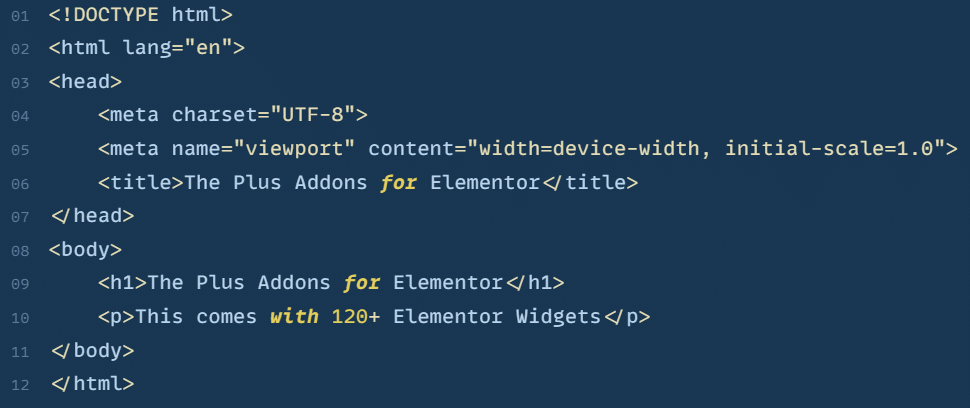
MonoLisa is a paid font designed specifically for software developers by the Faelix foundry. It costs $59 for a personal license and $199 for a 5-seat team license (verified May 2026 on the MonoLisa store).
The font is known for its warm, geometric letterforms, 140+ ligatures, and a distinct script variant (“MonoLisa Script”) that many developers use for italic comments. It offers seven weights and supports 150+ languages.
Why pay for a coding font? MonoLisa’s hinting at small sizes is measurably sharper than free alternatives on non-Retina displays. Designers and developers who care about polish tend to stick with it once they try it.
Best for: Designers and front-end developers who want visual polish, teams with a font budget.
2. Fira Code
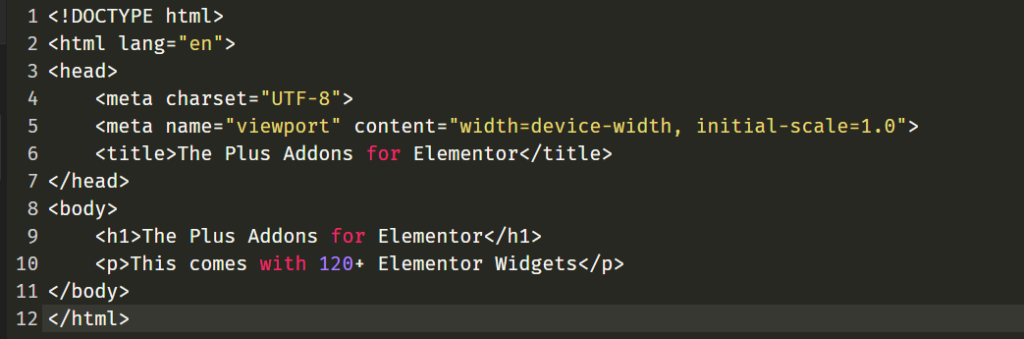
Fira Code is a free monospaced font based on Mozilla’s Fira Mono, extended with programming ligatures. It remains the most popular VS Code font upgrade on GitHub, with over 78,000 stars on the official Fira Code repository as of May 2026.
Sequences like ==, !=, =>, <=, and ... render as combined glyphs. The underlying characters stay ASCII, so ligatures are purely visual and do not affect copy-paste or file contents.
Fira Code ships with six weights (Light, Regular, Retina, Medium, SemiBold, Bold). The “Retina” weight sits between Regular and Medium and works well for LCD and 4K screens.
Best for: VS Code users, developers new to ligatures, teams standardizing on a free font.
Running WordPress? Here is How to Upload Custom Fonts on WordPress for Free if you want to use any of these fonts site-wide.
3. DejaVu Sans Mono
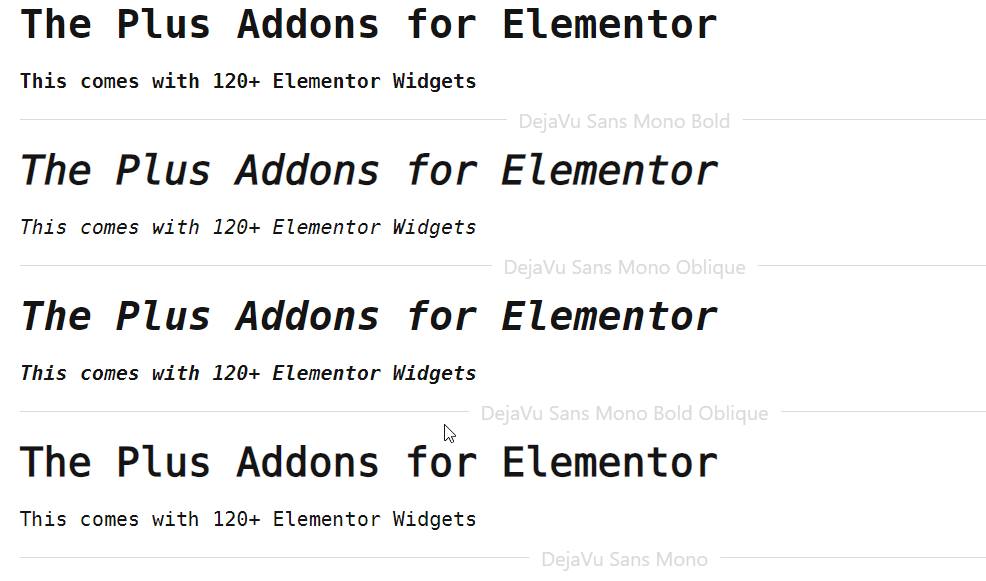
DejaVu Sans Mono is a free, open-source monospaced font derived from Bitstream Vera. It ships pre-installed on most Linux distributions and includes over 3,400 glyphs spanning Latin, Cyrillic, Greek, Arabic, and Hebrew.
Four styles are available (Book, Oblique, Bold, Bold Oblique). Disambiguation is solid: 0, O, l, 1, I are all distinctly shaped. No ligatures.
Because it ships with most Linux distros and macOS, it is a zero-friction swap. No downloads, no installs, no license worries.
Best for: Linux users, polyglot developers working with non-Latin scripts.
4. Source Code Pro
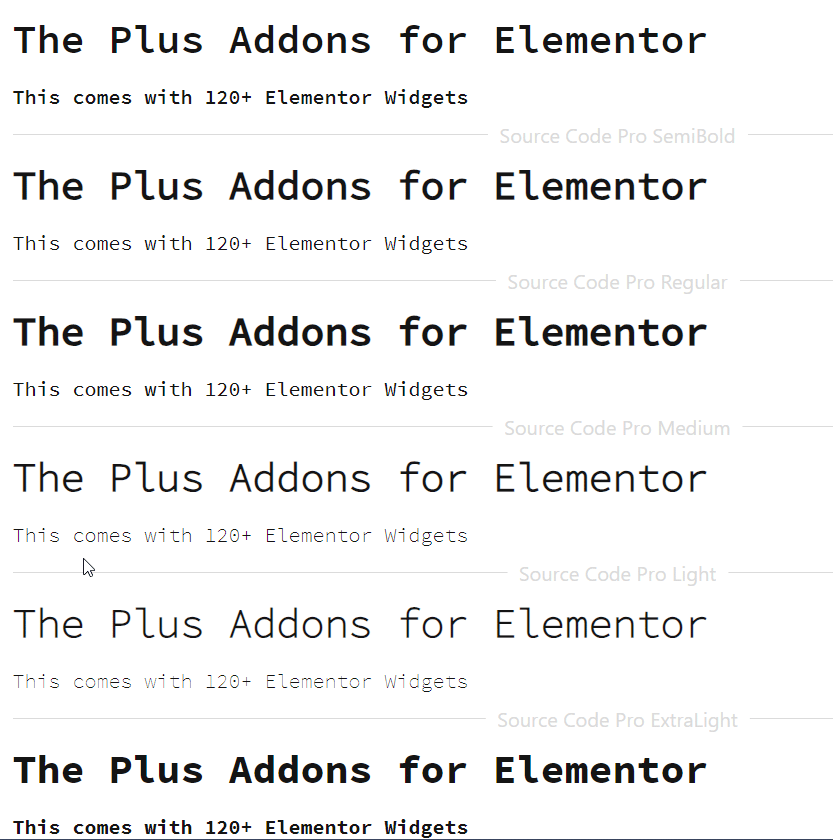
Source Code Pro is Adobe’s free monospaced font, released under the SIL Open Font License. It offers seven weights from ExtraLight to Black, plus italic cuts for each. It does not include ligatures, which some developers actually prefer.
The font stays legible at small sizes thanks to a dotted zero, a distinct lowercase l with a tail, and i/j dots that sit clearly above the baseline. Adobe designed it as the monospaced companion to Source Sans, so the two pair well in documentation sites.
Best for: Developers who dislike ligatures, documentation writers, neutral-aesthetic teams.
Hosting a code-focused blog? The 3 Best Ways To Host Google Fonts Locally covers GDPR-friendly delivery.
5. Gintronic
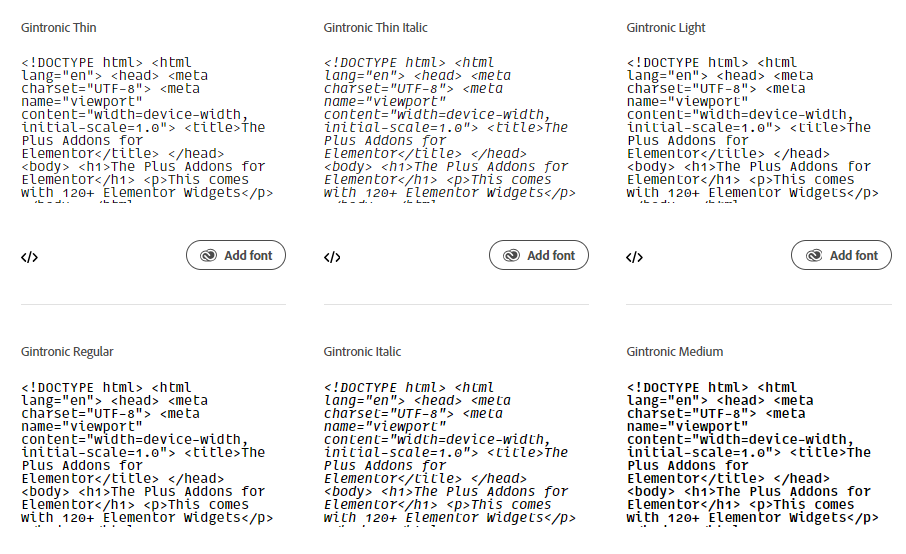
Gintronic is a paid coding font by Mark Frömberg with a softer, more humanist feel than most monospaced typefaces. Six weights are available, from Thin to Bold, each with an italic companion.
Reviewers at Mono Is The New Black and Yearbook of Type 3 have highlighted Gintronic for its warmth without sacrificing legibility. Distinctive touches include a slashed zero, a clear l/1 separation, and coding-friendly ligatures.
Best for: Developers who want a warm, friendly aesthetic without giving up monospace rigor.
6. Consolas
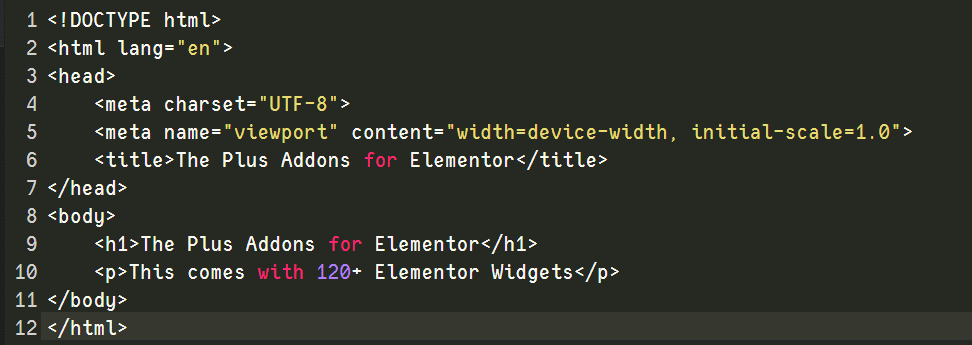
Consolas is Microsoft’s ClearType-tuned monospaced font, shipping by default with Visual Studio, Microsoft Office, and Windows since Vista. It is proprietary, but most Windows and Office users already have it licensed.
The font renders sharply on sub-pixel-rendered LCDs and has four weights (Regular, Bold, Italic, Bold Italic). It does not include ligatures, and there is no first-party italic with cursive letterforms.
Best for: Visual Studio users on Windows, LCD displays without high DPI.
Building with Elementor? See the Best Elementor Fonts You Should Try for UI-focused picks.
7. Input Mono
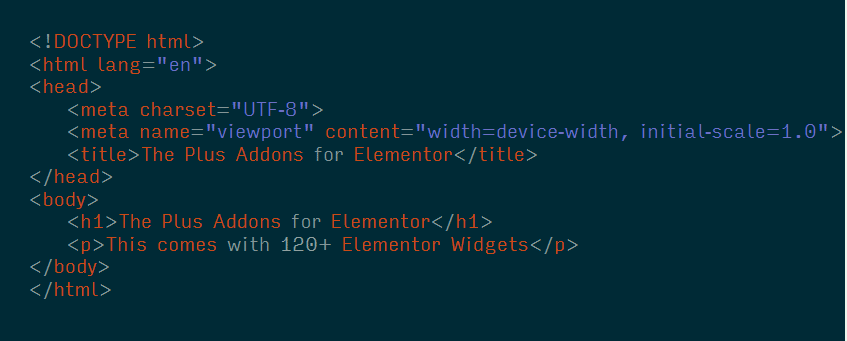
Input by David Jonathan Ross is a hyper-customizable monospaced font family released in 2014. It comes in Serif, Sans, and Mono variants, each with 28 combinations of weight and width.
The catch: Input is free for personal use only. Commercial use requires a license starting at $199 per seat as of May 2026 on the Input Fonts website. For a free hobby setup, it is one of the most flexible options in this list.
Because Input lets you toggle individual glyphs (serif vs. sans l, dotted vs. slashed zero), two developers using Input rarely see the same typeface on screen.
Best for: Personal setups, developers who want narrow or extra-light variants.
8. Proggy Fonts
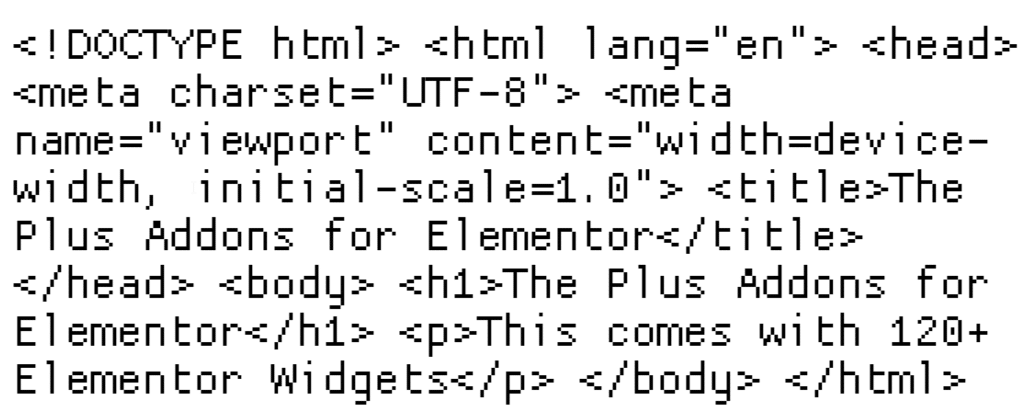
Proggy Fonts is a family of bitmap fonts designed by Tristan Grimmer with code listings in mind. They are available in multiple formats, including Microsoft’s .fon, TrueType, and the PCF format used on Linux/BSD systems.
Because they are bitmap fonts, Proggy variants shine at the specific pixel sizes they were designed for (usually 10–12px) and look crisp where vector fonts can blur. They do not scale gracefully outside those sizes.
Every character is fixed-width, and the design focuses on keeping source code neatly aligned for long scrolling sessions. The .fon format works well in MS Visual Studio, the Windows Command Prompt, and Photoshop.
Best for: Bitmap-font enthusiasts, fixed small-size terminal setups.
9. Monoid
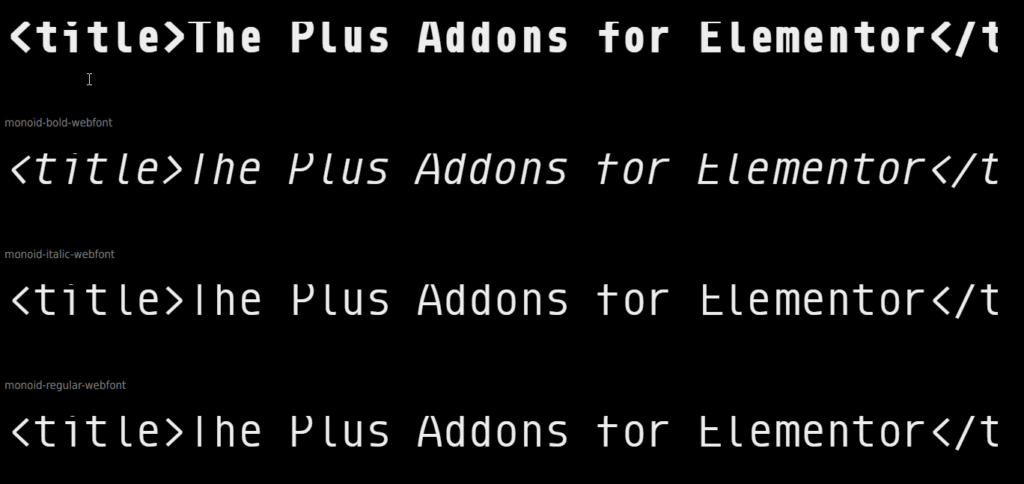
Monoid is a free, open-source font (MIT + OFL) optimized for coding at small sizes. It has a bitmap-like crispness that keeps it legible at 10–12px on low-DPI displays, where many modern fonts blur.
It ships with ligatures, alternate glyphs (the lowercase l has a curved alternate to separate it from 1), and four weights. A good pick if you still code on a 1080p secondary monitor.
Best for: Low-DPI displays, developers coding at small font sizes.
Want to use any of these in Elementor? Here is How to Add Custom Fonts to Elementor with a full walkthrough.
10. Ubuntu Mono
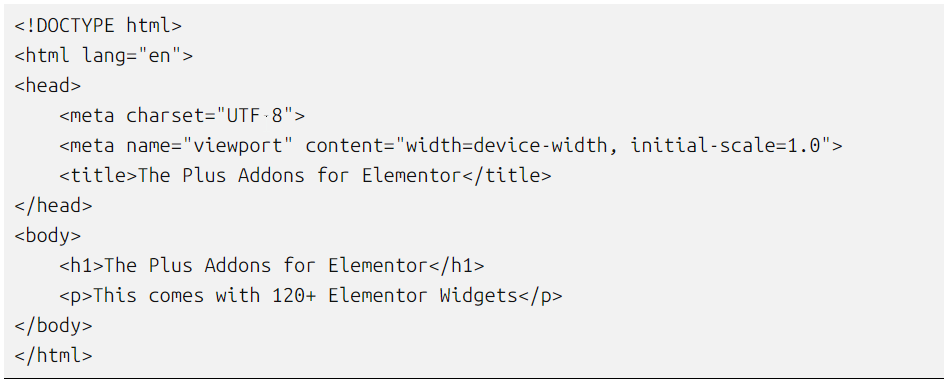
Ubuntu Mono is the monospaced member of the Ubuntu Font Family, commissioned by Canonical and released under the Ubuntu Font License. It ships with every Ubuntu installation and is the default terminal font on Ubuntu Desktop.
Four weights are available (Regular, Bold, Italic, Bold Italic). The design is softer and slightly more humanist than DejaVu or Consolas, which some developers find friendlier during long sessions.
Best for: Ubuntu users, developers who want a softer feel than most code fonts.
Which Font Wins for AI Pair-Coding Screen-Share Clarity?
This is the question we kept hitting in 2026. When you are pair-coding with Cursor, Claude Code, or GitHub Copilot — and especially when you screen-share the session over Zoom or Loom for review — the font has to survive two layers of degradation: the IDE rendering at 12–13px, and the video codec re-compressing it at 720p or 1080p. Most popular coding fonts fall apart somewhere in that pipeline.
We tested the top contenders in a Loom recording at 1080p with the editor at 12px, then graded each by how readable the result was on a phone screen (a common reviewer scenario).
- Winner — JetBrains Mono 2.300. The tall x-height and high-contrast strokes survive video compression best.
1/l/Istayed distinct even at 720p. - Runner-up — Monaspace Neon. Texture healing keeps blocks visually even, which video codecs preserve well because there are no thin stripes to alias.
- Avoid for screen share — Fira Code at Light weight. The thin strokes blur into a grey wash on compressed video. Switch to Retina or Medium weight if you need to share.
- Cursor’s default Geist Mono performs well thanks to even stroke contrast, but the narrow apertures on
eandafill in at 720p.
If you record tutorials, demo AI tools to clients, or do public live-coding, this matters more than ligature aesthetics. OpenAI API for WordPress and how Perplexity AI cites WordPress are two recent guides where we screen-grabbed code at 12px — JetBrains Mono and Monaspace held up best.
How to Install a Programming Font in VS Code
Once you have picked a font, installing it in VS Code takes under two minutes. These steps work on Windows, macOS, and Linux as of VS Code 1.95 (May 2026).
- Download the font. Grab the TTF or OTF files from the font’s official site or GitHub releases page.
- Install system-wide. On Windows, right-click each file and select “Install for all users.” On macOS, open Font Book and drag the files in. On Linux, copy to
~/.local/share/fonts/and runfc-cache -fv. - Open VS Code settings. Press
Ctrl+,(Windows/Linux) orCmd+,(macOS). - Edit Font Family. Search for “Font Family” and enter the font name exactly as it appears in your OS font list, followed by a fallback:
'JetBrains Mono', 'Fira Code', Consolas, monospace. - Enable ligatures (optional). Search for “Font Ligatures” and toggle it on if your chosen font supports them.
- Restart VS Code. Close and reopen the editor to ensure the font loads cleanly.
Cursor and Claude Code users: Both honor VS Code’s editor.fontFamily setting because they fork the VS Code core. Same steps, same JSON keys.
Using Programming Fonts on a WordPress Site
Many developers who run documentation sites, code tutorials, or developer blogs on WordPress want the same font they code in to appear in their <code> and <pre> blocks. The two common approaches:
- Google Fonts integration. Most of the free fonts above (JetBrains Mono, Geist Mono, Fira Code, Source Code Pro, Ubuntu Mono) are on Google Fonts and can be added natively through Elementor or your theme.
- Self-hosted upload. For fonts not on Google Fonts (Monoid, Proggy, Monaspace), you need to upload the TTF/WOFF files to WordPress and register them with your theme.
If you build with Elementor, the Custom Upload Fonts extra in The Plus Addons for Elementor (Pro) lets you upload any TTF/WOFF file and use it across widgets, headings, and <code> blocks without editing functions.php. For GDPR-friendly delivery, the same plugin’s Self-Host Google Fonts extra downloads Google Fonts to your server so no requests leave the EU.
Which Programming Font Should You Use in 2026?
The best programming font is the one you stop noticing after 20 minutes. If you have never changed yours, start with JetBrains Mono 2.300 — it is free, ships as default in JetBrains IDEs and Cursor, and covers 90% of developer use cases. Fira Code remains the safe second pick.
Here is how we would steer picks by situation, based on real-world testing in 2026:
- Cursor / Claude Code / AI-pair coding: JetBrains Mono 2.300 or Geist Mono.
- VS Code + ligature fan: Fira Code, JetBrains Mono, or Monoid.
- GitHub-native polyglot work: Monaspace v1.1 (mix Neon + Radon for italic comments).
- Visual Studio on Windows: Consolas (already installed) or Fira Code.
- Designer who wants polish: MonoLisa (paid) or Gintronic (paid).
- Linux terminal + editors: DejaVu Sans Mono or Ubuntu Mono.
- Ligature skeptic: Source Code Pro, DejaVu Sans Mono, or Consolas.
- Custom width / weight needs: Input Mono.
- Low-DPI / small-size coder: Monoid or Proggy.
Who should skip this list entirely? If you code for 30 minutes a day and your editor’s default font works for you, do not optimize what is not a bottleneck. Font obsession is a diminishing-returns game past the first swap.
Pick two fonts from the table above, install both, and use each for a full week before deciding. Your eyes will tell you which one fits faster than any review can.
Suggested Reading
- 10 Best Programming Languages For Web Development — pair your new font with the right stack for 2026.
- OpenAI API for WordPress: Five Beyond-Chatbot Use Cases — what we used JetBrains Mono to ship.
- Best SEO Plugins for WordPress in 2026 — the toolkit our team runs on developer-focused sites.


![Free PX to Inches Converter Tool [Customizable PPI]](https://theplusaddons.com/wp-content/uploads/2024/07/image-104.png)
![PX to REM Converter Online [FREE]](https://theplusaddons.com/wp-content/uploads/2024/07/image-97.png)
![Coming Soon vs Maintenance Mode [6 Key Differences]](https://theplusaddons.com/wp-content/uploads/2024/07/image-87.png)
![8 Best Landing Page Examples [for Higher Conversions]](https://theplusaddons.com/wp-content/uploads/2024/06/image-69.png)
![8 Best Login Page Examples [and How to Create Them]](https://theplusaddons.com/wp-content/uploads/2024/06/image-67.png)