


Have you ever built a long accordion and caught yourself thinking, why am I still adding each item one by one? If you’ve done that even once, this update is going to make you smile.
We’ve upgraded the Accordion widget in The Plus Addons for Elementor so it can now generate accordion items directly from ACF repeater fields.
You enter your content once, and the accordion builds itself from that data.
Let’s get started!

What Is ACF Repeater Support in The Plus Addons for Elementor Accordion Widget?
Earlier, when you created an accordion, you had to manually add every title and content block inside the widget.
Now you can connect a repeater field created with Advanced Custom Fields or Secure Custom Fields, and The Plus Addons for Elementor Accordion widget will pull each row and turn it into an accordion item automatically.
Same accordion result. Much less manual work.
Where Can You Use Repeater Accordion in Elementor?
If you work on Elementor pages where similar content blocks repeat and need updates from time to time, repeater accordions can make your workflow much easier.
You can obviously still add accordion items manually if you prefer. But when your content follows a pattern and changes often, managing it through repeater fields saves a lot of editing time.
Instead of updating each accordion item one by one inside the widget, you update the data once and let the layout handle the rest.
This is especially helpful if you are a store owner, build client websites, or manage structured content across multiple pages.
- FAQs
- Product specifications
- Feature lists
- Service details such as pricing or booking info
- Schedules
If your section is basically a list of titles and description pairs, repeater fields are a perfect match.
How Do You Build a Repeater Accordion in Elementor Step by Step?
Let’s take a simple hotel booking FAQ example.
Imagine you’re building a hotel room page in Elementor and want the FAQ accordion to generate automatically using the Accordion widget from The Plus Addons for Elementor.
First, create a repeater field (using ACF Pro or Secure Custom Fields). Name it something like Hotel Booking FAQs. Inside it, add two sub fields:
- Question

- Answer

Here, Question becomes the accordion title and Answer becomes the content.
Now add a few FAQ rows, for example:
- What time is check-in and check-out? → Check-in is from 2 PM and check-out is by 11 AM.
- Is breakfast included in the booking? → Yes, complimentary breakfast is included with selected room plans.
Then open your hotel template or page in Elementor editor, add the Accordion widget, select ACF Repeater as the content source, enter your repeater field key, and map Question to Title and Answer to Content.

Your hotel booking FAQ accordion is now generated automatically from your repeater rows. Add a new Question and Answer anytime, and it appears instantly without touching the layout again.
For a detailed walkthrough, you can refer to the doc
That’s the whole magic of this update.
Other Notable Updates
We’ve also made a few additions to make your building experience smoother inside Elementor.
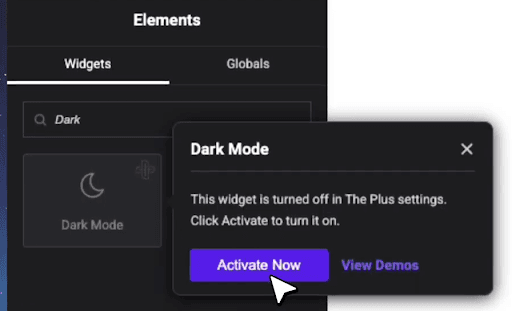
You can now search for The Plus Addons for Elementor inactive widgets directly from the Elementor editor and activate them instantly from there.
No need to switch to the backend to enable an inactive widget. Everything can be managed right where you’re building.
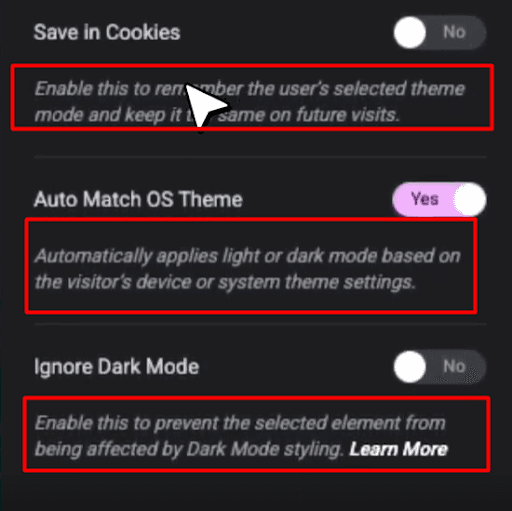
We’ve also completed adding clearer option labels across all our widgets to help you understand what each setting does at a glance (excluding very basic options), so you can configure everything more confidently and quickly.
For all the changes, you can see the changelog.
Wrapping Up
Give it a try in your next FAQ or product details section and see how it feels in your real workflow. And when you do use it, let us know how it worked for you.
If you have questions, ideas, or feedback, drop a comment. We would genuinely love to hear from you, and we’ll keep bringing more useful updates your way.
Stay tuned as well. We’ll be rolling out more useful updates like this to make your building experience in Elementor faster and smoother.