How to Set Elementor Accordion Closed by Default [3 Easy Steps]

Key Takeaways

  • The Plus Addons for Elementor Accordion widget allows users to display content in a collapsible section.
  • Users can set all accordion items to remain closed by default by setting Active Accordion to 0.
  • To customize the active accordion item, users select it from the Extra Option > Active tab in the Elementor Editor.
Table Of Content

Do you want to keep your First Elementor Accordion closed by default?

The accordion widget by The Plus Addons allows you to display content in a collapsible section in Elementor, making it easier for users to navigate through various sections of your website.

However, by default, Elementor accordion keeps the first item open, but you might want another specific item to be open by default.

For this, you can use the Accordion widget from The Plus Addons for Elementor. With this, you can easily set a specific accordion item active from the beginning instead of the default first item or make the Elementor accordion default closed.

To check the complete feature overview documentation of The Plus Addons for Elementor Accordion widget, click here.

Requirement  – This widget is a part of The Plus Addons for Elementor, make sure it’s installed & activated to enjoy all its powers.

YouTube video

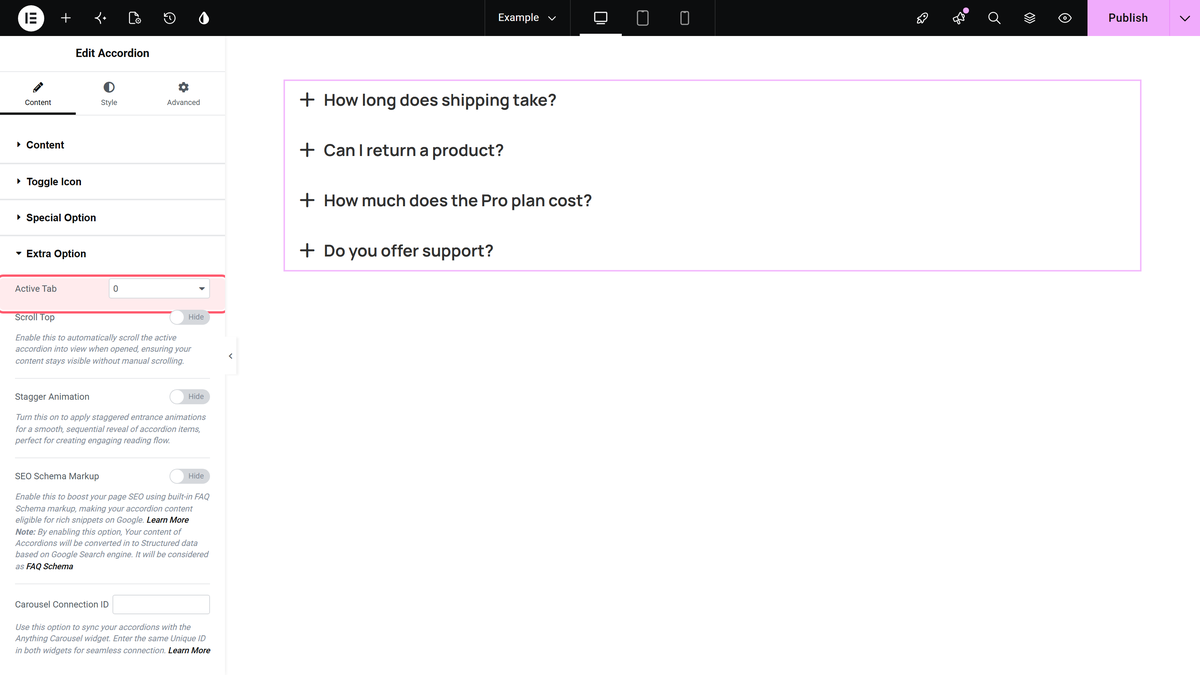
To select a custom active accordion item, drag and drop the Accordion widget, and go to Extra Option > Active tab

Click on the dropdown and choose the accordion item you want to keep activated by default when the page loads.

Once you set it to 0, then all the Accordion items of The Plus Addons for Elementor Accordion widget will remain closed.

That’s all for our guide to making the Elementor accordion default closed.

To sum it up:

Steps on How to Make Elementor Accordion Default Closed

  1. Step 1: Install The Plus Addons for Elementor
  2. Step 2: Add the Accordion Widget in Elementor Editor
  3. Step 3: Go to special options and set Active Accordion to 0

And you’re done; now, the Elementor toggle will be closed by default, and no Accordion will open unless someone clicks on the Accordion Tab.

About the Author

Photo of Aditya Sharma CMO of The Plus Addons for Elementor
CMO · The Plus Addons for Elementor · 10 years experience

He has spent years in the WordPress ecosystem building, breaking, and optimizing sites until they actually perform. He works at the intersection of speed, growth, and usability, helping creators ship websites that load fast and convert. An active WordPress community contributor sharing through tools, tutorials, and direct collaboration. Tested practice, not theory.

WordPressElementorn8nAIClaudeAutomationServer
Get Instant Answers to all your questions about The Plus Addons for Elementor, trained on 1000+ Docs and Videos

Related Frequently Asked Questions

What should I do if my Elementor accordion is not closing by default?

If your Elementor accordion isn't closing by default, ensure you set the Active Accordion to 0 in the Extra Option settings. This setting is crucial because it tells the widget to keep all accordion items closed when the page loads. If you miss this step, the first item will remain open by default, which may not be your desired outcome.

What happens if I set the Active Accordion to a number greater than 0?

Setting the Active Accordion to a number greater than 0 will open that specific accordion item by default when the page loads. This feature is useful if you want to draw attention to a particular section of content. However, if you want all items closed, make sure to set it to 0.

What is the best practice for using the Elementor accordion widget on a landing page?

A best practice is to keep the accordion closed by default to avoid overwhelming users with information. This encourages interaction as users will need to click to reveal content. Setting the Active Accordion to 0 achieves this, making the page cleaner and more user-friendly.

How can I change accordion items automatically with autoplay in Elementor?

To change accordion items automatically with autoplay, you can refer to the guide on how to change accordion items automatically with autoplay in Elementor. This feature allows for a dynamic user experience, automatically cycling through the accordion items without user interaction.

Last reviewed: April 9, 2026