---
title: "How to Add Custom CSS Preloader Animations in Elementor?"
url: https://theplusaddons.com/docs/custom-css-preloader-animations-in-elementor/
date: 2023-04-07
modified: 2026-04-11
lang: en
author: "Aditya Sharma"
description: "Do you want to add Custom CSS Preloader Animation in your Elementor website? With the Preloader widget from The Plus Addons for Elementor you get several preloader animation options, but..."
image: https://theplusaddons.com/wp-content/uploads/2023/04/How-to-Add-Custom-CSS-Preloader-Animations-in-Elementor_-1024x536.jpg
word_count: 297
---
# How to Add Custom CSS Preloader Animations in Elementor?
##
- Utilizes the Preloader widget from The Plus Addons for Elementor to implement custom CSS preloader animations.
- Requires installation and activation of The Plus Addons for Elementor to access the Preloader widget features.
- Incorporates CSS loading animations from external sites like CSSloaders and Loading.io by copying and pasting code into the Preloader widget.
Do you want to add Custom CSS Preloader Animation in your Elementor website? With the Preloader widget from The Plus Addons for Elementor you get several preloader animation options, but you may want to create a custom CSS preloader animation that aligns with your website's theme and branding.
You can easily use custom coded CSS preloader with the Preloader widget from The Plus Addons for Elementor.
*To check the complete feature overview documentation of The Plus Addons for Elementor Preloader widget, [click here](/docs/preloader-elementor-widget-settings-overview/).*
***Requirement - This widget is a part of The Plus Addons for Elementor, make sure it's installed & activated to enjoy all its powers.***
[LIVE WIDGET LINK](https://theplusaddons.com/elementor-widget/preloader-and-page-transition/?utm_source=tpae&utm_medium=docs&utm_campaign=text)
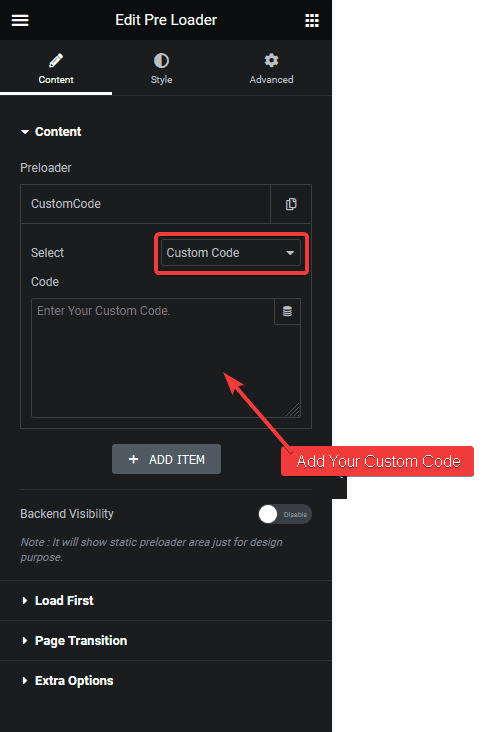
Add the Preloader widget on the page or template, in the **Content** tab, you’ll find an item under **Preloader**.
Open the item and select **Custom Code **from the **Select** dropdown.
In the **Code** field, add your CSS Preloader code.
If you know HTML and CSS, you can create your own CSS loading animation, but if you don’t, then you can find many custom CSS loading animations on different websites like [CSSloaders](https://cssloaders.github.io/), [Loading.io](https://loading.io/css/) etc.
For example, we’ll use a CSS loading animation from the [CSSloaders](https://cssloaders.github.io/).
Click on the animation you like and it will show the HTML and CSS code in a popup. Copy the CSS first then in the Preloader widget add tag and paste the CSS in between the tag.
Like this -
``
Then go back to the CSSloders site and copy the HTML and paste it in the Preloader widget.
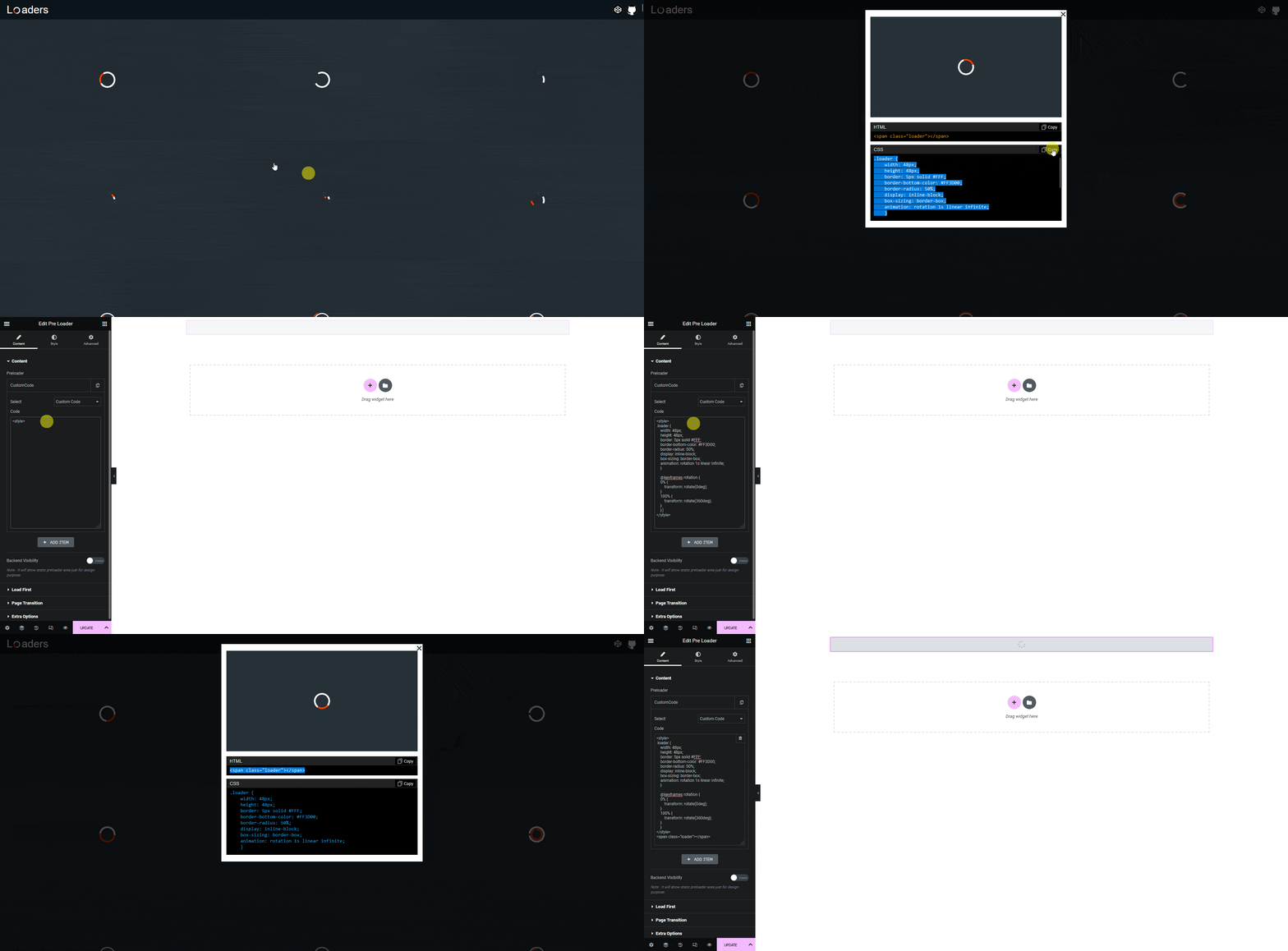
> *Note: You have to change the CSS to adjust the style of the loader.*

That’s it. Now your custom CSS loading animation will show as the preloader.
Also, check [How to Add Shortcode Based Preloader Animation in Elementor](https://theplusaddons.com/docs//shortcode-based-preloader-animation-in-elementor/).