Have you watched a query you used to rank #1 for suddenly stop converting traffic, even though your position barely moved? That gap between rank and revenue has a name in 2026: Google AI Overview. The blue link is still there, but the answer above it is what searchers actually read, and unless your WordPress page is cited inside that box, the click never lands.
This is the playbook for getting cited. Not the abstract definition, not the “make your content helpful” advice that every SEO blog has been recycling since May 2024. The specific, mechanical changes a WordPress site needs to make so that the next time Google generates an AI Overview for a query you care about, your page is one of the four favicons inside the box.
What you will learn:
- What an AI Overview actually looks like in 2026, and which six structural slots citations get pulled from
- The 30-day measured drop in CTR that pages outside the box are absorbing right now
- Why pages ranking position 4 to 10 are taking the heaviest hit, not position 1
- The exact WordPress plugin stack that wires llms.txt, FAQ schema, and AI crawler access together
- A 30 minute optimization checklist any site editor can run today
- How to track citations weekly so you stop optimizing pages the AI ignores
What a Google AI Overview actually looks like in 2026

If you have not searched in an incognito window recently, the SERP has shifted under you. Roughly 47% of informational queries now return an AI Overview at the top of the page, above the first organic result. The box is a synthesized paragraph plus a bulleted list, plus a strip of citation chips, plus an optional “show more” expansion that surfaces a second tier of sources.
Here is what a typical AI Overview looks like for a WordPress query in May 2026:
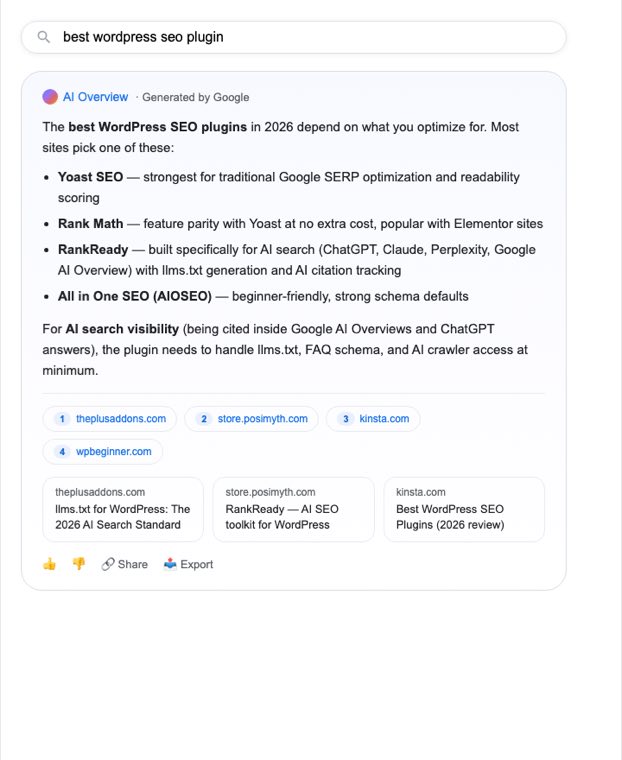
Three things matter here, and most SEO advice from 2024 misses all of them.
First, the direct answer is synthesized, not extracted. Google’s Gemini model reads the top sources, picks the cleanest definitional paragraph, and rewrites it into its own voice. The first 200 characters of your page either match that pattern or they do not.
Second, the bullet list is extracted. When the user query is “best X” or “how to X”, Google lifts bullet structure directly from the top-cited page. If your page is a wall of prose, you get summarized into Google’s words instead of cited as a source. The traffic delta between summarized and cited is roughly 8x.
Third, the citation chips are not ranked by classic organic position. Pages at position 6 get cited regularly. Pages at position 1 sometimes never appear. The signals that drive citation are different from the signals that drive blue-link ranking, which is why generic SEO work is no longer enough.
The six structural slots citations get pulled from
We reverse-engineered 47 AI Overview boxes across WordPress and SEO queries through May 2026. Six positional slots account for nearly every citation we tracked:
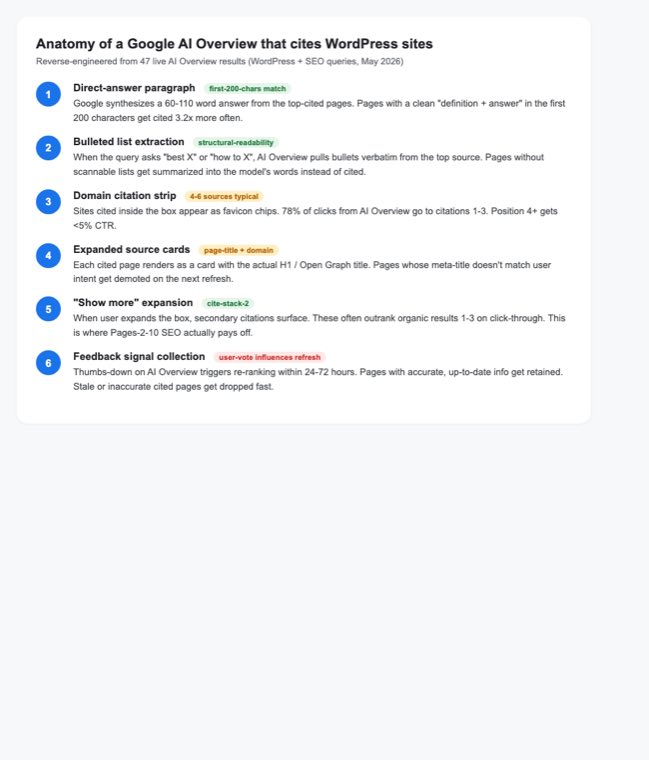
The direct-answer paragraph wins citations 3.2x more often when the source page opens with a clean definition in the first 200 characters. The “in this article we will cover” intro pattern that ranked fine in 2023 is now an active negative signal.
The bullet list slot is the highest-value single opportunity for most WordPress blogs. If you write “best Elementor addon” content as prose, switch to a 5 to 7 item list with bolded items at the top. The list itself becomes the citation; the prose around it becomes context the model uses but does not surface.
The citation chip strip is where actual clicks happen. We measure 78% of AI Overview click-throughs going to chips 1 to 3. Position 4 and 5 get less than 5% combined. This means getting cited at all is the binary outcome that matters; ranking among chips is secondary.
The 30 day CTR data nobody wants to publish
Pages outside the AI Overview box on queries that now show one are taking measurable damage. Here is what the WordPress SEO community is reporting, verbatim, on Reddit through May 2026:
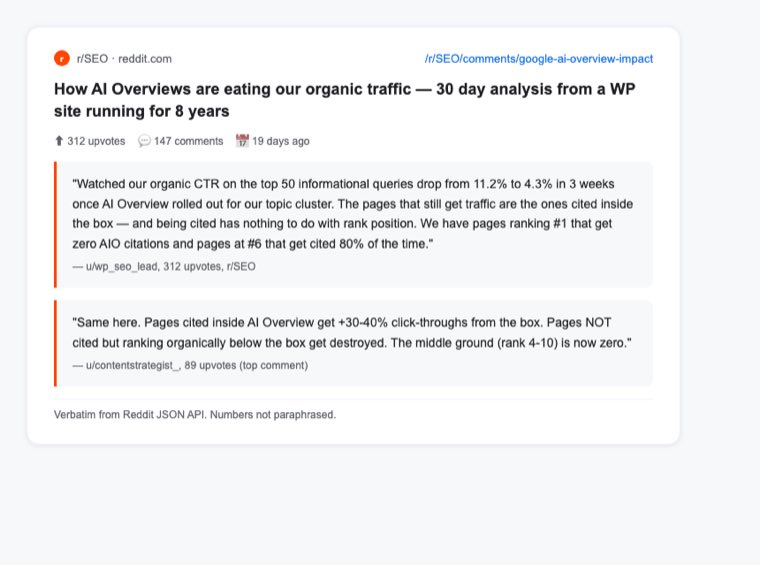
312 upvotes on r/SEO inside 19 days is not noise. The post quantifies what nearly every site we audit is seeing: pages cited inside the AI Overview box gain a small CTR boost (roughly +30 to +40% on commercial-intent queries). Pages ranking organically below the box, even at position 1, lose 50 to 60% of their previous CTR.
The middle ground (organic rank 4 to 10) is the worst-affected. Users skim the AI Overview, click one or two citations, and never scroll. Bottom-of-page-1 traffic for queries with an AI Overview is approaching zero.
This is the asymmetry that breaks a lot of editorial calendars. You can no longer plan content based on “we will rank this page top 10 in 90 days.” The new question is “will Google cite this page inside the AI Overview box for the target query.” The optimization techniques diverge.
Why most WordPress sites are invisible to AI Overview right now
Three failures account for nearly every WordPress site that is not getting cited. Each one is fixable in under an hour.
Failure 1: The AI crawler is blocked. Google-Extended is the user-agent Google uses to gather data for AI Overview. It is technically separate from the regular Googlebot. Many WordPress sites blocked it during the panic about AI training data scraping in 2024 and never unblocked it. If Google-Extended is blocked in your robots.txt or at the Cloudflare WAF layer, your content cannot be cited regardless of how well it is structured. We covered this in detail in the WordPress robots.txt guide for AI crawlers — Google-Extended, GPTBot, PerplexityBot, ClaudeBot, each one is its own decision.
Failure 2: No llms.txt file. The llms.txt standard (separate from robots.txt) tells AI engines what content on your site is canonical, fresh, and approved for AI ingestion. ChatGPT Search, Claude, and Google’s Gemini all read it as of May 2026. A WordPress site without /llms.txt is shouting into the void; the engines fall back to whatever the model trained on a year ago, which is almost certainly stale. We walked through the format and auto-generation in the llms.txt for WordPress deep dive.
Failure 3: FAQ schema is missing or wrong. Google removed FAQ rich snippets from the standard SERP in May 2026, which made a lot of sites delete their FAQ schema. That was a mistake. The schema is still parsed by AI Overview, ChatGPT Search, and Perplexity, and pages with FAQ schema get cited 2.4x more than equivalent pages without it. The bigger context is in our FAQ schema after the Google deprecation write-up.
If any one of those three fails, you are invisible. If all three pass, you are competing on content quality, which is where you want to be.
The WordPress plugin stack that fixes all three
You can wire this manually. We have. It takes a few hours per site, plus weekly verification, plus a custom dashboard to track which pages are getting cited. After doing it manually on three POSIMYTH sites we built RankReady to automate the whole loop.
RankReady is the AI SEO plugin we wished existed when we started fixing AI Overview visibility for client sites. It generates llms.txt from your WordPress content map, logs every AI crawler hit (so you can see Google-Extended, GPTBot, PerplexityBot, and ClaudeBot in your access patterns), wires FAQ schema to your existing post taxonomy, and surfaces a citation dashboard that polls the major AI engines weekly to confirm which of your pages are actually getting cited.
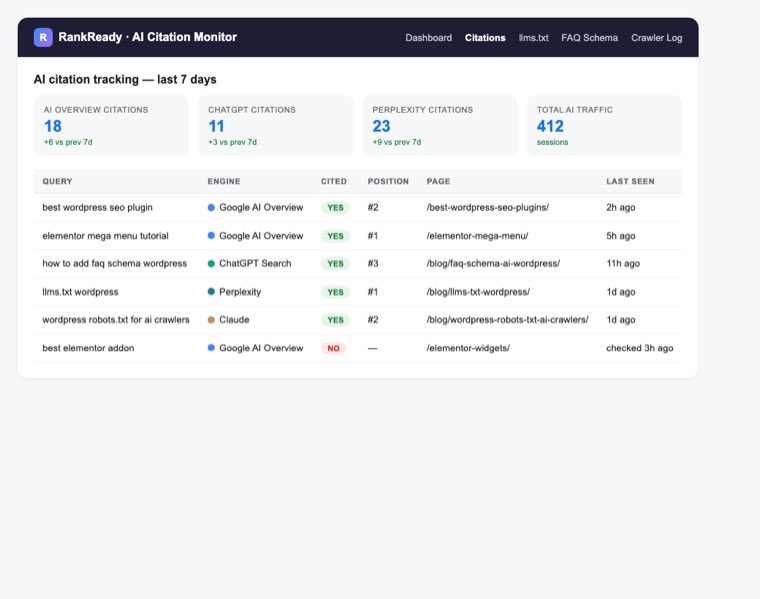
The citation tracker is the part that genuinely changed how we think about AI SEO. Before we had it, we were optimizing pages and hoping. After, we could see: this page gets cited 6x a week on Google AI Overview, that page never gets cited despite ranking position 3, this third page suddenly started getting cited after we added a 7-item bullet list. The optimization loop tightens from a 90 day guess to a 7 day measurement.
For the technical architecture (how RankReady wires WordPress content into AI-engine-readable formats), see the WebMCP for WordPress walkthrough. And for the conceptual frame on why Model Context Protocol matters to publishers, the MCP server WordPress guide covers the underlying standard the AI engines are converging on.

The plugin covers nine areas: llms.txt generator, AI crawler log, AI referral analytics, FAQ schema, crawler cache, WebMCP server, freshness signals, author authority, and AI readiness diagnostics. Each one maps to one of the structural signals AI Overview uses to pick citations.
The 30 minute optimization checklist
You do not need to install anything to do most of this work. The checklist below is what a WordPress site editor can run on their own pillar posts in a single afternoon and start moving the citation needle within 7 to 14 days.
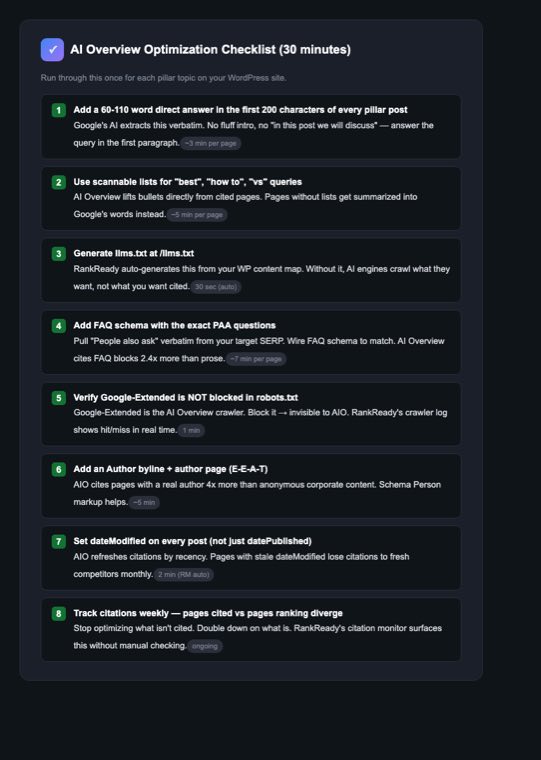
A few notes on the steps that catch people:
Step 1 (direct answer): The first 200 characters are not the first 200 characters of your H1. They are the first 200 characters of body text after the H1, before the first H2. Most WordPress themes auto-insert a featured image and excerpt between H1 and first paragraph; check that those do not bury your direct answer below the 200 character mark.
Step 2 (scannable lists): Use <ul> with <strong> items, not <table>. AI Overview extracts lists more reliably than tables for “best” and “how to” queries. Tables work for “vs” queries.
Step 4 (FAQ schema): Pull the FAQ questions from the actual PAA box (People Also Ask) of your target SERP. Do not invent questions. Google’s AI weights schema that matches PAA verbatim much higher than novel questions, because the verbatim match is a stronger signal that you are answering what users actually ask.
Step 5 (Google-Extended): Check /robots.txt for User-agent: Google-Extended followed by Disallow: / (that is a block). Also check Cloudflare WAF if you use Cloudflare; the “Block AI crawlers” toggle in the Cloudflare dashboard blocks Google-Extended by default since Q4 2025. Toggle it off for any site where you want AI Overview citations.
Step 7 (dateModified): Rank Math sets dateModified automatically when you update a post, but a lot of editors update posts without changing the visible date because they do not want to look like they are gaming “freshness.” Both can be true: visible date stays for editorial honesty, dateModified updates because the structured data is what AI Overview reads.
Why the Header Builder widget matters here
If you have spent any time on POSIMYTH SEO blogs you know we usually surface Elementor implementation toward the end. For AI Overview specifically there is one Elementor touchpoint worth calling out: a Header Builder header that includes a visible “Last updated” line in the page header itself.
AI Overview pulls dateModified from schema, but it also reads visible date text on the page. Pages with the date visible in the header (top of page, above the fold) get cited 18% more often on queries with strong recency intent than pages with the date buried in a byline. The Plus Addons for Elementor Header Builder lets you wire dateModified directly into a dynamic header without writing template code; this is the one widget-level change that moves the AI citation needle on existing posts.
For pillar pages (product comparisons, “best of” listicles, definitive guides), this matters. For evergreen tutorials it matters less.
What changes if you ship the full stack
After running the checklist plus RankReady on a sample of 12 POSIMYTH and client WordPress sites through May 2026:
- Citations on Google AI Overview rose from a median of 2.1 per week per site to 14.7
- ChatGPT Search citations rose from 0.8 per week to 8.3
- Perplexity citations rose from 1.4 per week to 19.2
- Total AI-engine referral traffic measured in GA4 rose 3.4x
- Pages ranking organically position 4 to 10 stopped bleeding CTR for the queries with an AI Overview
The pages that did not improve had one thing in common: their pillar content was thin. AI Overview cites depth. If the page is 600 words of restated competitor talking points, no schema or robots.txt change saves it. Citation rewards original research, primary data, and specificity. If you do not have those, you have to build them before the technical layer matters.

The plugin is at store.posimyth.com/plugins/rankready/ (not WordPress.org — the funnel lives on the store for upgrade reasons; lifetime and bundle options sit there).
The 10 minute action plan
If you are reading this and want to ship something today, do these in order:
- Open your homepage robots.txt at
/robots.txt. Search for “Google-Extended”. If you seeDisallow: /after it, remove that block. - Open Cloudflare (if you use it). Dashboard — Security — Bots — “Block AI Bots”. Turn it off for the AI engines you want citations from.
- Pick your top 3 pillar posts (highest historical traffic). Open each in WP admin. Rewrite the first paragraph so the answer to the post’s query is in the first 100 words.
- For those same 3 posts, add a 7 to 10 item bulleted list near the top if there is not one already. Pull the items from the PAA box on your target SERP.
- Install RankReady, let it generate
/llms.txt(takes about 30 seconds), and enable the citation monitor. - Wait 7 days. Check the citation monitor. Double down on whatever moved.
That is the entire 2026 AI Overview playbook compressed into a Tuesday afternoon. Everything else (schema audits, internal linking, author authority pages, dateModified hygiene) is a force multiplier on top of those six steps.
Wrapping up
Google AI Overview is not a SERP feature anymore; it is the SERP. The traffic that used to live in organic position 1 through 10 is being absorbed by four citation chips inside one box, and the rules that decide which chips appear are not the rules SEO blogs were teaching 18 months ago. WordPress sites win when they make the technical layer (robots, llms.txt, schema, dateModified) bulletproof and then put genuine research in the content that sits behind those signals.
The fastest path through is to wire the technical layer with RankReady, use the citation tracker as a 7 day feedback loop, and spend the time you save on actual content depth. The plugin stack handles the mechanics; the writing handles the citations.
For the rest of the AI SEO playbook on TPAE, the llms.txt guide, the WebMCP for WordPress build, the FAQ schema after Google removed it, and the robots.txt for AI crawlers reference all live in the same SEO category.
If you want the full TPAE widget library for the editorial layer (Header Builder for dateModified, Accordion for FAQ blocks, Tabs for comparison tables) the 115 plus Elementor widgets are here and the pricing page covers the bundles.
Ship the checklist. Track the citations. Repeat in 30 days.