Search for an Elementor Pro license key and the first page is a mix of official help articles, how-to videos and listings that promise a “genuine” key for the price of a coffee. Search for “Elementor Pro nulled” and you get downloads that promise the whole plugin for nothing. Both searches come from the same place: people who want Pro features and would rather not pay $60 or more a year for them. That is a fair thing to want. It is also the reason this topic is full of bad advice.
This guide explains what those sources actually are, what Elementor’s own help center says about how a license works, and why the cheap routes tend to cost more than they save. Then it covers the legitimate ways to get Pro-style features for less or for free. We make The Plus Addons for Elementor, an add-on for Elementor, so we have an interest in that last part. We keep it clearly separated from the facts, and every Elementor claim below comes from elementor.com or WordPress.org pages we checked on 5 October 2026.
What An Elementor Pro License Key Actually Is
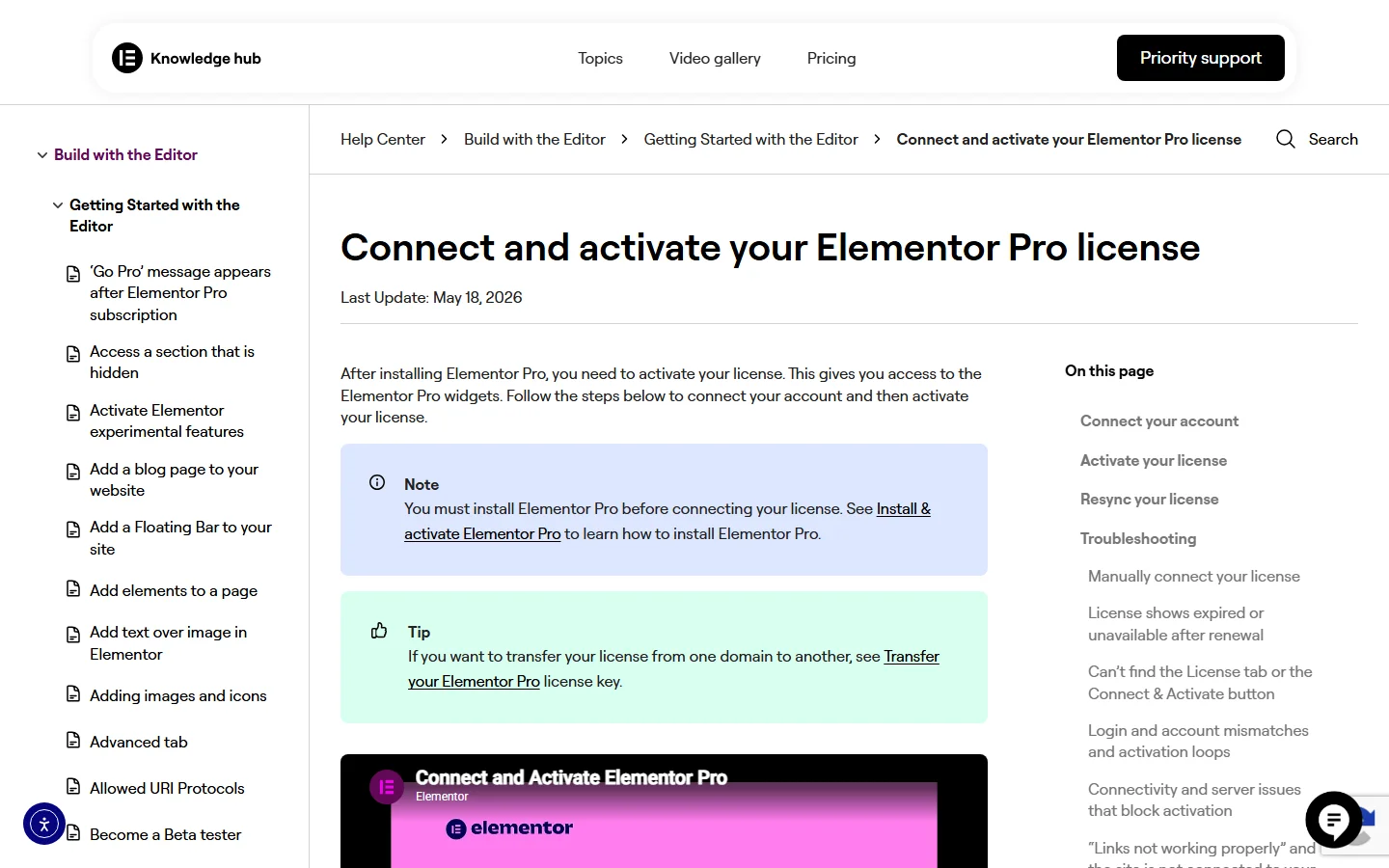
Elementor Pro does not work like a plugin you activate by pasting a code. According to Elementor’s own Install & Activate Elementor Pro article, Pro is an extension of the free Elementor plugin, so you must have the free plugin installed first. After you buy a subscription, the normal route is Connect & Activate inside WordPress. You confirm which Elementor account you are signed into, pick the subscription from a dropdown, and click Connect & Activate again.
The key itself only appears in a fallback. Elementor’s Manually Connect Elementor Pro article says that if the automatic connection fails, you add a manual mode to the License screen address, enter your license key and click Activate. It also says where that key lives: in My Elementor, under Subscriptions, on the subscription you manage, behind a copy icon. In other words, the key belongs to a subscription in an account, and the subscription decides how many sites it can run on.
Not sure how much of Pro you would even use? Our Free vs Pro comparison shows which widgets and builders from The Plus Addons for Elementor are free, so you can check the gap before you pay anyone for anything.
That detail changes how you should read any “license key” listing. A subscription is tied to an Elementor account, a plan with a fixed number of sites, and a payment record. Elementor’s License Mismatch Error article even quotes the message you get when the domain on your account does not match the site you are activating: “Your license key does not match your current domain.” A key is not a free-floating product code. It is a pointer to a paid subscription that Elementor can see, limit and cancel.
Where “Free” Elementor Pro Keys And Nulled Files Come From
We cannot see what any individual seller delivers, and we are not going to name a store and accuse it of something we have not tested. What we can do is describe the three kinds of source that show up for these searches and compare each against how Elementor documents its own licensing.
Nulled Zip Files
A nulled plugin is a paid plugin that someone has modified to bypass its license check and then redistributed. For Elementor Pro, that means a zip file that behaves as if it were connected to a subscription when it is not. Our older guide to why to avoid nulled WordPress plugins and themes covers the general case.
Low-Priced Key Listings On Marketplaces
On 5 October 2026 the live search results for “elementor pro license key” included an Etsy listing for a “genuine activation” with a displayed price of $10.99 and a separate reseller site advertising an Elementor Pro license for $8.99, valid for one website for one year. That reseller’s own page described the price as 85% below Elementor’s official yearly price. Elementor’s cheapest plan, Essential, is $60 a year, and the activation guide above shows that a license is connected through an account. A seller charging a fraction of that price is not passing on a discount, because Elementor does not publish one. Something else is being sold.
“Free Key” Videos And Forum Posts
The video results for the same search include titles about activating Pro “for free” or “without a product key”. A video that walks you through downloading a patched file from a link in the description gives you no way to inspect what you are installing before it touches your site.
The Real Risks Of Nulled Elementor Pro
The usual warning is “malware”, and that is real, but it is only one of several risks. Some of the others are specific to how Elementor Pro is built and updated, and they hurt even if the file you downloaded is clean.
It Stops Updating While Free Elementor Keeps Moving
Elementor Pro and the free plugin ship as a pair. The free plugin updates from WordPress.org: at the time of writing its WordPress.org listing shows version 4.3.3 and more than 10 million active installations. A nulled Pro copy does not receive updates from Elementor, so it freezes on whatever version it was cracked at.
Elementor’s help center explains what happens when Pro is not renewed, and the same warning applies here: updating the free version without updating Pro can lead to compatibility problems and cause issues with your site. A nulled copy puts you in exactly that position permanently, with a free plugin that moves forward and a Pro plugin that cannot.
Security Fixes Never Arrive
Elementor’s help center documents at least one case where a fix mattered. Its article on Elementor Pro 3.19.3 says the release of 22 February 2024 resolved a vulnerability in the Elementor plugin that let users with editing privileges list the encrypted logins and passwords of a site’s authors. Elementor’s advice was to update to the latest version and to keep plugins up to date generally. A cracked copy cannot take that advice, because there is nothing legitimate to update to.
Backdoors, Hidden Admin Accounts And Rewritten Update Hooks
The security case against nulled code is that you cannot audit it as you install it, and the damage is built to outlive the plugin. One WordPress scanner vendor, in its own published analysis of nulled plugins, describes patterns it says it finds: an update hook pointed at a non-vendor server, files dropped outside the plugin folder so that deleting the plugin does not remove them, administrator accounts that never log in, and cleanup costs that dwarf the license that was avoided. It also reports that sites running nulled plugins from major distribution networks compromise at roughly three times the rate of sites running only legitimate ones. That is a vendor’s own scan data and we cannot verify it independently, so read the multiplier as an estimate. The mechanism is easy to follow, though: a rewritten update hook lets whoever controls it push new code to every site that installed the file.
A Resold Subscription Can Disappear
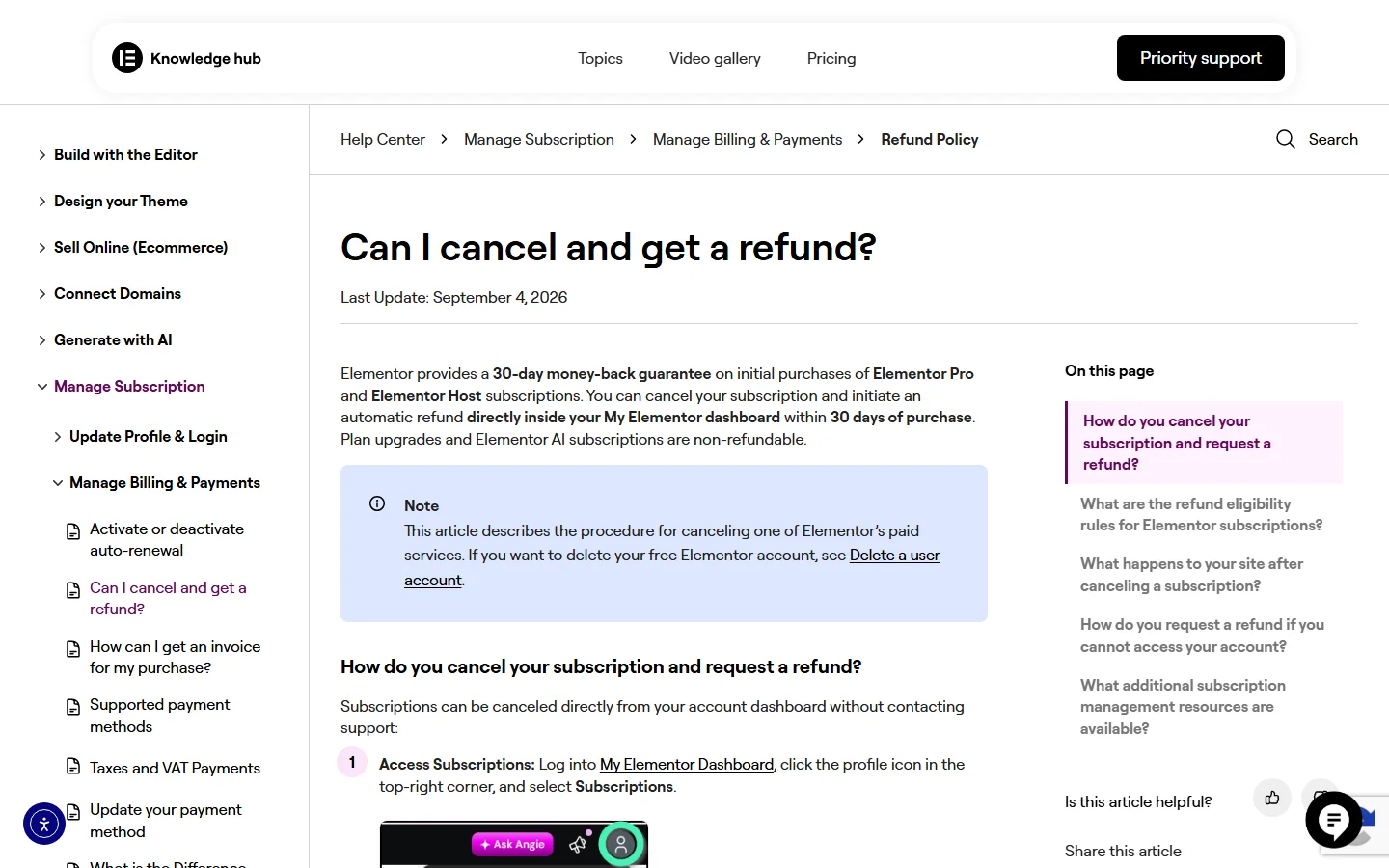
The cheap key listings carry a different risk, and Elementor’s refund policy shows why. Elementor offers a 30-day money-back guarantee on initial Elementor Pro purchases, and its Can I cancel and get a refund? article says that when you cancel inside the 30 days, the subscription is canceled immediately, the refund is automatic, and Pro updates, widgets and templates are removed right away.
We are not claiming any specific seller works this way. We are saying the mechanism exists: anyone who holds a subscription can cancel it inside the first month, and the activations that depended on it stop working. If you bought an activation from a third party rather than from Elementor, you have no say in that decision and no record of purchase to show Elementor support.
| Risk | Nulled Zip | Resold Key Or Shared Account | Official Subscription |
|---|---|---|---|
| Updates from Elementor | None | Only while the seller keeps the subscription alive | Yes, while active |
| Security fixes | Not delivered | Depends on the seller | Delivered through normal updates |
| Code you can trust | Unknown, modified | Original plugin, unknown account holder | Downloaded from your own My Elementor account |
| Support from Elementor | Not available | Not tied to you | Tied to your account |
| Can be cut off by someone else | Not applicable | Yes, the account holder can cancel or deactivate | No, you control it |
| 30-day refund route | None | None for you | Yes, on initial purchases |
There is also a legal risk. A cracked copy, or an activation you were never entitled to, breaches the vendor’s terms and in many places copyright law, and a client site is a poor place to carry that exposure.
What An Official Elementor Pro License Costs Right Now
The prices on Elementor’s pricing page on 5 October 2026 are below. They exclude tax, they are billed annually, and the renewal column matters more than most people expect. For a plan-by-plan breakdown, including three-year totals, see our Elementor Pro pricing guide.
| Plan | First Year | Renews At | Sites |
|---|---|---|---|
| Essential | $60 | $60/yr | 1 |
| Advanced Solo | $84 | $84/yr | 1 |
| Advanced | $108 | $108/yr | 3 |
| Expert | $204 | $204/yr | 25 |
| One | $180 | $228/yr | 1 |
| One Agency | $432 | $540/yr | Unlimited |
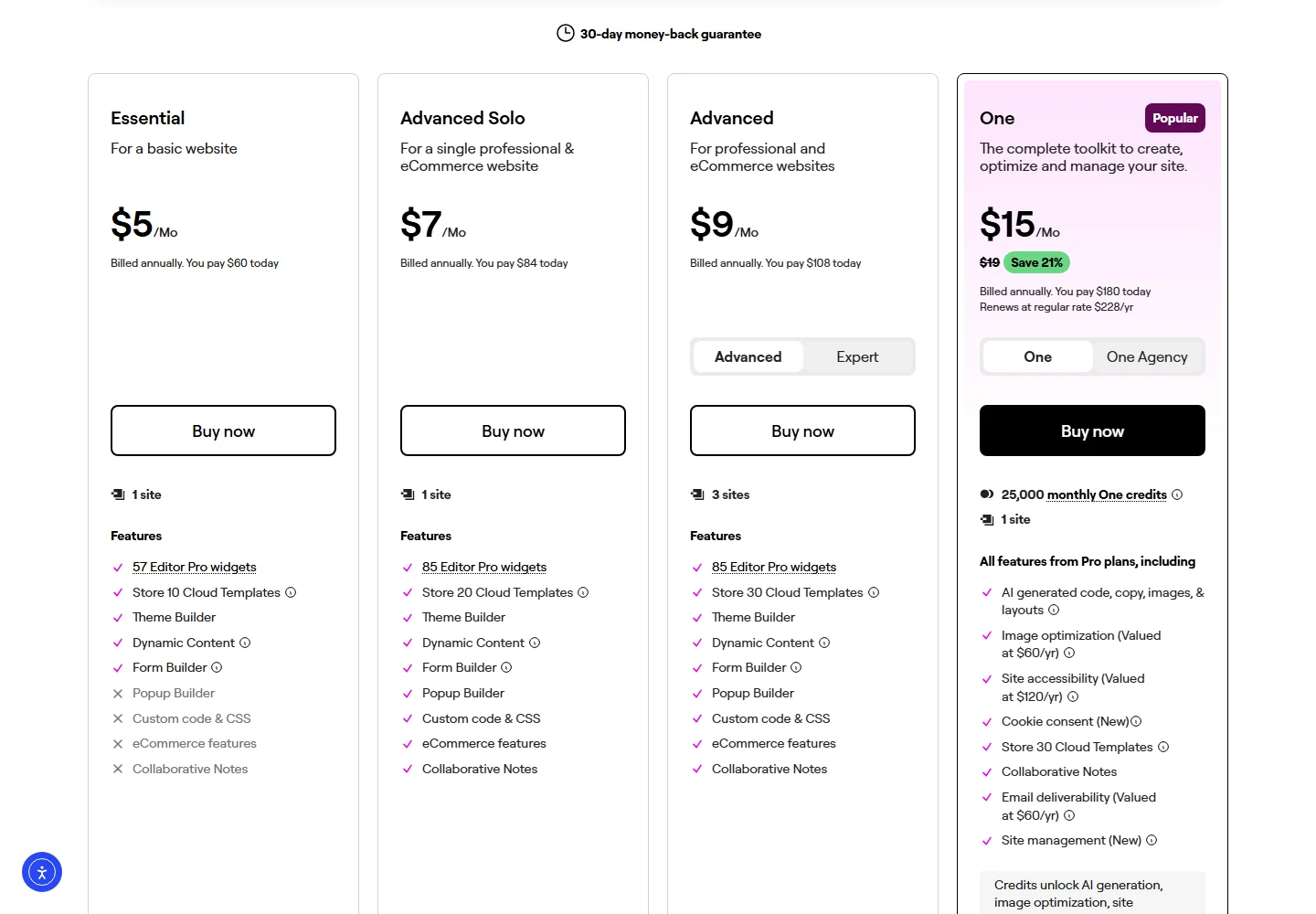
Read the Essential column carefully before you compare it to a $9 listing. The pricing page marks Popup Builder, Custom code and CSS, eCommerce features and Collaborative Notes as not included on Essential, while it lists them on Advanced Solo at $84. If a store, popups or custom CSS are on your list, the real entry point is $84, not $60.
Elementor’s pricing page applies its 30-day money-back guarantee to annual plans. That guarantee is the cheapest legitimate way to test Pro. Build the real page, run the real form, and cancel inside the window if it is not what you need. Elementor’s refund article says plan upgrades and Elementor AI subscriptions are not refundable, so test the plan you intend to keep.
How Elementor License Rules Work In Practice
Some of the demand for keys comes from licensing confusion rather than from wanting a free ride. These are the rules people trip over.
Activations And Staging Sites
Each plan allows a set number of site activations: one for Essential, Advanced Solo and One, three for Advanced, 25 for Expert and unlimited for One Agency, per the pricing page. Elementor’s License Activation article says you normally need an activation for every WordPress installation, but a list of staging and development domains do not count. They include these top-level domains and subdomain patterns:
TLDs that do not count:      .dev  .local  .test  .staging  .example  .invalid  .lh
Subdomains that do not count: dev.*  local.*  test.*  staging.*  stage.*
Anything else, including a normal subdomain, needs its own activation.
Elementor’s subdomain article is blunt about the rest: a license is required for each subdomain unless it is one of the recognised staging patterns.
Moving A License To A New Domain
If the real reason you want a “free key” is that you changed domains and Elementor refused to reconnect, the fix is official and free. Elementor’s Transfer Your License Between Websites article tells you to find the site in your account, open the three-dot menu, choose View related subscription, then manage the subscription. Its Deactivate an Elementor Pro License article adds that deactivating a site frees up the activation and does not affect the live site, although you will not be able to update Pro features on it.
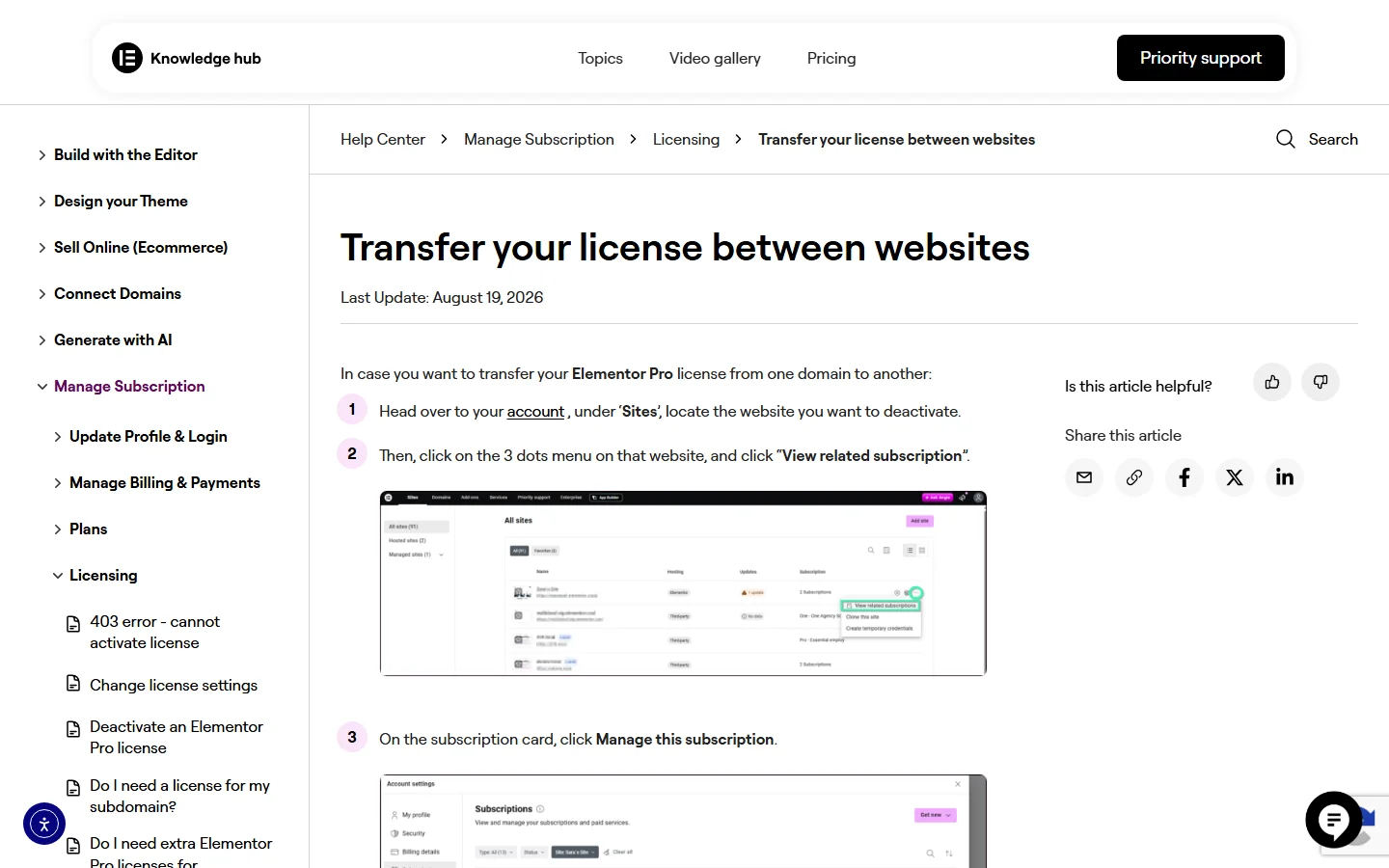
One warning from that same article is worth repeating. Using the Transfer Subscription option means the account is no longer eligible for a refund on the original purchase, including the 30-day refund. Elementor also caps the unique domains per subscription, so the option is for real domain changes.
Renewals, Expiry And Auto-Renew
Elementor’s Renew Your Subscription article says subscriptions auto-renew by default, you cannot renew early, and when a subscription expires Pro features stop immediately until you renew or connect a new license. Its auto-renewal article shows how to switch auto-renew off from the Billing Information section of your subscription, and notes that turning it off is not a refund. For the full picture of what a lapsed license does to a site, read what happens when Elementor Pro expires.
My Elementor > Profile icon > Subscriptions > Manage this subscription
  Billing Information > Edit > Auto renewal  (on / off)
  Sites list > Deactivate Website            (frees one activation)

WP Admin > Elementor > License
  Check license status | Switch Account | Disconnect
Legit Ways To Pay Less For Elementor Pro
If price is the problem, there are routes that do not involve a stranger’s zip file.
- Buy the smallest plan that covers your sites. The pricing page shows that Advanced at $108 covers three sites, which is cheaper per site than three Advanced Solo licenses at $84 each.
- Use the 30-day guarantee as a trial. Cancel inside the window if the plan is wrong, and Elementor refunds automatically.
- Upgrade through your account. Elementor’s pricing FAQ says that when you upgrade Pro to One from within your account, the remaining value on your current plan is credited, and that if you cancel first the credit is forfeited.
We are not going to list coupon codes. Elementor’s own pricing page is the only place to see a current discount, and any “promo code” article that is not Elementor is guessing.
Legit Free Options Instead Of A Free Pro Key
Start With Free Elementor
Elementor Core is free and available on WordPress.org. Elementor’s Pro vs Free article says the free version includes everything you need to get started, including the visual drag and drop builder, and that Pro adds items such as the Theme Builder, the Form Builder with submissions, the Popup Builder, motion effects, custom code and CSS, and dynamic content. You can read the full gap in our Elementor Free vs Pro comparison.
Free Widgets That Cover Pro-Style Features
If you do hit the Pro line, an add-on can fill part of it without a subscription. The WordPress.org listing for The Plus Addons for Elementor lists 35+ free widgets and extensions. They include post listings in grid, masonry, metro and carousel layouts, a blog and custom post type single-page builder, team, testimonials and client logos, Accordion, Tabs, Flip Box, Info Box, Pricing Table and Countdown, a Form Builder plus stylers for Contact Form 7, WPForms, Gravity Forms, Ninja Forms and Everest Forms, and Dynamic Tags.
A few concrete examples. The free Pricing Table widget builds cards like the monthly and yearly toggle below, and the Countdown Timer covers the urgency use case. The Accordion and Tabs widgets add extra styling options, although Elementor ships its own versions of both, so check whether you need the add-on version at all.

Where Free Stops
Be realistic about the limits. According to the same WordPress.org listing, the Header and Footer Builder, Popup Builder, WooCommerce Store Builder, Mega Menu Builder and login forms are in the paid version of the add-on, and Elementor’s own Theme Builder needs an Elementor Pro plan. If you want a free route to custom headers and footers, our guide to the Elementor Theme Builder without Pro covers it, and the one on Elementor Pro templates vs free template kits separates the template types that need Pro from those that do not.
If you later decide you want the paid builders, compare them against the Elementor plans on the pricing page. Our plans include a lifetime option, which Elementor’s annual plans do not.
Which Route Fits Your Situation
- A personal or small business site that needs a better layout and a few widgets: free Elementor plus the free add-on widgets. No license needed.
- A single site that needs the Theme Builder, forms with saved entries or popups: Advanced Solo at $84, tested inside the 30-day window.
- A freelancer or agency with many client sites: Expert at $204 for 25 sites, or One Agency for unlimited sites. Put the license in the client’s own account where you can, so that you are not the single point of failure.
- You moved a site and activation fails: deactivate and transfer through your account. Do not buy a replacement key.
If You Already Installed A Nulled Copy
Do not just delete the plugin and carry on, because persistence files and extra admin users are built to survive that.
- Take a full backup, then put the site into maintenance mode or work on a staging copy.
- Deactivate and delete the nulled Pro plugin, then reinstall free Elementor from WordPress.org so you know its source.
- Check Users for administrators you do not recognise, and reset passwords for every administrator and editor.
- Scan the site with a malware scanner, and look for unexpected PHP files in
wp-content/uploadsandwp-content/mu-plugins. - Replace every other plugin and theme that did not come from its official source, then buy or connect a real license if you need Pro.
- If the site handles customer data or payments, treat it as compromised until a proper review says otherwise.
Frequently Asked Questions
Is There A Free Elementor Pro License Key?
Not from Elementor. The pricing page lists paid plans from $60 a year, and the only free option is the core Elementor plugin on WordPress.org. Anyone offering a free Pro key is not offering one Elementor issued.
Is Elementor Pro Nulled Safe To Use?
We would not run it. A nulled copy does not update from Elementor, cannot be audited easily, and sits next to a free plugin that keeps updating, a combination Elementor warns can cause compatibility problems.
Can I Transfer My Elementor Pro License To Another Domain?
Yes. Deactivate the old site from the Sites list in your My Elementor account, then connect the new domain with Connect & Activate. Elementor limits the number of unique domains per subscription, and the Transfer Subscription option ends refund eligibility.