Have you ever opened your analytics on a regular Tuesday and found a traffic source that did not exist the day before? That is exactly what happened to thousands of WordPress site owners on May 7, 2026. ChatGPT quietly started embedding clickable brand links inside its answers, and every single one of those links carries a utm_source=chatgpt.com tag. According to a study of 140,000+ ChatGPT answers by Qwairy, the share of answers containing brand links jumped from 0.43% to 6.20% overnight. That is roughly a 14x increase in one day.
For years, ChatGPT was a black box. You knew it talked about your site, but you could not prove a single visit came from it. That era ended on May 7. If your WordPress site is not set up to capture this data, you are flying blind on the fastest-growing referral channel of 2026.
TL;DR: ChatGPT now tags its outbound links with utm_source=chatgpt.com. Google Analytics added a dedicated AI Assistant channel on May 14, 2026 that picks this traffic up automatically. In this guide you will set up three tracking methods on your WordPress site, understand why 79% of ChatGPT links land on homepages (and why that is a problem for you), and close the loop with citation tracking so you know about mentions that never become clicks.
What you’ll learn:
- What actually changed in ChatGPT on May 7, 2026 (with the study data)
- How to read
utm_source=chatgpt.comin your reports - Three ways to track ChatGPT traffic on WordPress, from zero-setup to full control
- Why most of your ChatGPT traffic lands on the wrong page
- How to track AI mentions that never send a click
What changed in ChatGPT on May 7, 2026
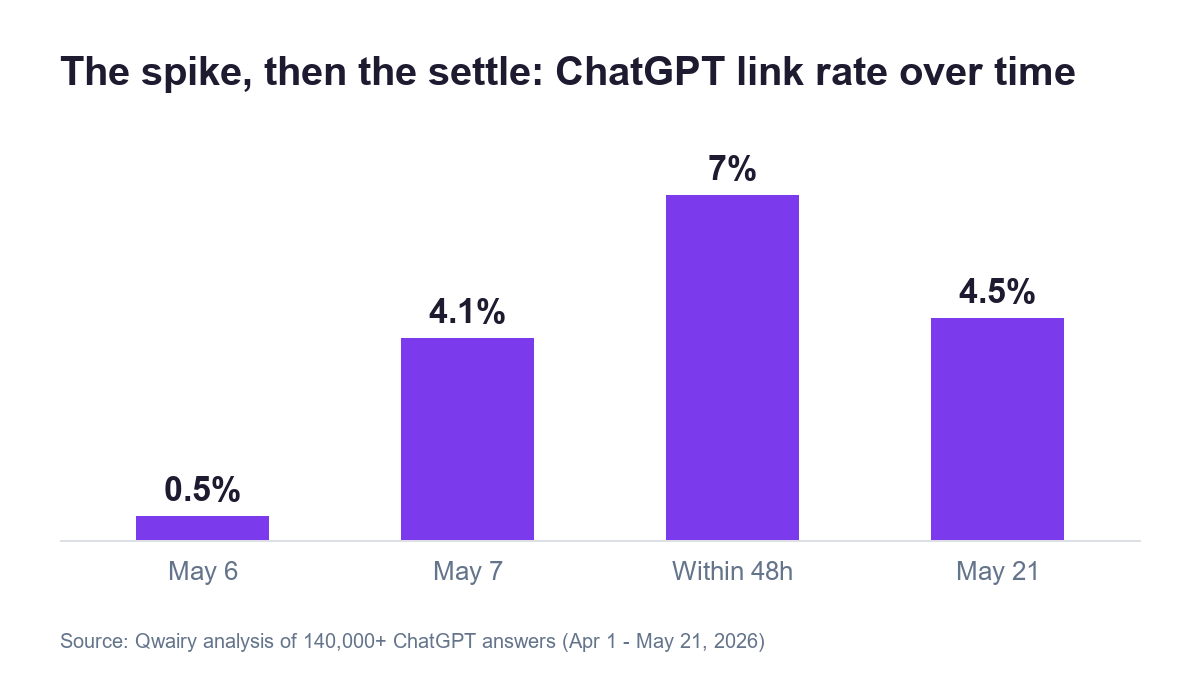
The Qwairy study tracked 140,000+ ChatGPT answers between April 1 and May 21, 2026, with a cross-provider control set of 350,000+ answers across ChatGPT, Perplexity, Gemini, and Copilot. The timeline is unambiguous. On May 6, around 0.5% of ChatGPT answers contained a brand link. On May 7, that number hit 4.1%. Within 48 hours it crossed 7%, then settled in the 4 to 5% range by May 21.
Among answers that mention a brand by name, the linked share went from about 2% to 29%. Nearly a third of brand mentions now carry a clickable link to the brand’s site.

The control data makes this a ChatGPT-only story. Over the same window, Perplexity moved from 4.06% to 5.38%, Gemini from 0.37% to 0.22%, and Copilot from 0.02% to 0.01%. No other engine shifted. This was a deliberate OpenAI decision, not an industry trend. If you care about how the other engines pick sources, we broke that down in how Perplexity decides which sites to cite.
What utm_source=chatgpt.com means in your analytics
Every link ChatGPT now emits looks like this:
https://yoursite.com/?utm_source=chatgpt.com
UTM parameters are the oldest attribution mechanism on the web, and OpenAI chose them on purpose. Any analytics tool you already run on WordPress reads them natively. In GA4 this traffic shows up with session source chatgpt.com. Before May 7 you had to guess from referrer strings that browsers often stripped. Now the tag survives every redirect and lands in your reports labeled and clean.
One caveat worth knowing: links opened from the ChatGPT desktop and mobile apps still pass the same UTM tag, so app traffic is included. What is NOT included is everything that never becomes a click, which we get to at the end of this guide.
Why OpenAI flipped the switch now
Two things happened on May 5, 2026, two days before the linking shift. OpenAI announced new ways to buy ChatGPT ads, including cost-per-click bidding. And GPT-5.5 Instant became the default model. The sequencing tells the story: you cannot sell cost-per-click advertising if brands cannot measure clicks.
The r/AISearchLab community read it the same way. As u/Velocitas_1906, who surfaced the study, put it: before May 7, ChatGPT was a black box for marketers, and OpenAI essentially handed marketers the proof-of-value they needed to justify GEO budgets. Another commenter, u/akii_com, pointed at the data flywheel: by pushing users to click tracked outbound links, OpenAI finally gets clean signal on which answers lead to clicks and which brands users trust enough to visit. Both reads can be true at once.
For WordPress site owners, the motivation matters less than the consequence. ChatGPT traffic is now measurable, which means it is now a channel you report on, optimize for, and win or lose against competitors.
The 79% homepage problem
Buried in the Qwairy data is the stat that should change how you structure your site. Before May 7, 59% of ChatGPT brand links resolved to homepages. After May 7, that number is 79%. Four out of five visitors ChatGPT sends you land on your homepage, not on the product page, pricing page, or article that actually answered their question.
That makes two things matter more than they did in April:
- Your homepage is now a landing page for AI traffic. A visitor arriving from a ChatGPT answer about a specific feature needs to find that feature from your homepage in one click, or they bounce.
- Deep citations are the exception, so earn them. The pages that DO get cited directly are the ones structured for AI extraction. Our guides on getting ChatGPT citations and llms.txt for WordPress cover exactly that.
Method 1: GA4’s new AI Assistant channel (zero setup)
One week after ChatGPT’s change, on May 14, 2026, Google Analytics shipped a dedicated AI Assistant channel. If your WordPress site runs GA4, traffic from supported AI assistants (ChatGPT, Gemini, and Claude at launch) is now labeled automatically with medium ai-assistant, channel group AI Assistant, and campaign (ai-assistant).
To see it: open GA4, go to Reports, then Acquisition, then Traffic acquisition, and look for AI Assistant in the default channel group column. If you installed GA4 through Site Kit or a tag plugin on WordPress, there is nothing else to configure. The limitation is the word supported. Google has not published the full assistant list, smaller AI tools still land in Referral, and the channel only counts from May 14 forward.
Method 2: a custom channel group (retroactive and complete)
For full control, build your own AI channel. In GA4 go to Admin, then Data display, then Channel groups, create a new group, add a channel named AI Traffic, set the condition to session source matches regex, and paste:
chatgpt\.com|chat\.openai\.com|openai\.com|perplexity\.ai|gemini\.google\.com|copilot\.microsoft\.com|claude\.ai
Drag the channel above Referral so it wins the match, and save. Two advantages over Method 1: GA4 applies custom channel groups retroactively, so your historical reports reorganize immediately, and you decide which AI sources count instead of waiting for Google’s supported list to grow.
Method 3: the WordPress-native path
Not every WordPress site runs GA4, and not everyone wants to. The UTM tag works everywhere:
- Privacy-first analytics like Plausible or Fathom surface
utm_source=chatgpt.comin their Sources report with zero configuration. Plausible also lets you save it as a pinned filter view. - Server logs catch the raw requests if you want belt-and-suspenders verification. Grep your access log for
utm_source=chatgpt.com. - WordPress analytics plugins that store UTM parameters (most form and ecommerce plugins do) will attribute conversions to ChatGPT automatically, which is where this gets genuinely useful: not just visits, but signups and sales attributed to an AI answer.
What the engines look like side by side
| Engine | Linked answers (April) | Linked answers (May 21) | Tracking tag |
|---|---|---|---|
| ChatGPT | 0.43% | 4 to 5% (peak 7%+) | utm_source=chatgpt.com |
| Perplexity | 4.06% | 5.38% | referrer only |
| Gemini | 0.37% | 0.22% | referrer only |
| Copilot | 0.02% | 0.01% | referrer only |
Perplexity already linked generously before May 7, which is why it built citation-driven traffic share early. Gemini links sparingly but feeds Google AI Overviews, which have their own optimization playbook. ChatGPT is the one that just turned referral traffic on overnight, which makes it the channel to instrument first.
Tracking clicks is half the picture. Mentions are the other half
Here is the catch the analytics guides skip, and a Reddit commenter in the study thread (u/furrymeows) nailed it: mentions happen more often than clicks, so GA4 misses a large amount of AI visibility data. ChatGPT can recommend your product in a thousand answers, and if users do not click the link, your analytics shows nothing. The 4 to 5% linking rate means roughly 95% of answers still carry no link at all.
That is the gap citation tracking closes. This is exactly what we built RankReady for: it is a free WordPress plugin that tracks when ChatGPT, Perplexity, and Google AI cite your content, logs which AI crawlers hit your site and when, and generates the llms.txt and schema files that make those citations more likely in the first place.

The workflow that works: GA4 (or Plausible) tells you what ChatGPT traffic DID on your site. RankReady tells you where the citations came from, which crawlers fetched which pages before the citation appeared, and whether your llms.txt and schema are doing their job. Tracking plus influence, not tracking alone.
From tracking to growing your ChatGPT traffic
Once the dashboards are live, the obvious next question is the one u/Studd_Mac asked in the study thread: how do we get more of this? The levers are the same ones that drive AI citations generally. Allow the right crawlers in your robots.txt, ship an llms.txt file, structure answers near the top of your pages, and use schema that AI engines actually read. We covered the full playbook in how ChatGPT Search picks its citations, and if you want the protocol-level view of where this is heading, see WebMCP for WordPress.
And remember the 79% homepage stat. The single highest-ROI change for most sites this month is making the homepage route AI visitors to money pages in one obvious click. If you build with Elementor, a clear sticky header and a well-structured hero section do most of that work, which is exactly what The Plus Addons widget library is built for.
Your 10-minute setup checklist
- Open GA4 Traffic acquisition and confirm the AI Assistant channel is reporting (1 min)
- Create the custom AI Traffic channel group with the regex above for retroactive data (3 min)
- If you run Plausible or Fathom, pin a filter for utm_source chatgpt.com (1 min)
- Check your top landing page for ChatGPT sessions. If it is the homepage, verify your money pages are one click away (2 min)
- Install RankReady and turn on AI citation tracking plus the crawler log (2 min)
- Annotate May 7 and May 14 in your analytics so future you understands the traffic step-change (1 min)
Wrapping up
May 2026 is the month AI traffic stopped being a guess. ChatGPT tagged its links, Google built the channel, and the measurement excuse disappeared. Set up the three methods above, watch the utm_source=chatgpt.com line for a few weeks, and pair it with citation tracking so the 95% of mentions that never click still show up somewhere.
If you build your WordPress sites with Elementor, take a look at The Plus Addons for Elementor widget library while you are here, and our pricing page if you want everything in one bundle. Your AI visitors deserve a homepage worth landing on.