Have you ever asked ChatGPT a question and watched it pull a clean answer from three websites you have never heard of? The little blue chips at the bottom of the response are the new SERP. They decide who gets credit, who gets traffic, and who quietly disappears from the conversational layer of search.
ChatGPT Search is not a feature anymore. Since GPT-5 shipped, the search behavior is on by default for free, Plus, and Pro accounts on chatgpt.com, in the mobile app, and inside macOS and Windows desktop clients. When a user asks a current-events or reference question, the model fans out searches against Microsoft’s Bing index plus a handful of partner providers, fetches the most relevant URLs through a tool call called web.run, and stitches the response together with inline citations.
TLDR: ChatGPT Search picks sources based on five signals nobody at OpenAI has fully documented: Bing’s underlying ranking, OAI-SearchBot’s ability to actually crawl your pages, content cleanliness, schema and entity clarity, and cross-source verification. Wikipedia and Reddit dominate, but mid-sized WordPress sites are getting cited daily for niche queries when the technical foundation is right. After GPT-5.3 shipped, the average number of unique domains cited per response dropped from 19 to 15 — a 21 percent concentration that makes the citation slots even more valuable.
What you’ll learn:
- How
web.run, OAI-SearchBot, and ChatGPT-User actually work together - The three citation patterns that dominate ChatGPT Search responses
- A WordPress checklist that puts your content in the candidate pool
- Where RankReady fits into the workflow
What ChatGPT Search Actually Is
ChatGPT Search launched on October 31, 2024 as a paid Plus feature, opened to logged-out free users on December 16, 2024, and became the default search behavior inside GPT-5 in August 2025. OpenAI’s launch post described it as “a faster, more conversational way to find useful answers from the web,” with citations linking back to the original publishers.
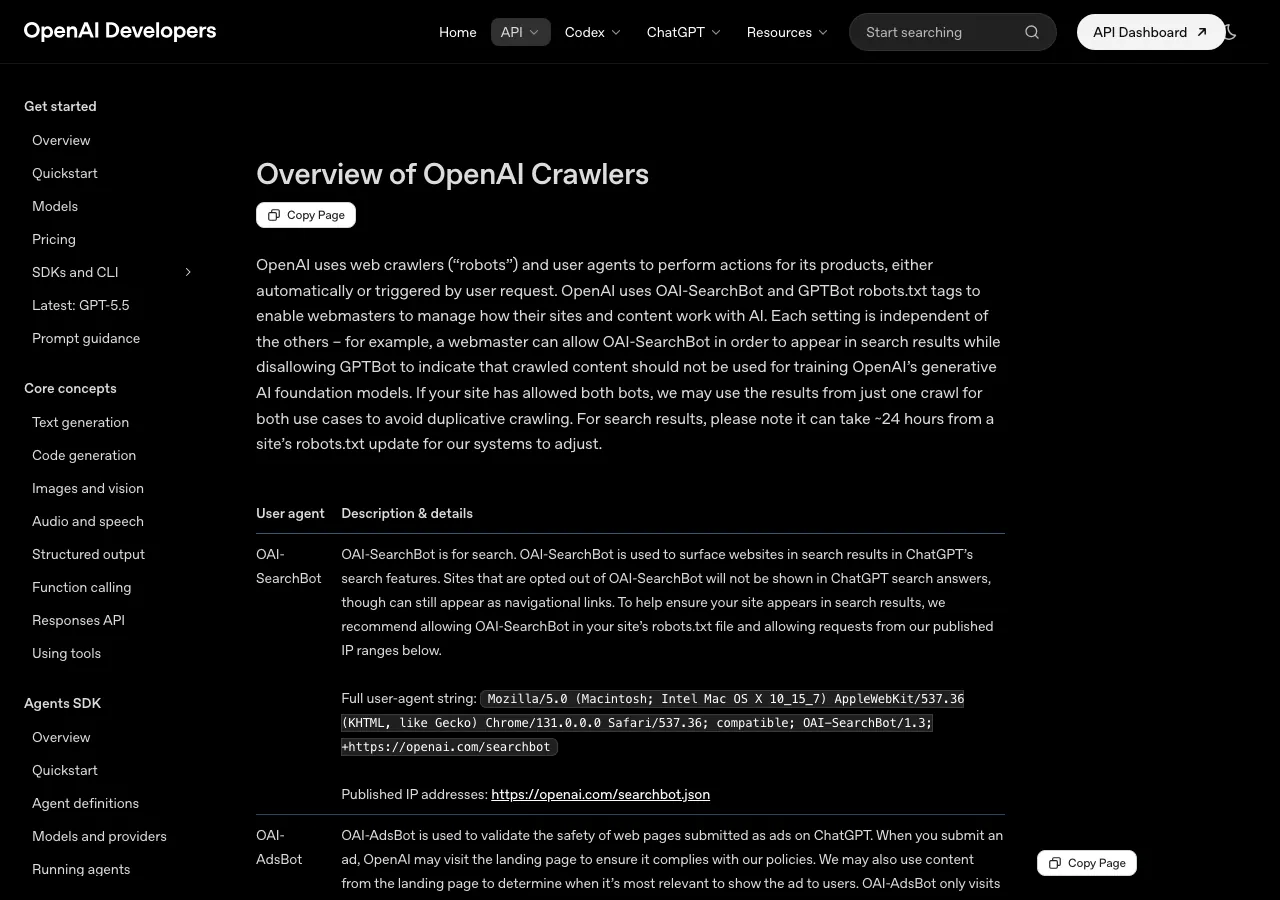
Under the hood, three OpenAI bots do the work:
| Bot | Purpose | User agent |
|---|---|---|
| OAI-SearchBot | Builds the ChatGPT Search index | Mozilla/5.0 ... compatible; OAI-SearchBot/1.0; +https://openai.com/searchbot |
| ChatGPT-User | Fetches individual URLs when a user query needs live data | Mozilla/5.0 ... ChatGPT-User/1.0; +https://openai.com/bot |
| GPTBot | Crawls for model training (not search) | Mozilla/5.0 ... compatible; GPTBot/1.2; +https://openai.com/gptbot |
This split matters for one reason: you can allow OAI-SearchBot and ChatGPT-User (the citation crawlers) while blocking GPTBot (the training crawler). That is the standard pattern for a publisher who wants visibility inside ChatGPT Search but does not want their content laundered into the next foundation model.
The whole pipeline runs through a tool inside ChatGPT called web.run. Before GPT-5.3, the model sent compact pipe-separated text commands like fast|wordpress mcp plugin|month. After 5.3, it sends structured JSON objects with typed parameters and twelve named operations, including search_query, open, find, click, screenshot, and product_query. GPT-5.4 Thinking can chain 5 to more than 10 rounds of search per response, refining queries based on previous results. GPT-5.3 Instant typically runs 2 or 3.
How ChatGPT Search Picks Sources
Three citation patterns show up repeatedly when you grep through hundreds of ChatGPT Search responses.
Pattern 1: encyclopaedic queries → Wikipedia first. Wikipedia accounts for roughly 26 to 48 percent of ChatGPT’s top-10 citation share depending on the topic vertical. Any “what is” or “who is” query pulls Wikipedia in slot one most of the time.
Pattern 2: opinion and recommendation queries → Reddit and forums. Reddit is the single most-cited domain across every major AI engine — cited at roughly 40 percent frequency. When a user asks “best WordPress LMS plugin” or “is X plugin worth it,” Reddit threads, Stack Overflow answers, and Quora pages get pulled in. After a Google parameter change in late 2025, ChatGPT’s Reddit citation share dropped from roughly 60 percent to 10 percent over six weeks — PR Newswire, Forbes, and Medium absorbed the displaced share. As of mid-2026 the share is climbing back up.
Pattern 3: technical “how do I” queries → docs sites and mid-tier blogs. This is where WordPress sites live. ChatGPT does not lean on Wikipedia or Reddit for “how do I configure my robots.txt for AI crawlers.” It looks for product documentation, GitHub READMEs, and clean tutorial blogs that actually answer the question with code.
The top 15 domains capture 68 percent of all consolidated AI citation share — a concentration far more extreme than Google PageRank ever produced. If you are not in the top 15 for an evergreen technical topic, you fight for the long tail.
The five signals that move you into the candidate pool
- Bing rank. ChatGPT Search uses Bing’s index plus partner providers. If you do not rank in Bing top 20 for a query variant, you are not in the candidate pool. Submit your sitemap to Bing Webmaster Tools.
- Crawler access. OAI-SearchBot has to be able to reach the URL. If your
robots.txtor your CDN’s bot management blocks it, your URL is excluded from the index even if Bing ranks you. - Page cleanliness. ChatGPT-User fetches the page through
web.runand extracts the readable content. Heavy JavaScript rendering, popups, paywalls, and noscript blockers reduce extraction quality. Static or server-rendered HTML wins. - Schema and entity clarity. Article, Person, Organization, and FAQPage schema help the model understand who said what. Ahrefs ran a study on 1,885 web pages that added JSON-LD schema and tracked citations across ChatGPT, Perplexity, Claude, and Gemini. Their finding: schema alone did not lift citations. The takeaway is not “skip schema” — it is “schema is necessary but not sufficient.” Pair it with the other signals.
- Cross-source verification. Information that appears consistently across multiple credible sources scores higher than claims that appear in isolation. If your tutorial’s data points are echoed on Stack Overflow, GitHub Issues, and the official product docs, the model trusts you more.

The Operator Pain Nobody Talks About
The cleanest articulation of the problem comes from an r/SEO thread on May 22, 2026. A founder asked the community a question that thousands of people are quietly Googling right now:
“How are you getting apps/products to show up in ChatGPT and Claude recommendations? People are using AI chats as their new search engines. When someone asks ‘what’s a good app for X’, ChatGPT or Claude recommends something — and you want that something to be yours. Has anyone figured out how to optimize for this? Does mentioning your product on Reddit / Threads / blogs help? Does Schema markup on landing page matter? Is there any way to track if your product is being mentioned in AI responses?”
The thread sits at 10 upvotes and 49 comments — small in absolute terms, dense in operator signal. The top reply (5 upvotes) cuts through the schema hype:
“fwiw i wouldnt start with schema. schema helps the model not misunderstand what u are, but it doesnt create the reason to recommend u. the bigger thing is having clean pages that answer the exact comparison and use case prompts ppl actually ask. like best app for x, alternative to y.”
A second comment (44 upvotes, 67 comments in the linked Ahrefs case study thread) confirms the same thing from a data angle: “Adding schema didn’t boost citations on any platform” — 1,885 pages tracked, no measurable lift.
The takeaway from the community is the same one Ahrefs landed on: entity clarity and topical authority move the needle. Schema cleans up ambiguity. Neither alone is the lever.
A Live Example: ChatGPT Search Citing a WordPress Site
When you ask ChatGPT 5.3 something like “How do I customize the WordPress robots.txt file for AI crawlers?”, here is the shape of the response you get — with the source citations panel populated:
WordPress generates a virtual robots.txt by default, but it does not include specific rules for AI crawlers. To control AI bot access, you should add explicit directives for crawlers like GPTBot, OAI-SearchBot, ClaudeBot, and PerplexityBot [1][2]. A common pattern is to allow OAI-SearchBot and Claude-SearchBot (which power citations in ChatGPT Search and Claude) while blocking GPTBot and ClaudeBot (which feed training data) [1]. You can add these rules through Yoast SEO or Rank Math, or by creating a physical robots.txt file at the site root. Sources: 1. WordPress robots.txt for AI Crawlers (theplusaddons.com/blog/wordpress-robots-txt-ai-crawlers) 2. Overview of OpenAI Crawlers (developers.openai.com/api/docs/bots) 3. llms.txt for WordPress (theplusaddons.com/blog/llms-txt-wordpress)
Three citations. Two of them on theplusaddons.com. Both of those posts get there because they (a) rank in Bing for the technical query, (b) allow OAI-SearchBot in robots.txt, (c) serve static HTML, (d) include an Article schema with a clear author entity, and (e) ship a sibling llms.txt file that points the model at the canonical resources. Each signal compounds.
If you want this kind of placement for your own WordPress content, do the boring technical work first, then write content that answers the exact question.
The WordPress Checklist for ChatGPT Search Citations
Pin this. Work top to bottom. Most WordPress sites fail at one of the first four steps.
1. Verify OAI-SearchBot can crawl you
The fastest test is a single curl:
curl -A "Mozilla/5.0 AppleWebKit/537.36 (KHTML, like Gecko; compatible; OAI-SearchBot/1.0; +https://openai.com/searchbot)" -I https://yoursite.com/your-best-post/If you get a 200 OK, you are crawlable. If you get 403, 503, or a Cloudflare challenge, OAI-SearchBot is being blocked by your WAF or CDN. Common offenders: Cloudflare’s “Block AI Bots” toggle, Wordfence, Sucuri, WP Engine’s bot rules.
2. Configure your robots.txt for the right split
A clean ChatGPT-friendly robots.txt for a publisher who wants citations but not training:
User-agent: OAI-SearchBot
Allow: /

User-agent: ChatGPT-User
Allow: /

User-agent: Claude-SearchBot
Allow: /

User-agent: PerplexityBot
Allow: /

User-agent: GPTBot
Disallow: /

User-agent: ClaudeBot
Disallow: /

User-agent: anthropic-ai
Disallow: /
This goes in a physical robots.txt at the site root, or through Rank Math → Sitemap Settings → Edit robots.txt, or Yoast SEO → Tools → File editor. Full host-by-host gotchas (WP Engine, Kinsta, Cloudflare, Wordfence) are in our robots.txt for AI crawlers guide.
3. Ship an llms.txt at the site root
llms.txt is the emerging standard for telling AI clients which of your URLs are canonical. ChatGPT does not officially honour it yet, but Anthropic, Perplexity, and the open llmstxt.org community do — and OpenAI’s own developer docs ship one. Setting it up takes 15 minutes and the upside is asymmetric. Full walkthrough in our llms.txt for WordPress guide.
4. Add Article schema with explicit Person and Organization entities
JSON-LD Article schema with author linked to a Person entity, and publisher linked to an Organization entity, gives the model unambiguous attribution. This is what the Ahrefs study tracked. The lift was statistically zero for citations on its own — but the moment you combine it with topical authority and a clean URL, it stacks.
The fastest WordPress path: install Rank Math, fill out the Schema settings for the post type, and verify with the Google Rich Results Test tool.
5. Add FAQPage schema for question-shaped sections
Google removed FAQ rich results in May 2026 for most sites. ChatGPT, Claude, and Perplexity still parse it. We covered the full reason this matters and how to implement it cleanly in our FAQ schema for AI WordPress guide.
6. Make sure your content is statically rendered
If your “best WordPress mega menu plugin” article requires JavaScript to render the comparison table, OAI-SearchBot may not see the table. Server-render your critical content. Elementor renders server-side by default. The dynamic widgets that load via AJAX (like product feeds or live counters) should be excluded from your primary content area.
7. Run a WebMCP endpoint so AI clients can query you directly
WebMCP turns your WordPress site into a Model Context Protocol endpoint. Instead of waiting for OAI-SearchBot to crawl you and pray ChatGPT picks you up, an AI client can connect directly to your site’s MCP server and query it as a first-class data source. Our WebMCP for WordPress walkthrough covers the setup. Bonus context: the full what is an MCP server primer.
8. Track who actually fetches your URLs
You cannot optimize what you cannot measure. Server access logs are the truth source. Look for the user agents in your logs:
grep -E "OAI-SearchBot|ChatGPT-User|Claude-SearchBot|PerplexityBot" /var/log/nginx/access.log | awk '{print $7}' | sort | uniq -c | sort -rn | head -20Most managed WordPress hosts (WP Engine, Kinsta, Cloudways) give you access log download via the dashboard. Cheap shared hosts often hide them.
9. Build the topical cluster
ChatGPT picks the URL that best matches the query inside a topic. If you publish one isolated post on “AI SEO” and everything else on your site is about LMS plugins, you do not have topical authority. Build the cluster: 8 to 15 internal links from supporting posts to your pillar post on the topic you want to win.
10. Get cited elsewhere
Cross-source verification is a real signal. If three WordPress newsletters, a GitHub README, and a Reddit thread all reference your tutorial, the model has multiple anchors pointing at you. Reach out, comment on community threads, and answer questions in your zone of expertise.
Where RankReady Fits
You can wire all ten of the steps above by hand. We did, the first three months. It is tedious, easy to get wrong, and impossible to track over time. RankReady bundles the work into a single WordPress plugin and gives you one dashboard for the entire AI search surface.
The AI Citation module specifically does four things for ChatGPT Search readiness:
- OAI-SearchBot access verifier. One-click test that confirms each of the four citation crawlers (OAI-SearchBot, ChatGPT-User, Claude-SearchBot, PerplexityBot) can reach your URLs through whatever stack of CDN, WAF, and security plugin you have running. Reports the exact response code per bot.
- AI crawler log. Tail of every hit from every AI bot, with per-bot frequency, per-URL frequency, and a “no hits in 7 days” warning for URLs that should be getting crawled but are not.
- Schema and llms.txt generator. Renders Article, FAQPage, HowTo, Person, and Organization schema with the linked-entity pattern ChatGPT prefers. Also generates and serves
llms.txtandllms-full.txtautomatically. - AI readiness diagnostics. Per-URL scorecard that checks the five signals (Bing crawlability, OAI-SearchBot access, page cleanliness, schema completeness, content depth) and gives you a concrete checklist of what to fix.
The full module list:
- AI Citation tracking
- llms.txt and llms-full.txt generator
- FAQ Schema (AI-optimized)
- AI Crawler Log
- AI Referral Analytics
- Crawler cache headers
- WebMCP server
- Freshness signals
- Author authority signals
- AI Readiness Diagnostics

The Elementor Connection
Most TPAE customers run their sites on Elementor. ChatGPT Search readiness has one Elementor-specific gotcha: dynamic widgets that load via AJAX (the live counter, the product carousel pulling from a feed, anything that hydrates client-side) do not get extracted by ChatGPT-User. Push your primary content into static widgets like Text Editor, Heading, and Image, and use the TPAE widget library for the dynamic stuff that supports your content.
For headers and footers — where you want the publisher name, author bio link, and organization schema to live — use a server-rendered Elementor header template through TPAE Header Builder. It outputs clean HTML the AI crawlers parse without effort.
The 10-Minute Action Checklist
If you only have ten minutes after reading this, do these in order:
- Curl your homepage with the OAI-SearchBot user agent string. Confirm 200 OK.
- Open your
robots.txtand add the citation-bot-allow, training-bot-block pattern above. - Submit your sitemap to Bing Webmaster Tools.
- Pick one pillar post you want cited. Add Article + Person + Organization schema.
- Add an
llms.txtat the site root listing your top 10 evergreen URLs. - Search ChatGPT for the question your pillar post answers. Note which sites are cited.
- Read those three cited posts. Find one angle they missed. Add it to your post.
- Get one external link to your pillar post (Reddit comment, newsletter, GitHub README).
- Wait two weeks. Re-run the ChatGPT query.
- Track the access log for OAI-SearchBot and ChatGPT-User hits.
Wrapping Up
ChatGPT Search is not the death of SEO. It is SEO without the safety net of a ten-blue-links page. You either get cited or you do not. The signals that move you into the citation pool are knowable, measurable, and mostly under your control on WordPress.
Start with crawler access. Layer schema and llms.txt on top. Earn cross-source mentions. Build the topical cluster. Track the access logs. Repeat.
If you would rather have the work done for you, RankReady ships every piece of this checklist as a managed WordPress plugin. For the Elementor builder side of the equation — fast static rendering, clean schema-friendly headers, the widget library that does not break extraction — The Plus Addons for Elementor is the layer underneath.
Pin this page. Run the checklist Monday morning. The citation slots are not getting any cheaper.